Why and how to lie about your email address

You've done this: you've gone to a website because you fancied something there and the site required you to register before you get it. So you haver a bit but eventually figure that you want it enough that it's worth handing over your email address.

No more.

If I choose to give Tesco, say, my email address then what I'll do instead is claim that it is tesco@williamgallagher.com. You know how they always send you an email asking you to confirm your address? It works. I get that and I can reply.

Is there a need to sign in to NASA? Then I'd be nasa@williamgallagher.com. You can see a pattern here. And yes, it's because I own my domain name williamgallagher.com and yes, I can write anything. And yes, I have told a site that my address is bollocks@williamgallagher.com.

And yes, if you emailed bollocks@williamgallagher.com I would get it.

Except.

I wouldn't, actually. Anything at all @williamgallagher.com is routed out to my real email until it causes a problem. If I signed up for a shop with something like supermarket@williamgallagher.com and then, what do you know, look at that, my spam rate booms up, I'll look at the address that spam is sent to. If all the viagra adverts are going to supermarket@williamgallagher.com then, flicks a switch, that address is gone. Send anything and everything you like, it will never get through.

And that did happen with wherever it was I registered as bollocks@williamgallagher.com. So I switched that off.

All you need is your own domain name – which is great because it also means you're not tied to @hotmail or @aol or anywhere else – and the ability to fiddle with its email settings. That'll be part of your control panel wherever good domain names are sold.

One thing against all this. I have sometimes registered with a site I was certain I'd never come back to again – and I was wrong. I suppose I should change that registered address to my real one, but I can't even remember what it is because I log in to most things through 1Password or through Safari and they both pop the login details for me.

But come on, it's fun being able to look someone in the eye and say yes, my email address is dippydippygumdrops@williamgallagher.com. Wanna make something of it?

Working for yourself is harder and better than you think

Lifehacker has a smart post about what it's really like when you go work for yourself. Some of the details are very USA-specific – naturally, since Lifehacker is an American site – but the principles are the same here in the UK:

Often, people want to freelance or start their own business because they're lured by the freedom of working from home. If that's what you care most about, you're probably better off trying to convince your boss to let you telecommute and learning about the downsides of working from home rather than leaving your employer to work for yourself.

List articles – 5 things to eat, 10 things to sell or whatever – are usually quite lazy pieces of writing that are also pointlessly empty. And I'll give you seven reasons why. But this one is simple and straight and practical: I'm not sure I've ever read it all put so well as Lifehacker does.

I've been freelance since the mid-1990s but I also had an enormous crutch of a regular client for a dozen years so I felt I eased into this life. Can't imagine going back now, but I can imagine doing this freelancing an awful lot better: when you've read that article, follow its many links out to further advice. It's a smart collection.

I must be a great writer, I get up early.

Hand on heart, I'm having trouble adjusting to getting up at 5am to write. Given that today is the 190th time I've done it, I may have to accept that I never will figure it out. Alternatively, I'll have to accept the old man concept of naps.

But the problem is at the end of the day and during the evening, it's fine when I get up and often it is fine actually getting up. Not today, as it happens, but often. Okay, sometimes. Alright, once. Once I fair bounced out of the bed. Madness.

However, I think my getting up early like this works as much because the phones don't ring – and I cannot call anyone – as because it happens to be the time that suits my writing. In my head I'm a late-night jazz kind of guy, possibly without the jazz, but in my typing fingers I'm an early riser.

I know you can't equate the time you get up to the quality of your writing, but that hasn't stopped a lot of people trying. Now comes what may hopefully be the definitive analysis. It's got to be definitive because it doesn't come up with an answer. It just shows you a lot of facts. A lot:

We ended up with a roster of thirty-seven writers for whom wake-up times were available — this became the base data set, around which we set out to quantify, then visualize, the literary productivity of each author.

Take a look at Brain Pickings' gorgeous infographic about famous writers and what time of day they got up out of their beds, the lazy bastards.

Jerry Seinfeld disowns the so-called Seinfeld Method

This was everywhere. It's even in my book, The Blank Screen (UK edition, US edition). Comedian Jerry Seinfeld allegedly has a big wallplanner and puts an X through each day that he writes. You can see how it would build up to a chain of Xs and his advice for being as famously productive as he is was this and this alone: “Don't break the chain.”

It is very good advice. He just didn't say it and doesn't do this Seinfeld method.

He was on Reddit's Ask Me Anything discussion this week and when asked about this, said:

“This is hilarious to me, that somehow I am getting credit for making an X on a calendar with the Seinfeld productivity program. It's the dumbest non-idea that was not mine, but somehow I'm getting credit for it.”

Read the whole (very long) discussion directly on Reddit. This point comes about a mile into the chat but there's a lot else to enjoy along the way.

A four-day week with pay

If you’re British and are old enough, the phrases three- or four-day week are not happy ones. They were borne of bad times when the economy was rough and companies were in trouble. That never happens now.

But it’s a term with bad connotations because it was a time when firms couldn’t afford to pay people for a whole week so they had to work three or four days instead. And there’s another way.

Hopefully there’s another way. Ryan Carson of the technology firm Treehouse proposes that maybe we can work four days a week and do more with it. He’s not trying to save money: you get paid your full, normal salary, you just don’t work five days a week. It sounds like he’s a productivity guru looking for a startling yet appealing angle, but the fella has his reasons and he’s put them to work: this is genuinely how his company is run.

What’s more, he wrote about it in his company blog, The Naive Optimist, more than a year ago and they sky hasn’t fallen under the weight of all that pie. I learnt of this through 99U which singles out his particular post about why he does this and specifically what has happened because of it.

There is a part of me that shudders at the notion. I love working, I don’t understand how to relax. But I am also very much an advocate of spending the right time on something: working for the sake of it is a waste of time, time that you could be spending working on other things. So I’m drawn to this and I admit you that I am persuaded by his reasoning and his results.

Snoozers are (allegedly) losers

I now cannot imagine lying in later than 5am on a writing day. I can dream about it, but I can’t imagine it. The New Yorker here makes me feel a little better. Only a little. But alongside it’s harsh information about not snoozing on, there is advice we can all apply whatever stupid time we have to get up.

Here’s The New Yorker article.


Documenting The Blank Screen part 1

This is just a website but it’s also the result of a lot of changes in my business and therefore in my online work: before this, I had a personal blog called Self Distract over on Blogger – I had such a good time there – plus a general personal williamgallagher.com website and what was supposed to be a business one for The Blank Screen book and workshops.

That last one never worked out. Roaring hosting problems, months of them, pointless errors. But as well as meaning I couldn’t rely on that site staying up, it also missed its launch date. Weirdly, the hosting errors were sometimes pulling down williamgallagher.com too so it was getting ever urgent that it be fixed and now I believe it all is. I’ve believed this before, roughly monthly since last May, so we’ll see. But as part of fixing that problem and part of how The Blank Screen keeps on growing, I spent about a month investigating whether I could have a single site for everything – and what that single site could be.

I want to tell you about this in case it’s of use: I spent a long time looking for the information I needed and went off a little ways down the road further than I needed. So if you do the same and I get the tagging right so that you can ever find this, hopefully it’ll help you.

I also want to tell me. Compared to my various iterating sites since a 1990s one solely about the BBC drama series Campion, this new spot for me is complicated. You don’t need to know that, but I do. Once I’d grasped that you don’t have to put your site on wordpress.com in order to run Wordpress on it, I changed my mind and embraced this platform. I still have the issue I’ve always had that you can tell me there are a million Wordpress themes – designs, really – but it’s as if everyone uses the same three. As I write this, I am no different. I’m using a theme called Reddle which is the first I tried.

It’s not the only one I tried, let’s be clear about this, but I think it may even have been the default. But I like it a lot and if I don’t add a background image, it has a plain stark simplicity that appeals to me and which also fits the idea of The Blank Screen.

But it took a month to get here and there are so many options that I need to keep straight in my head for any time I want to change anything.

So if you’re looking for help with your site, scroll down and keep an eye out for the headings that may be the most use to you. If you’re me, future William, and you’re trying to fathom out what the hell you did because you now need to fix it, take a biscuit or three and get reading.

The beginning: needing a Blank Screen news site

The first step was wanting to make more of The Blank Screen website since it had missed its launch and was just sitting there for me. Flashforward: I ditched the webspace and pointed the URL at williamgallagher.com in the end.

But I wanted a site I could post productivity and Blank Screen articles to. I wanted to know if I had the material to do this very often: Self Distract is once a week, I knew if The Blank Screen were to be worth reading, it had to be at least daily. Hopefully many times a day. But that meant there being enough to write about and it meant my being able to write it all that often. I secretly soft-launched a site on wordpress.com on 26 November 2013 and tried it out. As of today, 28 December 2013, I’ve posted over eighty times.

So I am now confident that there is material and confident that I can write it. I’m also enthused: with literally zero promotion – zero – I gained about a dozen followers to that site. I’ve now lost them all as I’ve moved away from the test, but.

I could have stayed on wordpress.com and I believed I had to. But I need to run ads on here: hopefully tasteful, hopefully few, and certainly nothing that will especially roll in the cash. (Update: I just checked and I made 74 pence from a test on my Self Distract blog. I will never see that 74p: you only get the cash when it exceeds some set amount. I’m not sure what it is, but probably around ten pounds. But I’m here for the long game and I needed ads in place from the start for it to ever generate cash and also, more importantly, so that you saw ads from the beginning. I don’t like the idea of building a site up over time and then switching on ads. Feels like me saying gotcha.)

But you can’t run Google Adsense ads on wordpress.com-based sites unless you pay for a premium theme/design. I was willing to do that: I was budgeting to do it when I believed it was my only option. I’d have to be paying at least £90 annually so that’s a lot of 74 pences but if it had to be done, it had to be done.

That’s been the key thing I’ve learnt from the whole process: you don’t have to be on wordpress.com to run Wordpress. Forgive me if this is obvious to you, it really wasn’t to me and that affected my plans for several weeks. Wordpress is a tool, a platform, for building websites and you can host them on the Wordpress company’s own space and use their extra benefits, but you don’t have to. With certain technical limitations that I don’t understand, you can use Wordpress on any hosted webspace you’ve got. Including the one I was already using. I’d tell you which one that was but I’m still smarting from the problems I’ve had.

Given that I could use this existing space and that I could run Wordpress on it, that meant I could use the benefits of Wordpress’s comparative simplicity and its abilities to handle web technologies I needed. It also meant I could run ads without buying a premium anything. As of this moment, it costs me $6.50/month to host williamgallagher.com which is one site that includes my personal site, The Blank Screen news plus my weekly Self Distract blog.

Or rather it appears to. It appears to and it actually does, but not in the way it looks. The Blank Screen is a news site but technically that’s a blog so for a long while I had to puzzle out how to have effectively two blogs on the same site. I originally learnt how to just make it look on screen as if they were separate but they really stayed the same and everything fell apart when I looked at how people could follow them. If you wanted to follow The Blank Screen, you’d get, what, twenty or more posts a week and I don’t think you’d mind very much that every Friday there’d be one Self Distract entry in there. But if you wanted to follow Self Distract – and 45 people did back on its old Blogger site – then I think you would mind very much when your one Self Distract per week was accompanied by twenty productivity articles.

The answer was to use a Wordpress feature called multisite and lie my head off at you: this is really two sites masquerading as one. You don’t need to know that but, man, I do. Once you tap on the Self Distract button you zoom off to another site and I have to make sure that all the menus connect back to where you think they do. That just means that when I make a change to the menu on williamgallagher.com I have to make the same change to the menu on williamgallagher.com/selfdistract/ which is a pain yet not really all that much of one.

Except I get lost. During the month’s secret soft-launch test, I ran a wordpress.com-only site and that worked well. During the last week or so, I moved back to my own space and I ran a test on the space I then had for The Blank Screen. Nobody ever went to that site because I couldn’t risk telling them it was there – as sometimes it wasn’t. Grrr. But I had this space, I had this need, I did the whole shebang there for a week or ten days. Found this multisite stuff, got it working, got used to how very easy it was to tap on a Wordpress menu and see my three sites listed: williamgallagher.com, The Blank Screen and Test. I no longer remember what Test was for. But the ease of going between them was great.

Until I moved it all to williamgallagher.com’s webspace and now have two sites but no easy way of swapping between them. I can do it, it gets done, but it’s a couple of steps now and I don’t understand the reason. It was actually this that made me decide I needed to document the work just so I can keep it straight in my head. Let me state, then, that to change sites as the owner/operator, I can choose William Gallagher and the Blank Screen from Wordpress’s My Sites menubar. And to change to Self Distract I have to choose that same My Sites, select Network Admin, choose Sites, then when all the sites are listed, then find Self Distract and tap on Dashboard.

Easy.

I need more biscuits.

Back later with the rest of the documentation and a plateful of dark chocolate digestives.

‘Appy days 2013

I’m a bit disappointed with Apple’s Best of 2013 pick of apps. There’s no real reason I should be, it’s just a list of what’s sold best and what Apple staff seem to like, but I thought I’d find something great in there that I wasn’t already using. And I admit, I unthinkingly expected to see software that helps you be more productive. This year, more than any, I’ve leant on software to get my work done and it’s been a terribly rewarding, satisfying kind of time because I’ve done so much more in so many more areas.

So when I wrote to you about Apple’s pick yesterday, I started in the expectation that I could show you some great tools.

Since that didn’t really work out, since the Best of 2013 became more of a curiosity than a grab bag of productivity tools, let me do what I wanted it to do. Let me show you the best productivity apps of the year.

Two very, very big caveats. One, I’m on a Mac so if you’re on a PC today then this is of precisely zero use to you. Well, not quite: there are some things here that are cross-platform. Platform-agnostic. But I’ll never have the patience to read through a list of Windows applications to find the single thing that will also run on my Mac, so if you’re in that boat, have a mug of tea instead and we’ll chat later.

Two, I’m sure some of these apps came out in 2013 but I’m never going to check. These are the tools that have made me enormously and enjoyably productive in 2013 and that includes ancient apps I’ve only just discovered and it includes old stalwarts that I have used for years. I know. Crazy. Maybe that’s why Apple’s list is more entertainment and games: maybe not much came out this year.

Enough. Here’s the list. I tell you now, it’s not as long as I thought it would be.

OmniFocus

(Mac: £54.99/US$79.99, iPhone £13.99/US$19.99, iPad £27.99/US$39.99)

Yes, I have all three and once you’ve bought any of them, you’ll go get the other two as well. So let me add that up for you: in the UK, the triptych costs you £96.97 and in the US it’s $139.97. Prices must vary a bit as I’m sure I spent nearer £80 when I bought them but if you’ve gulped, so have I: I’m going to be buying them again in 2014.

That amuses me a little: I keep saying that this price is incredibly cheap considering what OmniFocus has meant to me and that I would gladly pay it again – and now I’m going to. Because there are new versions coming and they are all paid upgrades. I expect there’ll be a discount for existing users of the Mac one but I know there won’t be for the iPad version because there wasn’t for the new iPhone one.

Nonetheless, the second that new iPhone version was out, I bought it. Actually, it requires iOS 7 so what I did was upgrade to iOS 7 and then immediately buy OmniFocus 2 for iPhone. I liked the previous version very much but I like this even more and use it even more. I’m not entirely sure that is possible, but I do.

All of which is a lot of detail to throw at you when you may have never even heard of OmniFocus. It’s a To Do task manager. But that is a bit like saying War and Peace is a stack of paper with some ink on it. 

OmniFocus may not be for you: it is very powerful and it tends to do your head in a bit at first before you get a whole series of Damascus moments and love it. I wrote in a Mac magazine once that “first it destroys your mind, then it owns your soul” and I meant it as a compliment.

But if it’s more than you need or it’s more than you can face, then £96.97 isn’t cheap, it’s suddenly a lot of cash. So tread carefully but do tread, okay? 

While The Omni Group has not announced its plans, the fairly smart money says that the new OmniFocus 2 for iPhone will be followed soon to soonish by version 2 for the iPad and then at some point for the Mac. This makes things a tiny bit tricky. I’d like to tell you to wait but I also want you to get the benefits of this right now. If the Mac version were easier to use, I’d say pull the trigger: the odds are that if you buy OmniFocus 1 for Mac now you will get version 2 for free when it comes. No guarantees, but it’s highly likely. And that dispenses with the money concern.

But it is a concern that this Mac one is hard to use. I’m happy that I put the work in and I enjoy that the Mac one is very powerful. But I got on the beta test for OmniFocus 2 for Mac early in 2013 and have found it hard to go back. That beta has closed and it looks like whenever OmniFocus 2 for Mac comes out for real, it will look and act substantially different to the beta because OS X Mavericks has brought some new possibilities. But still, even the unfinished beta was easier enough to use that I suddenly found version 1 to be a chore.

How’s this? Right now the very best version of OmniFocus is the one for iPad. It will be updated and it will be radically updated if the iPhone is a clue, but even if you buy it an hour before a new version comes out, it’s still a fantastically tremendous application that will transform you. Not your life, it will transform you.

Enough so that I really did pay the money again for the iPhone one and I really will immediately, no IMMEDIATELY, buy the new versions for iPad and Mac whenever they come. 

Take a look at the video about the iPhone version on this Omni Group page. Then this is a longer video about the iPad version – did I mention it’s great? – and a much, much longer but very good series of videos by independent writer David Sparks about the Mac version.

I promise to be more concise about everything else on the list. <Smiles nicely but has fingers crossed behind his back>

Evernote

Free or US$35/year for premium (gets you extra features)

It’s an app you can make notes in. There must be eleventy-billion such apps. And okay, you can also pop PDFs in there. Images. You can make a clipping from a web site and drag that in to Evernote. Okay.

But I was in a meeting, right, and suddenly needed a contract that had nothing to do with that day’s work. “Oh, yeah, that one,” I said and then called it up on my iPad exactly as if I’d been a soothsayer and known to bring it with me.

That worked and made me look very good because whatever you put in Evernote, you can get out of Evernote – wherever you are. I enter a gigantic number of notes in Evernote for iPhone and Evernote for iPad but I also use the Mac one a lot and I’ve used the PC version on occasion. I’ve been waiting in someone’s office and I’ve used their computer to open the Evernote website. And in each case, wherever I am, whatever I’m using, every single note I’ve ever made is right there.

Pages

Now free

I was on a bus going to my mother when I had an idea for a book. Because I had my iPad and it had the Pages word processor on it, I started to make some notes – and by the time I’d got to her, I’d written the first thousand words of what became The Blank Screen book. That book became a workshop that I’ve now run for individuals, students, university staff, colleges and in online seminars. And it became this blog, which is how I got to meet you. I’d call that worth the price of admission.

Mind you, I would like to mention now that I paid for Pages. It only became free toward the end of 2013 and if you think I’m narked by that, no. Fine. I think it is very undervalued but if you can get it for free, terrific. I’ve got so much out of this software already that I am completely fine with having paid whatever it was. Something preposterously cheap, I remember that.

Incidentally, I do have Word on this Mac. I’ve had Microsoft Word on every machine since the 1980s and I’ve used it on every machine. But the other day someone emailed me a Word document when I was using my MacBook. I’d had a problem with the hard disk on that and had wiped it completely, installed OS X Mavericks and got back to work. And there I was with this Word attachment, suddenly realising that I didn’t have Word.

Not only did I not have Word on there, for the first time in all those years, but I also hadn’t noticed. I’d reformatted that drive a month before and used the machine endlessly. Hadn’t noticed Word was gone.

And I didn’t have to notice now, either. Because my Mac just opened the document for me in Pages. 

I had to send that document back in Word format and Pages just did that for me too.

Adobe InDesign

Part of Adobe Creative Cloud, monthly rental cost varies

I used to work a lot on Radio Times, the website, and a bit on the magazine. There was this job where the site regularly needed some text from the mag and by chance of the schedules, it was always a bit easier to get it straight out of the magazine pages before they went to press. I leapt at it. It was a tedious, trivial and surprisingly slow job and I sped it up with some Word macros that would take the heavily formatted magazine text and make it heavily unformatted for the website.

But it also meant using the page layout program, Adobe InDesign. It is ridiculous how little you needed to know in order to do the thing I needed to do, but I would take the time to just explore InDesign for a minute or two each week. And over the years, especially since I was taking text from some superbly designed Radio Times pages, I learnt a lot. Taught myself InDesign.

To the extent that earlier this year Radio Times hired me back to work on a book specifically because I knew Adobe InDesign. And I learnt even more from doing that book work, to the extent that when I got back to my own office, I could and did design my The Blank Screen book in Adobe InDesign.

Read more about it and the whole Adobe Creative Cloud.

Keynote

Now free

Presentation software. This – and the Pages and Numbers spreadsheet that I use daily – is part of Apple’s iWorks suite of productivity applications and I’m really surprised they weren’t in the company’s pick of the year. They were great and cheap, now they’re pretty great and free. This year’s new versions shed some features (that are apparently coming back slowly) and gained some others. 

For the work I do, I have barely missed any of those features, whatever they are, and I have very much enjoyed using the latest versions. So far I’ve only used Keynote to present The Blank Screen workshop once but it was a pleasure. No one has ever said that about PowerPoint.

Read more about Keynote for Mac (and the iPhone/iPad ones are the same) on Apple’s page.

Reeder 2

Universal for iPad and iPhone: £2.99

In 2012, it was for iPhone, iPad and Mac. And I used them all. It’s a newsreader, an RSS newsreader, which means rather than my going to a couple of hundred websites to read news and articles, they come to me. I’ve already messed with your head and your patience by going in to immense detail, so lemme just say that the world has changed. Right now Reeder for Mac is no longer available while a lot of work is being done under the hood.

I miss it more than I can say. And I’ve used alternatives but still Reeder and most particularly the new Reeder 2 are so well designed and just, you know, right, that I simply don’t read RSS on my Mac any more. The second it’s back out for Mac, I’m having it and I’ll get back to using it on all my machines.

Read more about Reeder and a tiny bit more about what’s happening with the Mac version on the official site.

1Password

Angela showed me this on her iPhone one day and I wondered why anyone would want such a thing as a password manager. By the end of that one day, it was on my iPhone and on the front screen too. Later, I showed Angela the Mac version and that’s now on her machine.

This is why. I need to do some financial things in a minute so I’ll press the Apple and / keys here on my Mac and it will open 1Password. With one tap 1Password will open up my bank’s online banking website, enter my account numbers, passwords and all that. It doesn’t go all the way on that site: I have one last page to go through, one last piece of security, but it’s so fast getting to that point that I use it constantly.

And then later if I am booking train tickets – I’m always booking train tickets – 1Password will log me in to thetrainline.com and it will enter all my credit card details when I tell it to. 

I appear to have a preposterous number of websites I use that require passwords and so I have a preposterous number of passwords – an increasing number of which are generated by 1Password to be extra hard to crack. No more using the word ‘pencil’ as a password here. 

There is one thing I don’t like and it is the agony when you upgrade from one version to the next on iOS. It isn’t an upgrade, it isn’t an installer, it is alchemy. I can’t fathom how it can be so hard to do but once it’s done or if when you’re buying it for the first time, everything is so well done and easy that I can’t resist it. I know for certain that I use 1Password every single day, without fail, and I suspect I usually use it many times.

We could stop now

Those are the tools I spend my life in at the moment. I do also lean on iTunes a lot because I like telling it to play me an hour’s worth of music and then I’ll write until it stops. Plus I’ve been addicted to the new iTunes Radio which this very day also went live in the UK.

Then I came to really relish using iBooks Author to do the iBooks version of The Blank Screen (here’s the UK iBooks one and here’s the US iBooks one). TextExpander is one of those utilities that is so useful you forget it isn’t part of the Mac generally, but I’ve forgotten that it isn’t part of the Mac generally. Same with Hazel and Keyboard Maestro, both of which I’m just coming to use.

I really did expect that this would be a vastly longer list. Can you imagine that? In any average day I must surely use above twenty different software applications and I use them hard, but it’s only this set that I can honestly point to do as being the key productivity tools for me this year.

Next year may be a little different. I expect to carry on with all of these but I did a couple of projects using OmniOutliner for Mac (an outlining program from the same firm that makes my beloved OmniFocus) and now I’ve just got that for iPad too so it’s featuring more in my usual workflow. Bugger. I’ve been trying to avoid the word workflow. Ah, what can you do?

Similarly, I’m actually writing this to you in MarsEdit, the blogging tool that I’ve heard so much about for so long. I’m only on the trial version but it’s pretty much as good as advertised so I may very well continue with it. We’ll see. It doesn’t exist on iOS and I write a huge amount there so it’s not a guaranteed mandatory purchase or if it were, it isn’t guaranteed that I’ll use it a lot.

Whereas I want to give an honorary mention to some hardware. The best thing I ever bought was my 27in iMac last December: Macs do last a long time so my previous office Mac was a good six or seven years old and this new one boomed, just boomed into my working life. But then maybe the best thing I ever bought was my iPad Air as right now it is the thing I use most. I use it more than my kettle. I know.

I had thought that I used my original iPad a lot and while I didn’t regret giving it to my mother, I missed it more than I expected. And then I bought the iPad Air and am using it perhaps ten times as much as I did that original one.

I know what you’re thinking. You’re thinking that I never step away from one keyboard or another and I see why you say that, but I can prove you’re wrong. By going now.

I need tea. Can I make you one?
Bullet Biting #2 – starting over

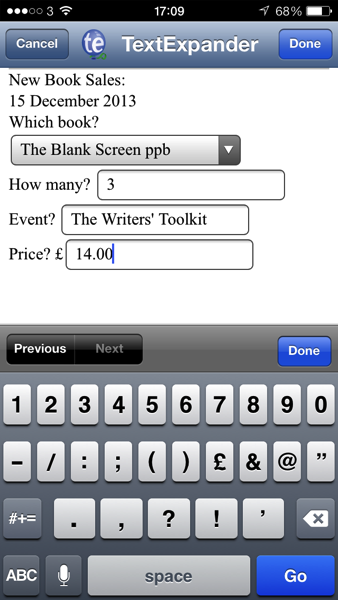
I know I’ve got a cold and I know that the Book Sales tool I knocked up in Launch Centre Pro, TextExpander and Drafts works, but it’s ugly and it doesn’t cover everything I need. I’ve also not finished it. The data currently lives in Drafts which means I’d have to export it some time. I was thinking of extending the idea and having it automatically append sales details to a note in Evernote, but that still feels clunky. And it still means having to manually process them all, manually have to move them from Evernote to my spreadsheets and databases.

Unless I spent the cash on FileMaker Server and a server to put it on – I really don’t want to leave my 27in iMac on all day, burning up electricity and presenting itself to the web for any and all security issues – I think that whatever I end up with will clunk a bit.

So it’s 21:00 on Sunday 15 December, about four hours since I finished that Launch Center Pro version detailed in the Bullet Biting #1 blog, and I’m back at the Mac, wanting to do it better.

With FileMaker Pro.

I already owned version 11 of that and run my other work databases through it but if one has the new version, one can also get a free FileMaker Go app that runs on iOS. Actually, if you’re a FileMaker Pro user yourself and you have version 12, you’ve got what you need to run FileMaker Go too. You can just download the app onto your iPhone and iPad and carry on.

There are issues. I wish there were some way to keep your database in the cloud so that you could access it from many devices, including my Mac. You can do that easily with your own server solution, I think there’s a way I don’t yet follow to do it with a website-based one, but for everything else you have to move databases onto your current device and then move the data off again before you run it anywhere else.

It’s not ideal. But I reckon if I get a good enough FileMaker Go solution that I will use it and will set an OmniFocus reminder to export all the data back to my Mac, say, once a month.

So I’ve got FileMaker Pro 13. And the FileMaker Go app is now on my iPhone and iPad. I think I’m going to only do an iPhone database because I daren’t try juggling multiple devices and if you can only use one, it has to be the phone because that is always with me.

It’s 21:05 and I have a blank Book Sales database open on my Mac. One thing I learnt from today’s Launch Centre Pro research is that I have a much clearer view of what I need the database to do.

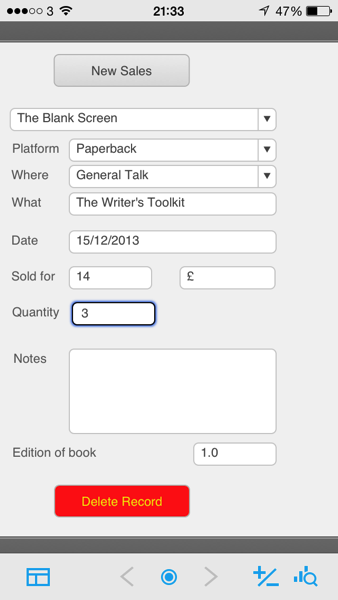
It has to let me quickly enter that I’ve sold X books. It has to let me say which books, where I sold them – and I now realise that should include online sales as well as specific venues or events I speak at – plus the price I sold them for. I previously had a drop down listing all the various varieties of the same book, such as The Blank Screen Paperback, The Blank Screen Kindle and so on. It’ll be more efficient and quick to have the book followed by the platform. So one book called The Blank Screen and then options to say it was sold online or at an event, which I then name.

That means my database structure needs to be:

Book title

Book platform (paperback, Kindle, iBooks, PDF)

Book event (name it)

Type of event (workshop, presentation, general talk)

Price sold at

Date of sale

Quantity sold

Notes (always good to have a notes field)

Version of the book (as I may be updating some eventually)

I’d like some kind of flag to say whether the data has been squirted off to the main Mac database but I don’t know how to do that. I’d also like some kind of way to mark the profit: Amazon takes such a complicated approach that it would be worth my time figuring out their logic and coding that so I could see directly in the app what the sale means to me financially.

If only I were in this for the money instead of because I like writing the books.

Howay. That list above is a database structure all right, so it’s 21:11 and I’m entering those as fields in my new Book Sales database on the Mac. 

21:14 Realised that I sell in multiple currencies. Have to think about that, but probably not tonight. Better to do it tonight in case I never come back to it. Hmm. I’ve added it in.

21:30 Database created and layout designed on iMac. Sending to iPhone via dropbox for testing.

21:33 On iPhone and tested. I can make the text a bit bigger and I can give myself some more space but it’s already infinitely better looking and easier to use than this afternoon’s one. Plus, I love what happens when you tap onto a field: if it’s, say, the book title, then the bottom of the screen simply lists all the titles and you can tap on the right one. Tap and it’s in plus you’re on to the next field. Very nice.

So I’m happy and I’m done for tonight. Here’s a before and after comparing this afternoon’s Launch Centre Pro complexity and FileMaker Pro/Go’s far better version. They have the same remaining problems to do with manually exporting and managing data but otherwise, FileMaker wins hands down – and it did so in 35 minutes instead of four hours.

I’m not sure how these two screengrabs will display on your screen but if you have any doubt which is which, look at the times at the top: 17:09 is the early TextExpander/Launch Centre Pro/Drafts solution and 21:33 is the FileMaker one.


TextexpandersampleFilemakergo

Ask for what you want and ask it now, ask up front

I do talk about this in my book, The Blank Screen: Productivity for Creative Writers but I’ve just now, this minute, had to put it into use for a new reason. When you want something and you’re emailing somebody to get it, say so right at the top. Line one.

The reason I give in the book is that we’ve all had emails where we’ve wondered what in the hell this person wants. And when they do that very British thing of working up to the point by reminding you who they are, how we met, how, gosh, you said some day you could send me something, maybe, hello, it has an unintended effect. I read all this about that time we met in ‘Nam, how we stole a taxi together in Saigon and wrote Les Mis 2 together and as it goes on, as it gets ever more specific, I can’t help but worry. This is going to be big, I think. This is going to be really serious. This may be trouble.

And then they just ask for a link to the book. (Here, have the UK link and the US one too. It’s no trouble.)

But there is also the fact that saying what you want right at the start is a difficult writing task. Especially today. I had to write to my agent with all sorts of issues. All good, you understand, but just the sheer volume of things to discuss about new projects, things I want him to do, things I should’ve told him I’d already done.

The more I thought about it, the more I could think of other issues I needed to cover. It’s fine to think I should pick one and only email about that, leave the rest to another day but this is a real job and a real email about a real thing. Anything like stripping it down would be a correct writing exercise but not what he or I needed. Too much, too intertwined, too complicated.

So I started with line one. What I want.

There is always something that you want most, there is always something that you want first. So I wrote that down.

And having written it, every single other thing fell into place. It turned out to be what I call a three-biscuit email (it’ll take him those and some tea to work through the things in it) but as a reader today he will fly through the email and know exactly what is going on and exactly what I’m after.

Because I spent so long thinking about the first line, the rest of the email poured out of me in a flash. 

It’s a big deal for me, it’s a complicated subject, but wallop, that email is done and I’m on to the next thing. Specifically I’m on to talking to you. And now I’ll just pop off to get some breakfast. I’m starving and saying all that about biscuits did not improve things.