Stop visiting websites. Make them come to you.

It genuinely astonishes me how many people haven't even heard of RSS. If you have and you're even now looking at this through an RSS newsreader, hello. I've got nothing for you: skip along to the next story from your next favourite website. But if you haven't heard of it before, you have now and I want to evangelise you into trying it yourself.

This is what happens when you try it, this is what I do every day. Sometimes many dozens of times a day. Waiting for the kettle. Standing in a queue. Taking a break from work. I'll just read the news on my iPhone or my iPad or my Mac, whichever is in front of me at that moment. And whatever news has broken since I last looked. There are websites I read every single article on yet rarely go to. There are others whose headlines I read every day and often then go to in order to read the full article.

It definitely means I read more websites than many people, but I don't take any longer doing it.

To do this, you need an RSS newsreader. There are eleventy-billion newsreaders in the world and there are ones for PCs, Macs, iOS and I presume also Linux and Android. Windows, OS X, anything. Everything. There are free ones aplenty but I bought one called Reeder for iPhone/iPad which cost me a whole £2.99. I would be surprised if I haven't read a million words in that app.

But just Google “RSS” and your computer or phone of choice and take your pick.

Then go to a website you like and look for the RSS button. It's that orange one with white stripes like radiating waves and it's often the orange one that says RSS next to it. Click on that and you'll either wallop off automatically to your RSS newsreader with the site just waiting for you to say yes, add this one forever – or you'll get a new webpage. Copy the link, open that in your RSS reader, say yes, add this one forever, and you're done.

RSS isn't the friendliest concept: you understand it but some sites make it hard to find and then offer you options you're not interested in. If you're given a choice of RSS links, one will be called Atom and one will be called RSS. I truly have not one single clue what Atom is: I've never tried it.

And I have tried a lot of sites. Something like 300 at the moment.

Two quick things. You'll notice I've now said RSS umpteen times and not told you what it stands for. I think it's like DVD; you know what it is and you watch a billion DVDs but you may not know that it stands for Digital Versatile Disc (or was going to stand for Digital Video Disc originally). RSS stands for Really Simple Syndication. Exciting.

The other thing is just that I can't recommend Reeder without warning you that the Mac version isn't on sale at the moment. Various changes to the world meant it stopped working and the update isn't here yet. It's taking quite a time but I like Reeder so much I'm waiting for it.

That's it, carry on. And see you in my RSS feed. I've got two. Oh, yes. Two. Get me. Actually, yes, get me: my personal Self Distract blog has an RSS feed at http://williamgallagher.com/selfdistract/feed and The Blank Screen is on http://williamgallagher.com/feed
The good, bad and dangerous of email signatures

Automatically putting your contact details at the end an email can be great, handy, daft, silly or even sometimes a little bit dangerous.

You want to know about the dangerous bit, don't you? And I want to tell you. I'm going to be a little circumspect because the person involved could conceivably read this and I don't to either upset her or open the story back up again.

It's like this. I'm a freelance writer, it is handy for me to give you a way to phone or email if you have some work you think I'd enjoy. So a long time ago, back in the 1990s, I used to include my mobile phone in the signature on all my emails. All my emails. That's the point, isn't it? You write this automatic block of text called a signature, you write it once, you never think about it again. I never thought about it again. Until a woman saw it – I'm going to do that anonymous name thing and call her Pentangle. No idea why.

I knew Pentangle but it had been a gigantic number of years since we'd been even in the same city, I believe, so whatever way we found each other online, I was glad and it was fun. Except I sent her a cheery email and it included my phone number as all my emails did.

She went quiet.

And after a few days emailed back saying she'd been in some turmoil about my giving her my number like that. Did I expect her to give me hers? What would her husband say? If you're reading this like it's a joke then I'm doing a bad job: she was serious and it was a big thing for her. I'm ashamed to say I joked it off: it didn't occur to me that she could really be this serious. I tell you, nobody fancies me, it just doesn't happen, I wouldn't notice or understand if it did. But something like it was happening then.

I hadn't met her since those years before, this was all innocuous email stuff and actually to this day I have not met her. But it spiralled off into her consulting her minister for advice about what to do, it went to late night phone calls from her, it went to my being CCd on emails about me that she'd sent to her friends.

It only stopped when she went in to hospital to be treated for some mental health issues. I don't know what, I didn't really dare ask her for fear of exacerbating whatever was happening, and it's now a long time since I heard from her. I often think of her and hope she's okay, but.

So that took longer to tell you than I expected. Sorry about that. Let me skip straight to the happier, sillier, dafter end of things. There is a tremendous spoof of legal email signatures written by the site McSweeney's.

For real examples of how not to do it, advertising guy Ken Segall wrote back in 2012 about the signatures that came on his phone by default – and one that is a lot worse than “Sent from my iPhone” – and he has suggested alternatives.

Yet it genuinely is handy for certain people to have your phone number. You want them to. And you can say that to them in one email but nobody remembers which email you mentioned your number in. So whacking it at the end of them all, could genuinely be useful.

The issue is not the usefulness, it's not the bit about it being at the end of your email, it's the word 'all'. That's where this goes so very badly wrong.

So right now, I have no signature at all. Not one. Not a pixel. I've certainly deleted the “Sent from my iPad” and not just because I was emailing someone who believed I was working for them on the Mac in my office. Instead, most emails I send out get no signature – and all the ones that could use one, do.

I do it through TextExpander from Smile Software. When I'm at my Mac and I'm emailing you, if any part of the back of my head thinks you could use my contact details, I type “;sigw” (without the quote marks) and, wallop, it's all there. An entire signature with contact details and a couple of links. That's my work signature; I intended to do a “;sigp” with my personal signature, but I've never bothered.

It's great on my Mac because even though I type very quickly, that just means I've rattled off “;sigw” at lightspeed and the rest of the text is there within a beat. It's not so good on my iPad and iPhone: there is a TextExpander for iOS but it can't insert itself into Mail in the same way. If I'm that fussed, I will go to the TextExpander app, type “;sigw” and copy-and-paste it into the email but generally I don't tend to be that fussed.

But I am fussed enough, especially on my Mac, that I do this TextExpander lark a lot – and it has paid off as an email to one person gets forward to another and suddenly I'm getting work from strangers.

When technology makes you giggle and is still useful

Oh, what did we do before our phones knew where we were? The service If This Then That (IFTTT) has now added features that will act on your going somewhere or being somewhere and it's tremendous. I use the hell out of location-based reminders: I am forever telling Siri on my iPhone to remind me to this or that when I get here or there. Forever. But IFTTT has much fancier uses and Lifehacker just compiled some of the most deliciously daft, make-you-smile ones that are also useful.

For example, my favourite is being welcomed home automatically a-la Marty McFly with your own theme song a la Ally McBeal:

Nothing is cooler than walking into a room to your own theme music and this recipe makes that possible by using IFTTT, Dropbox, Hazel, and Automator. Basically, when you enter a location, the recipe creates a text file in Dropbox which triggers Hazel, then starts an Automator workflow that turns on iTunes and plays a track. You could use this basic idea to launch pretty much any Automator workflow you wanted.

Okay, maybe it's stretching things to say this is useful. But others in Lifehacker's list are – and that's why they're not my favourites.

Pattern Weeks part 4 – did it work?

Previously…

Last year I cracked getting up at 5am every weekday to write and it was a boon. It was bigger than that, it was huge. This year I want to stamp some kind of structure on my weeks, a base pattern for how Monday-Friday should go. It never will: no week is ever going to stick to a plan. But by having one, I hope to be aware of what I should be doing and have each hour be more of a conscious choice to do the plan or go off it.

Six days ago I told you my plan was finally ready for you to see, albeit a bit redacted. Now, read on.

Day 6.

I stuck to the plan perfectly for Monday to Wednesday, inclusive. Then Thursday was a day of meetings and a talk in the evening that ran late into the evening. I can't ever just go to bed when I come back from one of those so it was a late night and that had its impact on Friday.

The best thing from the pattern week is easily that it got me to make calls. This is, for some reason, a real weakness with me: I'm far better yapping face to face and I can write a crackin' email, but cold phone calls are tough. I do go in phases, though. There's a bit about this in my book, The Blank Screen, (US edition, UK edition) where I mention that my most successful calls happen between 11am and noon. That's quite true: I don't understand it, I can't see a particular reason, but I've noticed it. When I was writing that chapter, though, I think I was on a high for some reason because I said I had five calls to make and that I'd just whack through them. I did have them to do and I did whack through them.

But it was unusual. And I have to be aware now that while calls are a difficulty, I do seemingly have these highs and so it's far too soon to tell: did I make my calls this week because of the pattern schedule forcing me to or did I just happen to be good at phoning people? We'll see next week, I suppose. But for now I'm choosing to think it was the pattern. I made sixteen calls and perhaps seven of them were successful.

If you've ever worked in sales – and I haven't so I'm just guessing here – then I imagine the figure of sixteen doesn't impress you but the success rate might. It's certainly encouraging.

There was one other thing that was good about working to this pattern instead of my usual chaotic plate-spinning. And it was also a bad thing. That's great for having something to tell you about, it's ace that I can have a natural bridge between the good and the bad, but I didn't want any bad.

Here's the thing. At 10:59 on each day I was making calls, I would rush to start and then at 12:00 I would stop it and feel great. So far, so excellent. But that happened with each hour that I had planned and the pattern has huge, giant gaps which is where I'm supposed to be doing the work and instead, I'd look at that and think phew, I can relax a bit now. And I did. Too much.

As a result, I don't feel I got enough done in the week and that is exactly the opposite of what this was all supposed to do.

So I'm just going to have to work harder, aren't I?

Oh, yes it is: Time says CES a success, so there, possibly

I'm not alone in thinking and saying that the annual Consumer Electronics Show is always hot air and lately not a lot of that. (See We're Done with CES – in both senses.)

But Time magazine's Harry McCracken says no, it definitely probably isn't true because there is this other CES he calls the secret one. It's the CES behind the CES where companies and people go to show off their brilliant technologies while everyone else is looking at their not so brilliant technologies:

Every CES participant attends his or her own distinct Shadow CES: Nobody gets to see anywhere near all of it, and I’m afraid that some of the juiciest parts are off-limits to journalists like me. (They involve hush-hush products we won’t learn about for months to come — in some cases, not until CES 2015 or beyond.) So it doesn’t make sense to declare that this year’s Shadow CES was better or worse than last year’s Shadow CES. But I do know that it remains an essential ritual — and that any assessment of CES’s relevance that doesn’t acknowledge its importance is too incomplete to take seriously.

We could wait for two years to see if he's right – or we could just look back two years. CES 2012 featured laptops and TV sets. Okay. There was a thing that let you control Windows with your eyes. Haven't seen a lot of that around though, to be fair, each time I use a Windows I tend to roll my eyes and that's the kind of edge case that delays a product launch.

Verizon had a Borg-like eyepiece for you to see your mobile phone without lifting it up. HP unveiled a laptop that was apparently just as good as a MacBook Air so that was definitely innovation, so there, QED.

And Audi showed a car that did something. This year's CES featured a lot of cars doing a lot of things with your smartphone but we are still waiting for KITT.

I am a fan of technology that can help me and I love how it has enabled me to do more and to be in a career I wouldn't have imagined. I have no doubt that there is more and better to come. But lauding this year's tinsel and saying yeah, but, but, next year, just you wait, that is too asinine to take seriously.

Pattern Weeks part 3: ready for you to see

Well, there are limits. I want you to see an illustrated plan of my typical or pattern week because I want you to see if it’d be any use to you too. Plus, I hope that showing it you here means I’ll stick to it and find out whether it’s really any use to me.

Previously on Pattern Weeks… really the only thing to check out if you want to know more about this is the first post I wrote back on 31 December. Now read on.

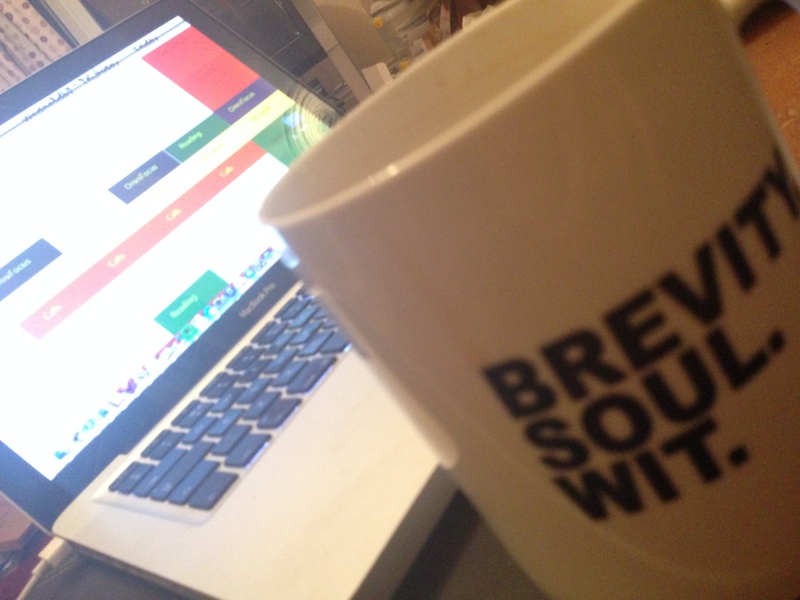
Or rather, look on. Here’s the final thing: a pattern for my week that I’ve made my desktop wallpaper on my iMac and, here, my MacBook. The MacBook and its screen are artistically blurred; the tea mug in the foreground is mistakenly blurred.

TBSmug

And below it is the actual pattern, albeit without any incriminating text.

Pattern-Week-No-Text

I won’t get any points for artistry. And without the incriminating text, I think there is only a little you can take away from the idea. But it’s a good little. And it’s this: I have put these many tentpoles into the week where at certain times I will do these certain things. That means on the one hand that I’m trying to guarantee that these get done but also on the other that there’s all that whitespace. That’s when the real work of the week will be done. If I planned it out too much, I’d be so often breaking the plan that I’d come to ignore it.

I think what I’m trying to create here is analogous to an ordinary office job’s schedule. Whatever you do, you have certain times in which to do it and there are points when you have to attend meetings or deliver reports. And as I say in The Blank Screen (US edition, UK edition) I believe that when you have a commitment like those, it takes away a lot of the churning stress. It adds other issues, but for that hour or whatever, you know you are doing what you have to do and you therefore don’t spend a lot of energy questioning it. You just get on with the gig.

The one other thing to say is that I’ve got to underline the word pattern. This is what my week should look like, it is the pattern for the future. And I know it won’t be like this. For one thing, I’ve planned out here 05:00-15:00 which I’m finding is a good amount of time to work both in when I’m at my best and in how much I can get done. But this coming Thursday, for instance, I’m definitely working until 21:00 so I might start either that day or Friday a bit later than usual.

But we’re halfway through January already and while I’m getting a lot done, I need to do more and the visual reminder right here on my screen, constantly, permanently, I am hoping that it will help. That it will keep me on track through the week and that it will also appeal to the visual side of me as I go.

We’ll see. But this is something new and just sometimes I suspect I need a new toy to help me work.

Maybe the five productivity apps you need but probably not

Two reasons to show you one article about five productivity apps: first, they might help you. But second, I'm fascinated how differently we all approach what we do. I very heavily use exactly one of the five applications mentioned here (iWork with Pages, Numbers and Keynote) and I can't fathom how anyone would leave out 1Password, Evernote and my beloved OmniFocus.

And I shudder at the idea anyone would include a fitness app. Shudder. Told you.

You know and I'm slowly realising that there is no one way to do what we want and that if there were, many of us wouldn't like it. I think I'm at the point where my work flows along just about as well as I can make it and if I pootle around trying other things, it is more curiosity than it is a necessity.

Still, I have a terrible weakness for articles such as Apple Gazette's 5 Apps to Boost Your Productivity.

We’re done with CES – in both senses

There was probably quite a lot of talk at this year's Consumer Electronics Show in Vegas about technology that will help us be the more productive, creative, happy people we should be but I wasn't listening. Were you?

CES gets feted as a big deal in a lot of places – BBC News's Click looked like it was going to love it there from the brief bit I saw before changing channels – and certainly big announcements there are treated as world-changing.

But I lost interest years ago when I noticed that the world kept on staying pretty much the same.

Full personal disclosure: I worked on computer magazines for many years and was never allowed to go to CES. I can tell you this now: that was because I don't drink. It was regarded as a waste to send me. But maybe I was showing signs of disinterest even then. Maybe I was sober.

Because CES still talks the talk yet it's been a very long time since anything was unveiled there that you remember. We're talking home video recorders. CDs. There have been others since but I'm struggling here. And the show is now better known for big announcements of new products that then never go on sale.

So CES is an empty roar and it was so obvious to me that I wouldn't be talking to you about it that I can't even call this a big editorial decision. It was just CES, uh-huh, what else is happening? But now that the show is closed and the excited pre-event articles are being followed by post-event shrugs, I came across a description I just like a lot.

In the New York Times article about the Consumer Electronics Show, MIT's Natasha Dow Schüll summed it up exquisitely: “It’s like a high tech SkyMall”.

Pattern weeks – part 2

I'm still fiddling. Previously on Pattern Weeks… I was working to bring some kind of structure to my typical or pattern week, chiefly because every week was changing and I knew I wasn't getting enough done. For a detailed previously and maybe reasons why you might like to think about it too, see Pattern Weeks.

Now I'm embarrassed to say that I wrote that and was planning all this back on 31 December and we're now a fortnight further on.

But I do have the plan, at last, sort of.

I ripped up lots of versions and settled for working out a list of things that I really have to get done. I used OmniOutliner for that; lots of bashing in things as I thought of them, as a search of my calendar and To Do list brought them up. And then lots of juggling around. A fair bit of realising that this bit or that was quite similar to something else on the list, I could save some time by doing them one after another.

I ended up with tent poles in the week: inviolate times when invoiolate things have to be done inviolately. They won't be. But they will be more than if I weren't looking out for them.

And that's nearly where I am now. I've got the list, the kind of super-list, the overall no-details-but-big-picture list and I have these tent poles. Certain few of these things have to happen at certain times and I know the things, I know the times.

The intention is to end up with wallpaper on my Mac with this pattern in my face. I'm about a quarter of the way through producing that image in Adobe Illustrator and it's a Tetris-like calendar kind of image with big red boxes, little green ones and some yellow 'uns too.

I'm trying to work out how I'll show that to you when it's done and all the boxes have all their text in – without you being able to see that the big red box that stripes across the whole week at the same time is really just breakfast.

But I'm getting there and it's proving useful plotting and pondering. So I wanted to share that with you, even as I can't yet share the plan.

Post-It Notes: yet another handy thing Evernote does for you

I will never use this. I will so very never use it that I think my mind simply blocked its very existence: it's an Evernote feature that works rather smartly with real-life Post-It Notes. I hate Post-It Notes. I have a think about tiny scraps of paper, makes my skin crawl, and that is one big reason why I got into using Evernote and all things electronic. But it is smart. It is really smart.

Wade Roush is into this and says on Xconomy:

The Post-it Camera is a feature of Evernote’s iOS app (iPhone and iPad only so far) that accesses the device’s camera and helps you take a clear, evenly aligned picture of any Post-it note. It then creates a digital replica of the note—basically, it sharpens up whatever wording is on the note and cleans up the background color. What’s cool is that you can set Evernote to store these digitized notes in specific notebooks according to their color. It’s best at recognizing green, blue, pink, and yellow. (And yes, you’d better believe that this is all a big co-marketing operation: 3M sells Evernote-branded Post-it notes in the correct colors.)

Read his full article for details of how to use this, unless you're me in which case have a skim across the rather long piece for many other Evernote-y and organisation-y gems.