Let’s turn to the phones

I swear to you that this is a thing. It really is. Just Google “iPhone home screen” and you will find literally half a dozen articles with people talking about what’s on their iPhone front page. I don’t think it’s such a big with Android users but then I wouldn’t be bothered looking. So. Maybe it’s Android too, maybe it’s everyone, maybe I’m not crazy. But I do have one thought about showing you my iPhone front screen.

Is there any better way of recommending software apps to you than showing what I actually use?

And since we’re talking about the front page, these must be the apps that I use the most. Yes. I use these to run my life. One caveat: I also have an iPad but that would be far too big a screengrab to show you. I also have a 27in iMac, but let’s be serious. You’d have to serialise a screengrab from that.

So here’s my iPhone and this is what it’s got on it that is practically worn out from the amount of use I put it all to:
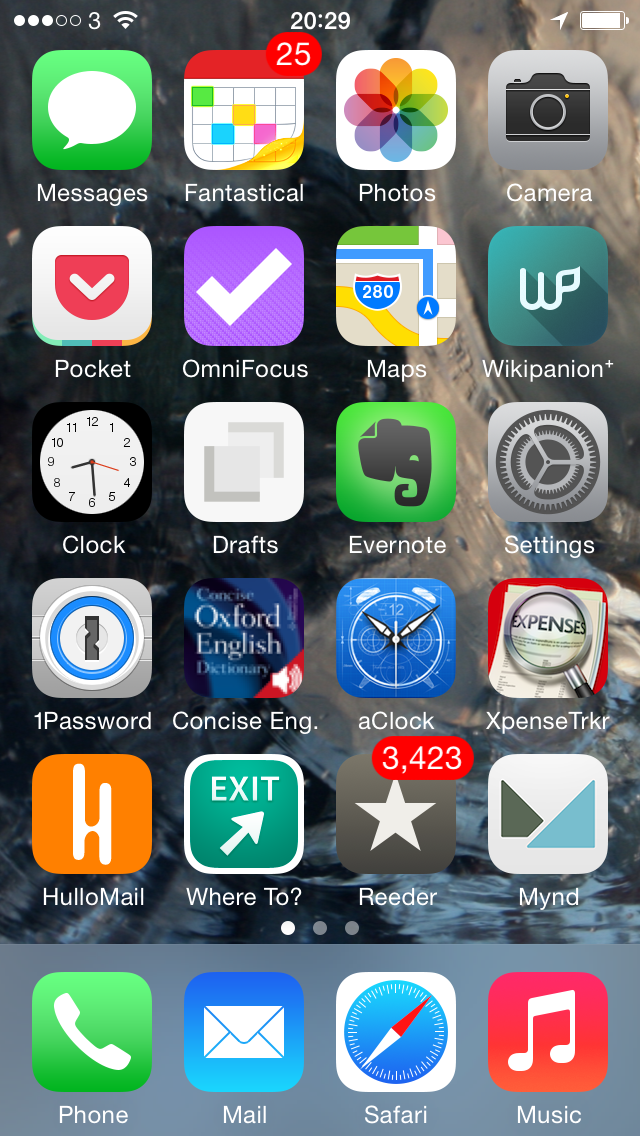
iphone homescreen today


Some of this stuff you know, some of it just does what it says underneath. Phone, for instance. Music. Let’s just wallop through the biggies:

Top row, second from the left – Fantastical 2 for iPhone. I’ve already talked about that and also Mynd, way down there toward the bottom, one up from Music, in Three Calendars, No Waiting. I was testing out Fantastical 2 then and also Mynd, which I’d only just realised is also a calendar. (I thought it was about meetings. It is. It’s just more.) Time has moved on and you can see that Fantastical 2 has kept its space on my home screen so I must like it. Whereas Mynd – wait, Mynd is still there. Bugger. It’s very good when it’s very good and when I need it but, oddly, I haven’t needed it much. Despite having many meetings. I’m afraid Mynd may be on its way out. I’ll think about it and get back to you. But Fantastical 2, unreserved recommendation: get it here.

Second row from the top, first on the left – Pocket. Read something here on the phone in Safari or in my RSS reader, or on my iPad, or my Mac or someone else’s PC, anything and anywhere, and I can lob it off to Pocket. Pocket is not the first Read It Later service, but it is the first that I used consistently often to save things and also to later remember that I had them and finally read the things.  Pocket is free, by the way. Off you go.

Second row from the top, second on the left – OmniFocus 2 for iPhone. Need I say any more? Can I say any more? I can? Start reading here – and bring a mug of tea. Then go buy this version of OmniFocus for your iPhone. It’s been updated fairly recently and the iPad one hasn’t so I’m havering over whether to recommend that to you. Up to a couple of weeks ago I’d have said yes even though it’s not quite as whizzy as the iPhone one. The iPad version of OmniFocus has traditionally been the best of the three – but that third one, the Mac version, that’s zooming up. It used to be very hard to use, now a vastly easier yet still powerful one is in beta and I’m addicted to it. Right now, I think the Mac one is the best. Go to the Omni Group’s website and find out about all three.

Third row down, second from left – Drafts. I don’t use this remotely as much as I would expect and chiefly because that’s Evernote right next to it. I’ve now got muscle memory that if I want to write anything quickly, it goes in Evernote. Drafts is possibly a nicer writing experience and it is definitely more flexible. Anything you write in Evernote stays in Evernote and that’s great because it stays there in Evernote on your phone, your computer, your tablet and so on. Anything you write in Drafts stays in Drafts but with one tap can go almost anywhere else. Write something and send it from Drafts to OmniFocus or to a text message or to an email. Or, I’ve just this week found out, to Fantastical. I found it tricky to set up but now it works so smoothly that I wonder if it’s even working. All I definitely do with it at the moment is jot down ideas that it then automatically appends for me to a Story Ideas note in Evernote. Get Drafts here and Evernote there.

Fourth row down, first on the left – 1Password. Actually, see today’s The Blank Screen newsletter for more details of this and then go buy it while it’s on sale. If the sale is over by the time you catch this, go buy it anyway. I paid full price, I’m happy. And buy 1Password for iOS here.

Fourth row down, second from the left – Concise Oxford Dictionary. Not only the dictionary text but also an audio pronunciation guide for many words. Every word I’ve ever tried, actually, and I’ve had this app since about 2008. I use it a lot. I wish it were upgraded for iOS 7 or even just to the stretched out iPhone 5 that I use and I wish all sorts of things, but it’s a great dictionary. Unfortunately, it is sufficiently old that I don’t think you can get it anymore. You can get many similar versions but not quite the one I know, so I can’t recommend a particular one. But do have a look at them all, okay?

Fourth row down, third from the left – Awesome Clock. I use this as a bedside analogue clock. It’s very customisable but now I’ve found an arrangement of clock face and hands that I like, I like it a great deal. Unfortunately, it ain’t around. Not today, anyway. Vanished from the App Store.

Fourth row down, fourth from the left – XpenseTracker.  That fourth row sees some action, doesn’t it? I use this for recording all my expenses. Are you okay? Did you just faint with surprise? Someone, bring us hot towels and some whisky. And tell me how much that costs because I need to pop it into XpenseTracker

Fifth row down, first from the left – HulloMail. I used to be on O2 and got Visual Voicemail. (Whereby instead of dialling in for your messages and listening to eight spam calls before you finally get to one from your client and, wait, hang on, she said a number there, bugger, where’s my pencil, you just tap. Here’s a list of the calls you’ve missed and which left messages. Tap on the one you want to hear first, you hear it first. Missed a phone number or couldn’t quite catch a word? Scrub back and forth through the recording.) It is so good that I had no idea there were iPhones that didn’t have it. Until I left O2 for 3 and despite in all other ways being far better, it didn’t have Visual Voicemail. HulloMail brings it back. It brings it back with ads and I keep meaning to upgrade but it’s a subscription and I’m not certain I use it enough. Take a look at HulloMail here.

Fifth row down, second from left – Where To? I keep wanting to call this Exit. Actually, I keep calling it Exit. And I rotate between using this and Localscope: both are easy of finding out what’s near you. I love this kind of app and I pummel mine: the first App Store review I ever wrote was for one called Vicinity and I could not get over what a stunningly great and useful idea this is. Where’s the nearest bank? Where’s a pizza place? Tap, there it is. With business details. I can’t remember why I fell away from Vicinity but I regularly bounce between Where To? and Localscope. Where To? looks very old to me and I just don’t enjoy using it as much as I do Localscope, but it’s given me more accurate information somehow. And I also understand it: I find I have to keep thinking with Localscope about where a certain feature is. But here’s Where To? and here’s Localscope: do have a look at both, would you?

Last one. Fifth row down, third from the left, Reeder 2 for iOS. This is my RSS reader of choice and I have done an awful lot of choosing. Here’s what I wrote about it when a new version came out late last year. There’s now also a Mac version in beta, which I enthused about here. But just go buy the iPhone version.

I’m worn out from enthusing.

My iPhone home screen, like everybody else’s I presume, changes a lot. You can see I’m havering over a couple of these apps. But the rest, the ones that stay there, tend to stay for the very good reason that they are very good. If you want a recommended app, this is what I recommend.

I hope you find they are as good for you as they have been for me.
Do it all wrong, do the opposite of all productivity advice

I did a writing exercise with a group of school-age kids last year and they had to go away to continue it. They wanted rules, I gave them rules. But one of the kids completely ignored those rules. She wasn’t being obstructive or rude, she was being right. Her story was good but the fact that she’d thought about it and gone against my instructions was fantastic. I praised her in front of the group and then later when they were all gone, I swear to you I punched the air.

Sometimes you just have to do it wrong because you know that’s right.

So on reading advice that I should say nuts to just about every piece of productivity advice I’ve sworn by, I was willing to give it a go. And my reward for being brave was that actually much of this purportedly counter-intuitive advice is what I swear by.  Certainly this one:

Use at least Facebook, Twitter and 3 other social networks
Are social networks blocked by your employer? That’s probably not a good thing for your productivity, according to a recent study by Evolv. They monitored hundreds of metrics from Fortune 500 companies and found an exciting correlation between usage of social networks and productivity/output per employee.

10 of the Most Controversial Productivity Tips That Actually Work – buffer.com

I’m not sure I’d say it was exciting, but I maintain that the fact you are distracted by social media is a good thing. If you found it all a burden, that would be… less good. Facebook, twitter and the rest are your friends. I don’t even say that because you can get money or audiences from promoting things via these services. I say it because if you have a great time trying to build an audience and you fail to do that, you fail to get any more readers or customers or whatever, at least you had a great time on the way.

You do also need to be able to switch the bleedin’ things off, mind.

Or then there’s this. This is one of the most popular sections of my The Blank Screen book and I’ve even run it as a standalone workshop, quite apart from the productivity advice:

Get rejected
Here is something to finally stop being angry or disappointed about: Being rejected. Instead welcome it in and work on how you react to it. “Social rejection can inspire imaginative thinking, particularly in individuals with a strong sense of their own independence”.

10 of the Most Controversial Productivity Tips That Actually Work – buffer.com

My version is How to Get Rejected: I specifically tell you how to make sure you don’t get any work – and why that’s true. Actually, when I run this in a workshop I tend to get the whole audience to reject me. It’s cathartic for them though for me, not so much.

Here’s another eight pieces of counter-intuitive productivity advice from Buffer.com. I’m not sure I agree with all of them but their case is well made.

Also, Buffer.com is a service that I’ve just started trying out with The Blank Screen and Self Distract. I tend to tweet about that personal blog around three times: once the moment it’s out, then over the lunchtime the same day, probably around early evening too. With Buffer.com, I could write three different tweets and tell it when to send them out. I’m half pleased with it: the service works perfectly and it is very handy to not have to remember to tell people about a new blog, but on the other hand it’s harder to then get into conversations with people about it.

Tiny changes, big results

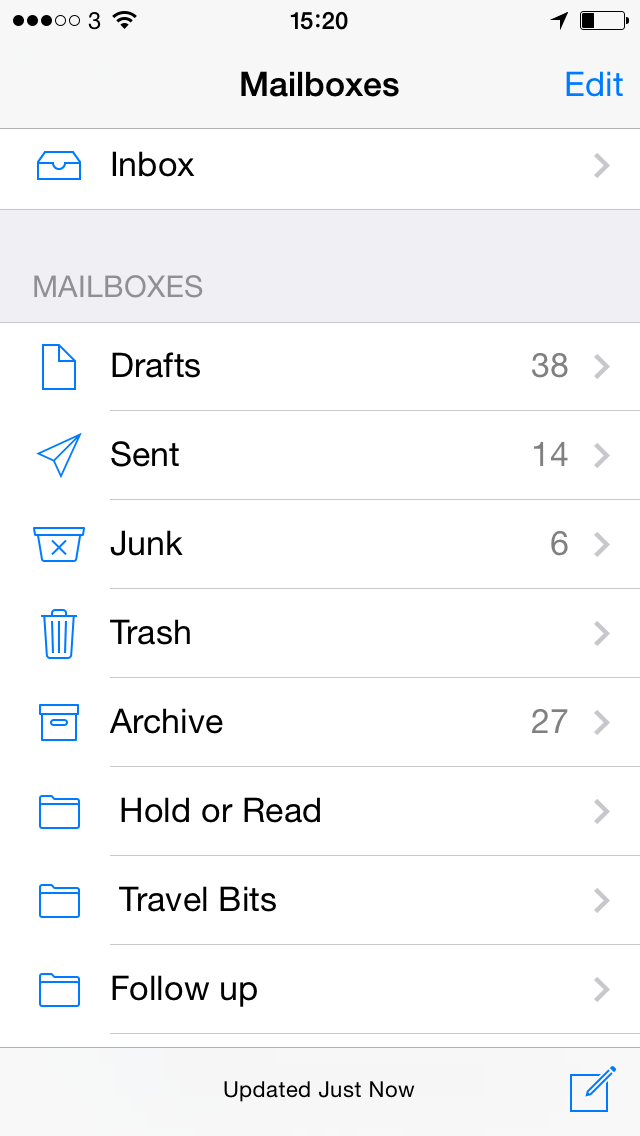
Yesterday, checking email on my iPhone meant scrolling down a list of mailboxes. Today, it doesn’t. One glance and I see if anything has come in.

If you only have one email address then I think I may envy you, but sanity requires me to have two. There’s the one I’ll cheerily post anywhere and everywhere, a business one that’s wg@williamgallagher.com. Then there’s what I’m afraid I think of as my real email address. I’m not hiding it from you, specifically you. If you email me at wg@williamgallagher.com, you’ll get the reply from my real address. The real address is for proper people, you are most certainly a proper person.

The business one helps keep spam away from me, it also keeps business emails away from my main account so that I can deal with them together. Unfortunately, it used to also keep me away from the business emails. I would forget to read them because this is what it all looked like on my iPhone:

photo 1

You can’t even see that other mailbox. It’s one more slot down below Follow up: I had to scroll down to read it, so I didn’t. After missing two important emails – very important – I began training myself to make that scroll. Open up mail, swipe back from the Inbox to that list above, scroll down, see if there was anything unread in the other mailbox.

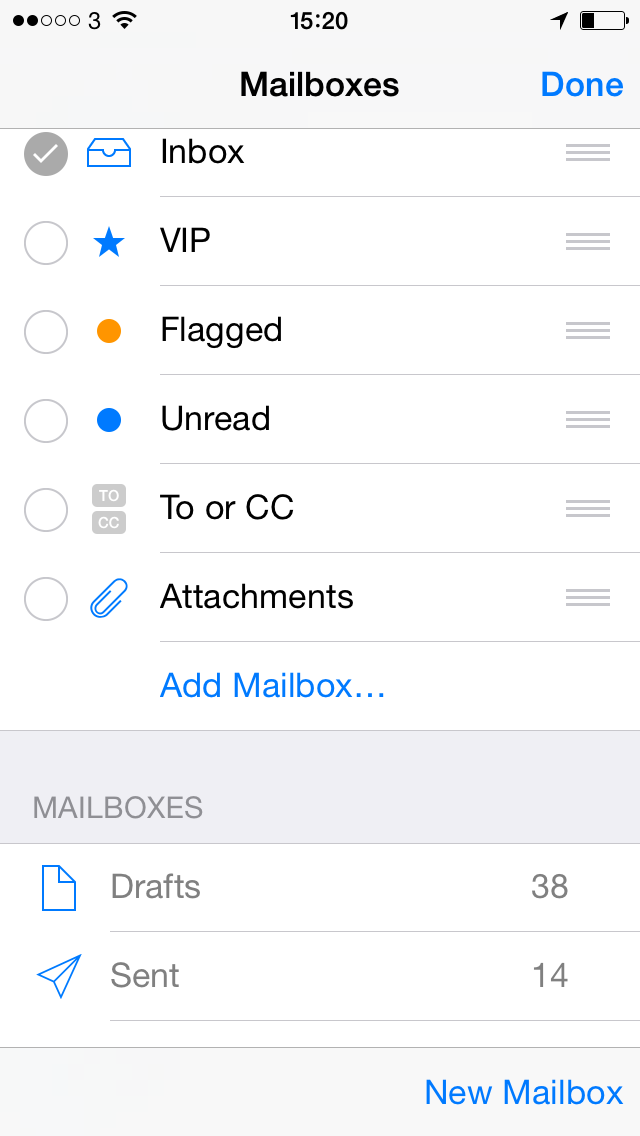
I got really good at doing this and I haven’t missed anything since. But it’s bleedin’ tedious. I know, there are worse problems. But last night I decided to have one more go at doing something about it. I’ve hit that Edit button (top right) before, this time I hit it again. And I got this:

photo 2

Defeat. Those three bars beside the top mailboxes, they’re grab handles so I can shove those ones up or down as much as I like. Within that band. There is an Add Mailbox button but, come on, I already have two mailboxes, I don’t want more and anyway, how does that solve my problem?

It solves my problem completely.

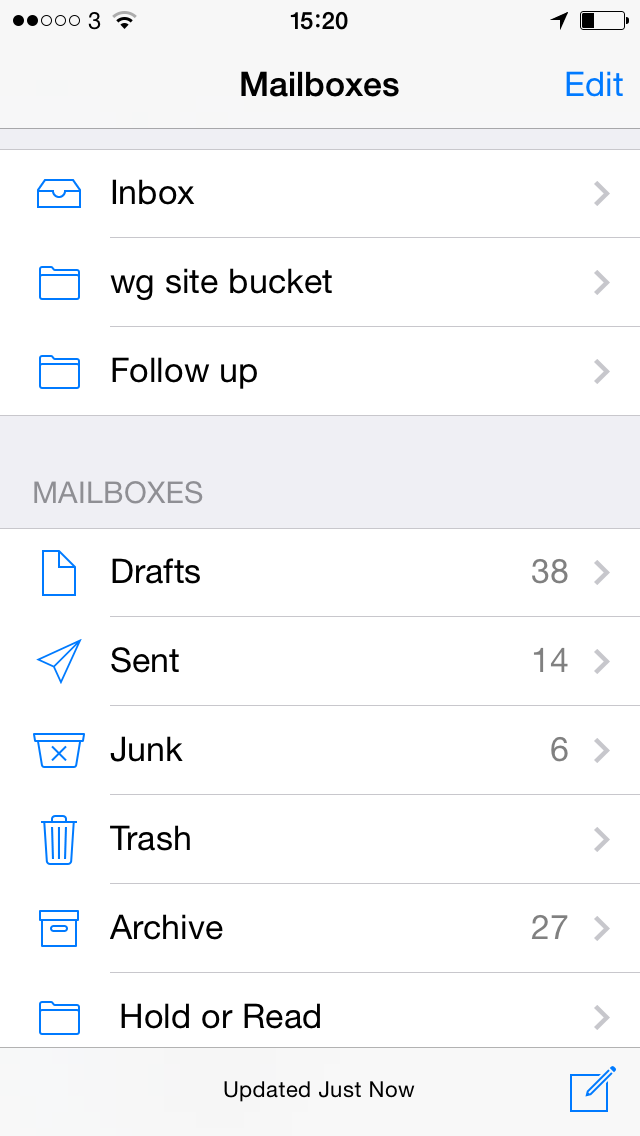
“Add Mailbox” there does not mean create and add a new email account, it solely means add one of your existing mailboxes to this list of them that goes at the top. I tapped Add Mailbox, it listed all I had, I tapped twice more and have ended up with this:

photo 3

All done. No opening, no scrolling, no swiping: I just pick up my iPhone, glance, and I can immediately see if there is any email at all for either of my accounts. It’s the tiniest of things but it makes such a difference that all day today I have been picking up my phone and thinking “Is that it? I don’t have to do anything more?”

If you’re wondering why my other mailbox is called “wg site bucket” instead of “wg@williamgallagher.com”, it’s because that mailbox traps all emails that go to anywhere at all @williamgallagher.com, my site address. See Why and how to lie about your email address.

Make it worse for yourself

There are jobs I don’t like doing.

Wait.

That’s not actually true. There isn’t a single thing I’m working on that I don’t relish. That’s nice for me, isn’t it? But nonetheless, there are always elements of most jobs that I really just don’t enjoy doing. Things that I put off for one reason or another. You’re the same, I can see it in you, so let me suggest something to help.

Find a thing you hate even more.

If that’s hard for you, bugger. I mean, it’s good that you can’t find bad things, but it’s a bugger because I need you to. For me, for instance, I don’t like invoicing and I don’t enjoy cold-calling. (I’m not a salesman who relies on cold calls but so many successful pitches and projects have come from my just ringing up a firm that I am compelled to keep doing it. Compelled. But still, I don’t like it.)

So I try to rig my time such that my choice is between doing an invoice or making a call.

Invoicing wins.

More than that, invoicing becomes the lesser evil at first, then it’s a near-as-dammit a pleasure because it’s the thing that means I don’t have to do this horrible other thing. I start looking for more invoicing to do so that I can postpone phoning people.

You may think I’m stupid and I will not disagree with you. But at the start of this, I hated invoicing enough that I wasn’t doing it, I was at best postponing it for as long as I could. And now at the end I’m looking for invoicing to do.

What’s so great about OmniFocus part 2: handle everything

Previously… Barely a minute goes by without my mentioning that I am life-support-dependent upon the To Do manager OmniFocus. Rather than just keep telling you why, I’m showing you how. In Part 1, you jotted down To Do tasks, you whispered them to Siri, you forwarded an email right into OmniFocus. Now you’ve got eleventh-billion To Dos and you haven’t looked at one of them. Read on…

Every stray thought goes into your Inbox

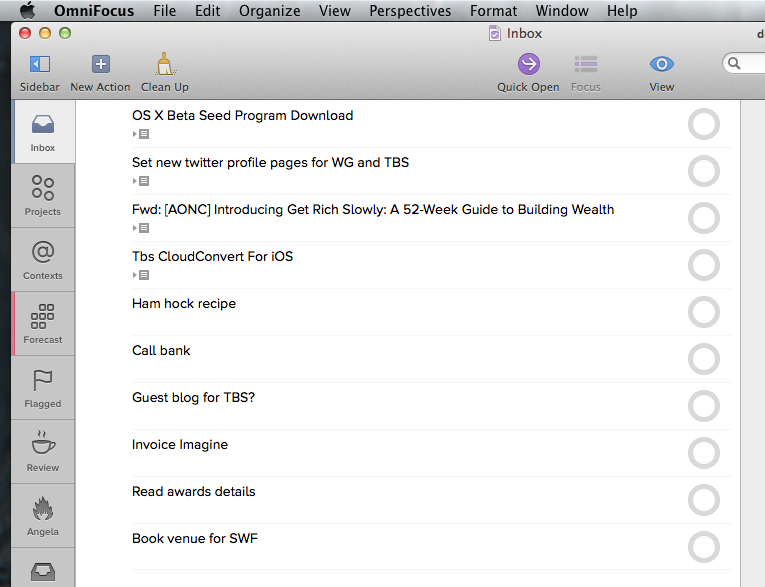
Think of it, add it to OmniFocus, move on with your day. Every task that occurs to you gets out of your head and into your OmniFocus inbox. The mess in your mind becomes the mess in the inbox. Like this, this is my Inbox right now:

omnifocus inbox example

That shot is from the new beta version of OmniFocus 2 for Mac which, incidentally, is very good. I bunged a few of those items in there on my Mac just to show you but I know for certain that they are all now on my copy of OmniFocus 2 for iPhone:

OmniFocus 2 for iPhone shot


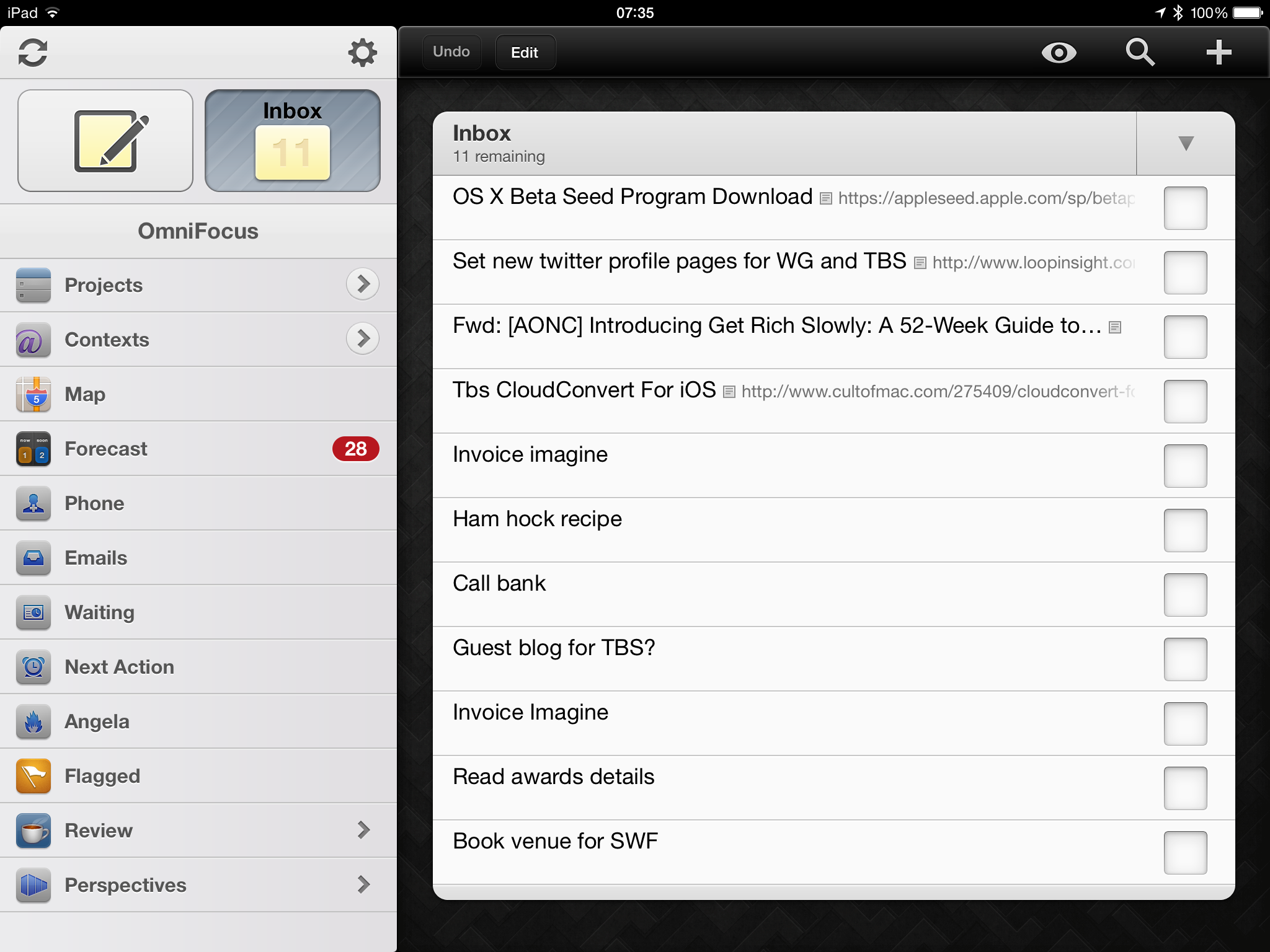
And on my iPad version of OmniFocus too:

OmniFocus iPad shot

 I hadn’t consciously realised this before taking those shots but you can see very clearly how similar OmniFocus for iPhone and Mac now are. The iPad version looks different, older to my eyes.  It’ll be updated next, after the Mac version.

But now, if you’ve read The Blank Screen (UK edition, US edition) then you’ll know that almost every one of those tasks is wrong.

“Invoice Imagine”? For what? How much? Who do you send the invoice to? Do they use Purchase Order numbers or what? To do this task quickly, to get it done and get you back to your real work, you need to take a moment to write that task as if someone else is going to do it. So I’d write it as “Invoice Imagine Magazine for Acme feature…”. It’s not a big difference but it’s significant when you’re doing a lot of invoicing. (I don’t like invoicing but I love having invoiced. Consequently I let invoices build up a bit and then I need to run through them as fast as possible. Writing the task this way means I see it, I do it, it’s done. Writing just “Invoice Imagine” means I have to go check which feature I’m talking about: what have I already invoiced, what haven’t I? It’s still small stuff yet it adds up.)

One thing: notice the ellipses at the end of that task. That’s all. Just notice. Okay?

The thing with the inbox is that you can and I do bung anything and everything in there. I’m fine with stray thoughts and hurried jottings. Sometimes it catches me out because I can’t remember what in the world I needed to call the bank about. So I should and I do try to write it always as if it’s for someone else: hence the only entry in that inbox that I would say is correct –

Set new twitter profile pages for WG and TBS

Last night I read that Twitter has emulated Facebook’s design of a personal home or profile page. I’m not that fussed but I think without it, my two Twitter accounts would look a bit bare. So I made this note and actually this morning, I did it. Saw it in my Inbox, understood what I needed to do, did it.

So all I’ll do now with that task is tick it as completed.

Why would you do anything else? It’s done, let it go. But I will do other things to the rest of the list, I will rewrite them as if for someone else so:

OX X Beta Seed Program Download

becomes

Install OS X Beta Seed on MacBook Pro

Apple is now allowing anyone to download early test versions of the next OS X and I’m interested so I signed up when I heard about it. But I heard about it while reading on my iPad and OS X is for Macs. Rather than go to my office, I just forwarded the website’s link to OmniFocus so I’d deal with it today.

I could do what I did with Twitter and simply get that task done and tick it as completed. But while I’m interested and I will do this, it’s hardly urgent. Doesn’t have to be done today at 9am or whatever.  But if I leave it in the inbox, it will get lost in what I promise you becomes a sea of tasks in there. On a day rushing around, I will very easily end up with twenty tasks in the inbox and I’ll probably have done five or six by the time I get around to checking the inbox. So tick, tick, tick, tick, tick, very satisfying. But that leaves 15 tasks in there and the odds are that I didn’t do them because I need to get something, ask someone, do something that can’t be done right this moment.

If you just left the task in your inbox, OmniFocus would be an ordinary To Do application.

Here’s what we do instead. I’ll show you on the iPad version but you can do this on them all and the key thing of it is that it takes me close to infinitely less time to do this than to tell you.

First, I just tap the task on my iPad and this pops up:

box1

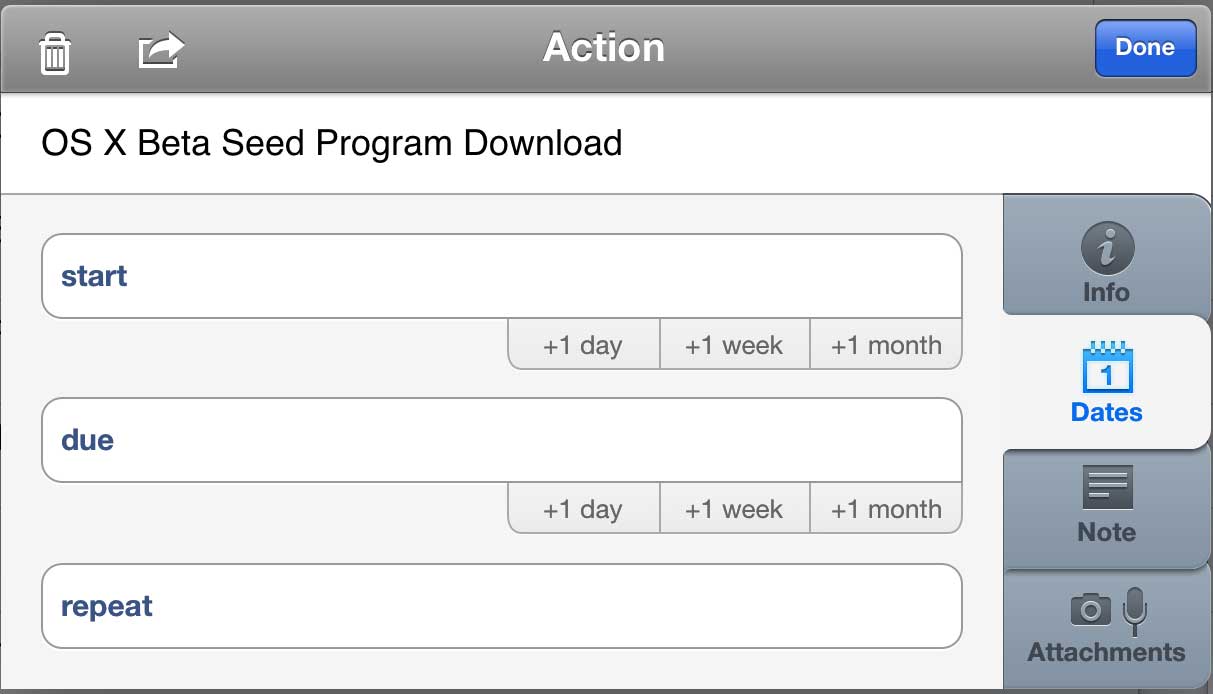
If this were a magazine feature, I’d have a deadline and I’d put that in the Due section. If the work was going to take me a couple of days, I’d put an earlier date in the Start one. And you can guess with Repeat: if I had to install this OS X beta every day or every month or whatever, I’d say that here.

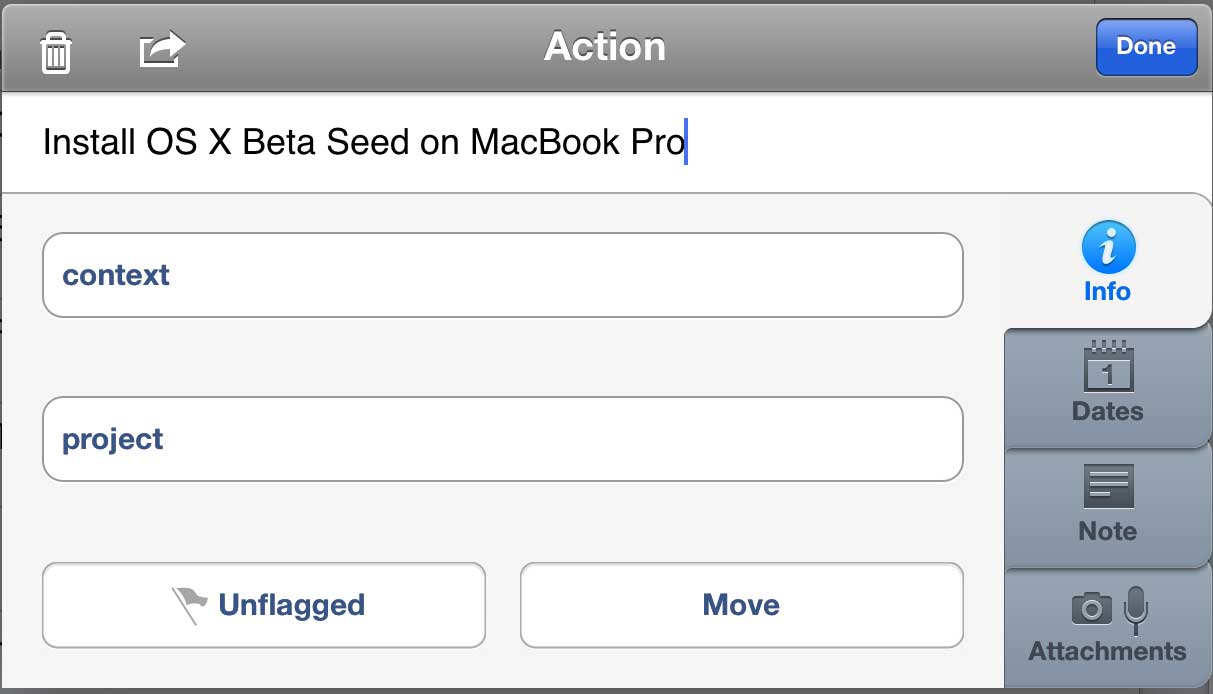
But I don’t have a deadline and I don’t have a start date and I’m only going to do this once. Despite every muscle tempting me to put Today as the Due date, I won’t do it. I change the task name but otherwise I write nothing at all in this box: I just tap on the grey Info button to the right. That gets me this:

box2

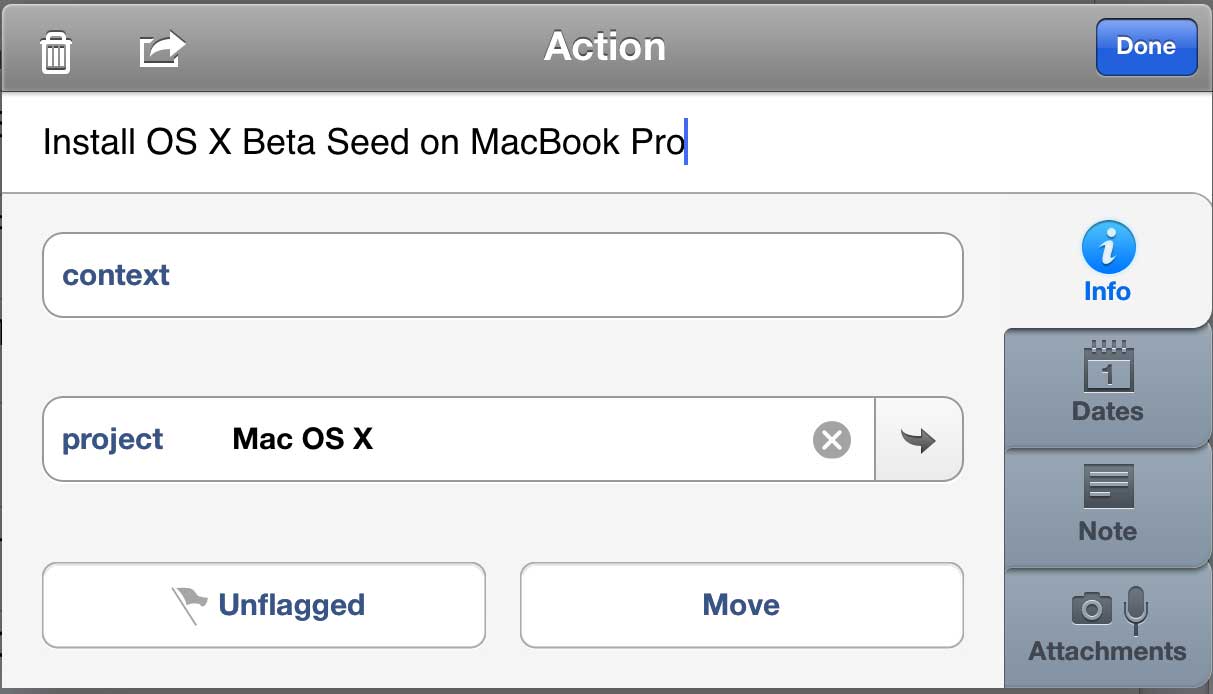
I don’t have to do anything here either. But I do. I have a project called Mac OS X where I bung in tasks to do with this stuff, so why wouldn’t I bung this in there too? Tap on the project field, find the project. OmniFocus shows me a list of all the projects I’ve got on but – utterly gorgeously – I can just type the bit of the name I remember. If I just typed X, it would find “Mac OS X”. If I typed the initials MOX, it would get it.

box3

There’s an Unflagged button below this. I never use it. There’s a Move button too and I do: if it turned out that installing this OS X beta was somehow a massive job involving lots of people or oodles of steps, I could take this one task and turn it into a new project replete with its own tasks. I’ve done that. I’ve done that a lot.

There’s also that Context field up above Project. I use this to excess. But not today. Not for this task, it doesn’t need it. So let me leave that for now and, actually, let me leave all of this. Leave the Note button, leave the Attachments.

No, I can’t do it.  I won’t use them here for this task because I don’t need to but I can’t let you go without knowing about them. Here’s Contexts:

A context is where you’re going to do a task or it’s something you need, someone you need, to do it with. It’s a little tricky to paint your living room when you’re out at work, so you could make a Context called Home and mark “Paint the living room lilac” with that. Some people do.

Or you could mark a task as being a phone call. I do that: it’s usually obvious from the task name – “Call Anne to get the purchase order number” but still I’ll mark it with my Phone context. It’s quick to do, for one thing, but it also means that when my train is delayed, I can get OmniFocus to list all Phone tasks and then I’ll just start knocking them off. No need to dig into projects, no need to check anything, it’s right there in front of me so I do it.

Many of my jobs are to do with my wife Angela Gallagher and I so I have a Context called Angela. Anything I need to discuss with her when we’re both back in the evening, bung it in there and skip through it all later while I’m cooking.

By far the most useful context for me, though, is the location context. Not as in this task is to be done at Home and this one at Work, but that this is to be done when I get home. That sounds the same but I mean it literally: I have a Home context and within that I have another one called Arriving. If I mark a task as having the Context of Home: Arriving then as I pull onto our front drive, OmniFocus will remind me.

Seriously, it’s infinitely faster to do this than to talk about it.

I’ll try to be faster with Notes:

Write anything you like in here. Anything. If you get an email with a task in it and you forward it into OmniFocus, the email’s subject becomes the task’s name and the body of the email goes in notes. Very often I need to remember quite a bit about a task, more than can go in its name, so I’ll write a short, clear task name and then lob notes in here. So that I notice when I’ve done this, I add ellipses to the end of the task name. It means there’s more to read.

Attachments, I can do that even faster:

Add documents, photographs, anything you need to help you get this task done. Most common example for me: when I’m shopping for something  that’s unfamiliar because Angela likes it more than I do, I’ll take a quick photo of the empty box so that I can get the right size and type.

But you don’t need attachments, you don’t have to write notes, you can ignore Contexts for the rest of your life and never care about them.

Except, to get a task out of your Inbox, you need to set a Project or a Context. Either of them. Set either and, whoosh, that task is out of your inbox.

It’s a bigger deal than it sounds. I said that tasks get out of the mess of your head and into the mess of the inbox. Doing this with setting a project or a context, choosing to add a start date and a due date, making it repeat, including a photo, all of this gets rid of the mess. You’re not actually doing the task, you’re just changing the details, but it makes a massive difference.

It’s gone from your inbox so you don’t have to keep thinking about it, thinking about whether you can do it now or if you’ve still got to wait for Bert to return that spanner.

That’s all. But is huge. The task is there, you’re going to do it, you won’t forget, but it isn’t slapping you in the face. It isn’t making you give up the will to live because there are eleventy-billion To Dos in your inbox.

One more thing. You are better at doing jobs than you are at remembering them. If you get a task, you can do it. If you get a giant list and you have to schlep through just remembering what’s important and what’s urgent, you won’t do it.

Handling tasks in OmniFocus is about getting them out of your way. Hiding them, really. That’s what this processing through your inbox does but it also puts each task back in your head for a moment. You’re examining it like it’s a thing on Antiques Roadshow: you’re sizing up the job, whether it’s worth keeping, that kind of thing. Then you put it down in a project and pick up the next inbox tasks to appraise.

You’re brilliant at that. Whack it into your inbox, have a think about it later, tap that Done button and go get some work done. If that’s what you do, if this adding tasks and processing your inbox is all you do, you will run fine for weeks. To run longer, to never forget anything and to always get things done, you need to one more thing. I’d shock you now and say that it’s what we’ll talk about in part 3. But I’ll also surprise you now by telling you what it is. It’s reviewing. You review all your tasks just like you did when they were in your inbox. And for much the same reasons.

Fortunately, there is more to say or part 3 will be very empty when it comes out.


Please, say thanks.

I’m British, I do this sort of thing. But not as much and not in the ways that Dr Laura Trice argues for in this TED talk. Hand on heart, I expected this video to be a bit preachy, certainly a bit insincere, but she’s got a point and she’s persuasive. Also rather brief, which you have to be thankful for:

That’s the whole video right there but you can see it with an interactive transcript (not entirely sure what that means but you’re curious to find out now) on the TED talk website.


Also, a tip of the forehead to Lifehacker for spotting it.

The Onion: Study Finds Working at Work Improves Productivity

WASHINGTON, DC—According to a groundbreaking new study by the Department of Labor, working—the physical act of engaging in a productive job-related activity—may greatly increase the amount of work accomplished during the workday, especially when compared with the more common practices of wasting time and not working.

Full story: Study Finds Working at Work Improves Productivity – The Onion 5 November 2007


Lighten up and take more time off

I want you to get more work done. (Because I want to get more work done too.) But The Guardian newspaper says you're better off doing less:

Most time management advice rests on the unspoken assumption that it's possible to win the game: to find a slot for everything that matters. But if the game's designed to be unwinnable, [book author Brigid] Schulte suggests, you can permit yourself to stop trying. There's only one viable time management approach left (and even that's only really an option for the better-off). Step one: identify what seem to be, right now, the most meaningful ways to spend your life. Step two: schedule time for those things. There is no step three. Everything else just has to fit around them – or not. Approach life like this and a lot of unimportant things won't get done, but, crucially, a lot of important things won't get done either. Certain friendships will be neglected; certain amazing experiences won't be had; you won't eat or exercise as well as you theoretically could. In an era of extreme busyness, the only conceivable way to live a meaningful life is to not do thousands of meaningful things.

This Column Will Change Your Life: Stop Being Busy – The Guardian 19 April 2014

The piece is an interesting and persuasive read. It's really also a part-review of Schulte's book, Overwhelmed (UK edition, US edition)

I'm thinking a lot about this idea of winning the game. That's not really me. I just know that I am happiest when I've thought of a new thing I want to create and then I've created it. When it's a real thing instead of a pipedream. You think of it and then you do it. That's what I want: would you call that a game?

The one good thing I can see about a game is that you can change the rules. I'm definitely up for that.

Sfhskrjhfsjdhfhj

Statistics are not everything

Two or three times now, I've come across a link to an article about how the most impressive people in the world run meetings and two or three times now I've come within a pixel of recommending it to you. Let me recommend it to you: it's Run Your Meetings Like a Boss – Lessons from Meyer, Musk and Jobs on 99u.

But now let me tell you why I kept not doing it. I'd follow the link, start reading the piece, and it begins with a description of Melissa Meyer from Yahoo and how she likes to run her meetings. Meyer is impressive, when I've read interviews with her I've rather admired her, but this particular article's first point about her keeps stopping me reading any further:

Mayer believes that numbers and facts are essential to having effective meetings. She thinks of data as the great equalizer: whether you’re an intern or a VP, you can have your way as long as you have the data to prove your claims. By making decisions with metrics, she can avoid lengthy debates stemming from opinions and organizational politics. Businessweek offered a peek into Mayer’s process:

Mayer discourages using the phrase “I like” in design meetings, such as “I like the way the screen looks.” Instead, she encourages such comments as “The experimentation on the site shows that his design performed 10% better.”

Run your Meetings like a Boss – 99U

Bollocks.

I've friends who work in research and they are clever and talented. Also witty, as it happens. But you can't research the future, you can only research the past and a bit of the present, you can only analyse what you can show people. And people tend to be wrong. “We want a typewriter ribbon that lasts longer” does not lead you to the internet.

More, the folk who do rely on research are people too. So they tend to be wrong. Microsoft spends a deeply astonishing about of money on audience research (I want to say billions, but that can't be right, can it?) and look at them. Specifically, look at Microsoft Word 2007 for Windows. There was a fascinating blog about the development of that and its seemingly radically new way of making the word processor easy to use. Two things to take away from that blog and all of Microsoft's talk about Word 2007: first, the new system meant that whatever you wanted to do in your document, the right tools – and only the right tools – were presented to you in a ribbon. Second: they did extensive user testing. Extensive. I got bored with how much the blog went on about this.

Yet on the final day of that blog, Microsoft posted – ta-daaa! style – the first screenshot of the complete Word 2007 document screen. And there was no visible way to open an old document nor create a new one.

You can tell me you did your research extensively, you can tell me all about getting in loads of people to test out every scintilla of design paradigm you explored, but apparently none of them – none of them – either tried to open a document or to create one.

Microsoft, you were had.

There was probably a PowerPoint presentation somewhere that said 100% of people who used the new Ribbon thought it was much better. This thereby hiding the fact that 100% of people did not use the Ribbon.

I would've found it useful to be told that 0% of people could not use my product. I'd have found much to think about if told 75% of people prefer it when I write shorter Blank Screen posts. But setting up a situation where you get a huge amount of data and then setting up a scenario where you say you rely exclusively on that data, that's putting research on a pedestal. Doing all that and then just ignoring the bits you don't like, that's neither statistical nor creative, it's only stupid.

Well, probably also expensive, so not only stupid.

There are certainly people who need figures to deal with the world and there are certainly people who find them constraining. I think I clearly sit in the latter camp so your mileage may vary. But my sticking point with all this is not the use of research, is not the studying of figures, it's the mandate that you must do this. That you can't tell Melissa Meyer that an idea is bollocks, you have to tell her that it's 67% bollocks.

Doctors say that Nordberg has a 50/50 chance of living, though there's only a 10 percent chance of that.

Quote from The Naked Gun: From the Files of Police Squad! (1988)

A friend is an important accountant in a coach company. She once said to me that marketing and advertising was a problem because you couldn't tell how much of a return you got on it. You couldn't directly measure the success of a marketing campaign, you cannot say how much of your business you get from marketing, therefore she didn't like it, therefore it was a waste of money.

It's taken me years to think of the snappy rejoinder but there is one and it is this:

You can measure how much of your business comes from marketing and it is a very simple maths equation. It goes: equals 100%.

Don't believe me? Cancel all marketing. Stop TV ads, stop press, stop billboards, radio, internet. While you're at it, remove the signage from your coaches: that's nothing more than advertising anyway. Signage at the coach station, what's that really for? Kill it. Do you have a phone line? Don't advertise the number. Do you print your company name on the tickets? Stop that. It's just branding, it's a waste of ink.

You won't die overnight. Momentum from existing customers will keep you going for a while. They'll even get you new customers by recommendation. For a while.

But you'll die.

Melissa Meyer is cleverer and more successful than I am. If it works for her, it works for her. But if this really is how she operates, I couldn't work for her.

Do let me know if you manage to read on past that opening section of the 99U article and it turns out to be good, would you?

To Not Do list

We've had To Do lists. A lot. We've come up with Done Lists which are very satisfying: you write down what you did as you finish it and then looking back later is immensely cheering. That's pretty much the entire purpose of my month reviews (see That Was March 2014…). But maybe we could take a further step and write ourselves a To Not Do List.

It feels risky. Like it could end up as a kind of new year's resolution fad: I will not drink so much tea, I will not keep putting off the gym.

But it could also be a good guide. I keep reading headlines lately about the first app that people use in their mornings and I've been stopping at the headline because I don't want to find out the detail. Chiefly because I want to avoid thinking about mine.

Since you're here, I'll face up to it. My first app is email. If you don't count Awesome Clock, which I use to give me an old-fashioned analogue clock face on my iPhone all night. If you don't count my iPhone's own alarm. Then it's email. As I lurch to the loo and on to the kitchen and into my office, I am checking both my main or personal email account and my public one, the wg@williamgallagher.com address that is your best route to talk to me about The Blank Screen.

I want to stop doing this. Funnily enough, I've been training myself to make sure I check my calendar every morning and that's going fine. (See I nearly missed an event today, though I suggest you bring a packed lunch with you because that is a long, long post.) So I want to keep that new habit going, I do want to reinforce my early OmniFocus use every day.

But I have to drop the email one.

Because too often now I've woken up at 5am to start writing and been derailed by a bad email. Usually a rejection. And at that time of the morning, most rejections matter. Later on, they wouldn't, but right there and then I am somehow more open to the slap.

I'm fine with being slapped. But it also saps. There are few things worse than getting up at 5am to write but one of them is getting up at 5am and not writing. I've seen this after big projects finish when the pressure is off and I have nothing that truly has to be done then. That's a horrible time. But yet worse is this paralysing that you can get from certain rejections, when they're strong enough, when they're important enough.

All this is on my mind now because I had a rejection that would've cut whenever I read it, but it did especially stop me one 5am start.

Or it should've done. It certainly did for a time. I certainly struggled to begin working. And I didn't do the thing I was intending to do that morning. Instead, though, I worked on fiction. You know how great it is when you are reading a book and you're completely into it. Writing fiction, at times, can be similar. For whatever reason, I hit that moment that day and by the end of 2,000 words on that project, I felt better.

And I had a solution to the rejection.

Without thinking about it, without brooding on it, my noggin' had found a way around the problem.

Now, that's good. And having been able to take my mind away for 90 minutes or whatever it was, that was also good. But the solution requires other people and it requires much planning, all stuff that I couldn't do anything about at 7am that morning.

So if I'd just put off reading the emails until, what, 9am, I'd have had four hours solid work done, I'd be far less prone to the rejection paralysis and when my head came up with a solution, I'd have been able to do something about it right there and then.

Top of my To Not Do List, then, is this: I will not check emails first thing in the morning.

Do we have a deal?