Three calendars, no waiting

Thanks. I was thinking about how we use calendars and how I have been working to use mine more but there was one exasperating thing. Yet just working out how I would describe it to you may have solved it for me. May.

It’s Fantastical 2. I bought this for my iPad and it sits there right alongside OmniFocus so I can and do work all my tasks and times together. It’s working so well that I’ve been using my ancient copy of Fantastical 1 for iPhone too and this week just bloody well caved in and bought the update to Fantastical 2 for iPhone. Still can’t tell you what the functional difference is but I like the look of it and I like paying for something I am using a lot.

Only, I have had to keep Apple’s Calendar app around too. On both iPad and iPhone, I’ve needed that because event invitations have come in via it. I’ve got notifications of event invitations and had to open Apple’s Calendar to see what they were and to say yes or no. Then I’ve closed Calendar and by the time I’ve opened Fantastical, the accepted event is in place.

That’s just a chore, though. Clearly I would prefer event invitations to come up in Fantastical and save me that trip out to another app and back. But before I said that to you here, I fact-checked like a proper old-fashioned journalist and it appears I’m wrong. It appears that Fantastical accepts invitations and that you can say yeay or nay right there. I cannot see how and I cannot see why it hasn’t happened before. Could you send me an invitation so that I can try it out? But  I am now convinced it’s true because there’s evidence on the internet. (That never goes wrong.) Evidence including screen grabs of it in action.

Mind you, the reason there are screen grabs of Fantastical showing event invitations is because people have been asking why it doesn’t or how the hell it does. So I’m not alone and if I am not yet fully imbued with the knowledge of how to do it, the next time I get a calendar invitation I will take a little time and figure it out.

If that happens, I don’t need Apple’s Calendar any more. Not on my iPhone and iPad. It’s still the calendar I use on my Mac: currently Fantastical for Mac is a menu drop down and I think I heard it may become a more fully-fledged app so while I continue getting used to it, I’ll stick with what I’ve got.

You can’t get rid of Apple’s Calendar on iPhone or iPad, it cannot be deleted. But you can bung it in a Apple folder alongside the weather and stock apps that you never use.

But Calendar and Fantasical. That’s two calendar apps.

And I did say I use three.

I’m using Mynd on my iPhone. No matter what, I would have to use something else on my iPad because Mynd is iPhone-only for now. But as I’ve mentioned before, I did not appreciate that it is actually a full calendar app. It’s just so useful for telling me the very next thing happening and a slew of rather spookily great extra features to help each meeting or appointment go well. But it is a full calendar, you can do everything you do on Calendar or Fantastical. (I don’t know about event invitations. That’s another thing I’ll need to try. Could you hurry up with that invitation? Is that too much to ask?) 

So not only do I have three calendars on my iPhone, two of them are on my front page, the home screen.

It feels wrong, it feels like a waste of space on that screen and it feels like an unnecessary division of mental effort. But I don’t think to use Mynd unless I’m going to a meeting and want all its extra gorgeousness for that one particular event.

Similarly, Fantastical 2 has a lot of features for running your To Do list and I so much, so completely fail to think of Fantastical for tasks that I even tried to switch that off. You can deny Fantastical permission to access your Apple Reminders list but if you do, I found it also wouldn’t let me enter any events. So with reluctance, chagrin and some annoyance, I allowed Reminders and just choose to never use them.

Why would you use Apple’s Reminders either directly or via Fantastical when you have OmniFocus?

Funny: OmniFocus has a calendar in it. Yet I use that. I use it to glance at the day and see how much is going on.

I should get a Venn diagram going here of how these four apps (Calendar, Fantastical, Mynd, OmniFocus) overlap and what I do and don’t use in them.

Or I could just get a life and accept that where I used to eschew all calendar apps, I now have three.

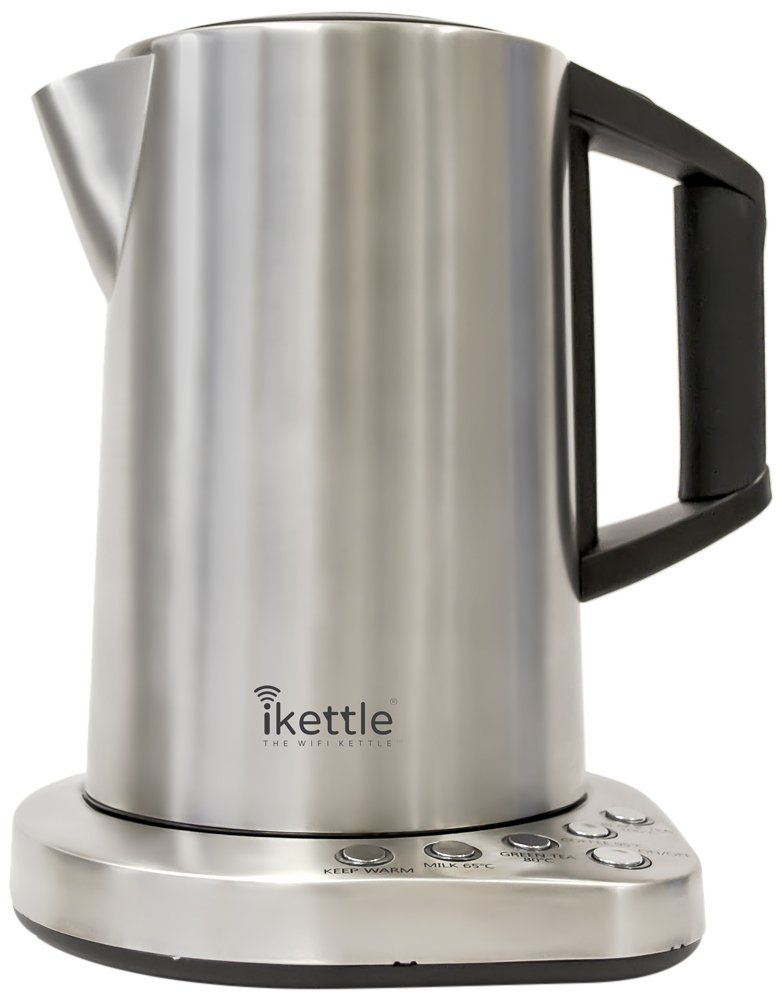
The world’s first wifi kettle now on sale in the UK

ikettleDon’t let me buy this.

For the past few months, I’ve mentioned this kettle in my Blank Screen workshops but have had to say that it’s only available in the States. Now it’s officially here in the UK but I’d like you first to wait until it’s actually stocked – Amazon UK says temporarily out and Firebox says coming 23 April – and second to just think about what a wifi kettle means.

Stumbled in the front door from work exhausted? Nervy half-time ad break during the World Cup final? Slaving away on a late night project and can’t waste a second? Whatever the urgent hot-drink scenario, a simple one-touch setup allows you to instantly control the iKettle from anywhere in the house with your smart-phone.

iKettle on Firebox.com

I work at home and wouldn’t know one end of a football from the other, but yeah, otherwise, that’s me. I am drawn to the idea of being able to tap a button on my iPhone and have this kettle go boil itself in my kitchen. And for it to then send a push notification back that it’s done.

Except.

The kettle is £99.99 UK, or will be, depending on whose release date you see first. That’s not a problem. Well, it’s not a convenience either, but if you were in the market for a kettle and were looking north of whatever’s on sale at Tesco, you could spend a lot more. Seriously more. Amazon lists some kettles for over £300 apiece. So the £100 iKettle with wifi isn’t a bargain but it looks like one next to these others.

That’s not the except.

The except is that I know. I know. I absolutely know that I would press that button without having thought to put water in.

So I reckon that would work out at about one hundred pounds per mug of tea.

“Siri, cancel my appointment…”

I’ve already lost the ability to check the weather on my iPhone in any way other than asking Siri. I already add more reminders to OmniFocus via Siri than I do through typing. And I have some days when Siri is worthless. But I have more days when it is great and sometimes, just sometimes, it is astonishing. A friend had to pull out of a coffee chat and, partly because I had my hands full, partly because I wondered if it would work, I said to Siri:

Cancel my appointment with Steph

And it did.

Took it off my calendar.

As ever when a gap comes up, other events can shuffle about to fill it so I tried saying:

Move my 4pm meeting to 2pm.

And it did.

It genuinely is becoming faster and handier to talk to my phone than to type. Never thought that would happen – and I’m struggling to believe that it has. I remember years of promises that voice control was coming and here it is. If only Siri were consistent.

You don’t have to be creepy about it

But do your homework about people. I just had a terribly fun meeting with someone – er, I hope she enjoyed it as much as I did – and before I got to her, I'd read her blog. I'd seen her professional pages, I'd read what she did, I had an idea of some of the work she did.

I intended to stop there. The idea of coming to a meeting entirely cold makes me wince but equally I'm there to meet you, I'm not there to show off my deep research. I really want to meet you: easily the best part of journalism is that you get to bound off and say hello to people you might otherwise never come across. Utterly love that.

And I stopped intentionally looking into this woman's background. But I've been trying a free iPhone app called Mynd and it did some digging for me without my realising it.

Mynd is like a calendar assistant; I found it because I was exploring calendars and looking for why I nearly missed an appointment recently. I also found it because it got mentioned a few times by Katie Floyd on the Mac Power Users podcast. All it does, I thought, is show me my entire day in one screen: how many events I've got to get to, where the next one is, what the weather's like today. I also found that it calculates how long it's going to take me to drive to somewhere and it will say so right there on the screen: you need to leave in 10 minutes if you're going to make the appointment. Sometimes it sounds a notification too. I haven't figured out why it's only sometimes.

But I have figured out that it believes I drive everywhere when really it's more that I drive almost nowhere. So I got a Mynd notification that I ought to get out of Dodge and start the car right now when I was already on a train to London.

I was going to ditch it for doing that. I have Fantastical now that does all the work I need of managing my appointments and events. (Fantastical 2 for iPad is £6.99 UK, $9.99 US. Fantastical 2 for iPhone is £2.99 UK, $4.99 US. The iPad prices are launch offers and will shortly increase by about 33%.) Plus I don't care about the weather and when I do have a mind to wonder about whether it's going to rain, I ask Siri.

But.

There is a panel on this Mynd screen called People and up to now it has always been blank. Today it showed a photo of the woman I was meeting. And it got that photo from LinkedIn. When I tapped on that photo, it showed me her short LinkedIn bio and then it had options for calling her. If you're running late, you open Mynd, tap the person's photo, then tap to send her a message. If you've got the number of her mobile, anyway. Or an email address.

That would be spectacularly handy if I were ever late for anything but usually I'm cripplingly early. Still, it's impressive.

What was even more impressive is that I scrolled to tomorrow, saw the first meeting had a fella's photo there – and behind it was a list of related Evernote documents. It's just reminded me of the last note I made when talking to him. Right there. I'd forgotten I'd ever made a note but there it is.

It's like Mynd gives you a personal briefing before you go to meet someone. I don't think that means you should skip looking in to them yourself, but I feel wildly efficient about tomorrow now. And I won't feel wildly stupid if he mentions the topic of my last note.

Mynd is free for iPhone on the App Store. There's no iPad or Android version.

Have a look at the Mynd website too. It proposes using the software as your sole calendar for a week and I've just learnt that you can do that. Bugger. I think I'll continue using it as an adjunct to Fantastical but it's handy to know that all the ordinary calendar functions are in this Mynd app as well.

Click on the wrong link sometimes

Wait. I sound like I want you to deliberately click on advertising links or something that would bring me giant pools of money. What I mean is that sometimes in our constant journey through the internet, the odd left turn can be a very good thing.

There are entire sites devoted to sudden left turns, most notably or at least most famously StumbleUpon.com which has nothing but new links and at most a gentle hand on the tiller to steer you in directions you might like.

But today I was going to meet someone and as I read her blog, I found she's in to productivity and had what sounded like a great link to a David Allen Getting Things Done video. Except when I tapped on it, I didn't notice that I'd actually tapped on the next link down. No connection to productivity, no connection to the woman I was going to meet, just something she had found and liked. Something I had not heard about. So while it took me a moment to realise this wasn't David Allen, I am so glad that I found it:

Jill Bolte Taylor got a research opportunity few brain scientists would wish for: she had a massive stroke, and watched as her brain functions — motion, speech, self-awareness — shut down one by one. An astonishing story.
Jill Bolte Taylor's Powerful Stroke of Insight – TED talks

I should go back and get you the David Allen link too but, ah, Bolte Taylor is more interesting.

Update: the Facebook battery drain is true

As always, your mileage may vary, but I’ve been following the advice from this morning’s piece about Facebook and it’s true: my iPhone battery lasts longer now. The quick summary of this piece is that Facebook uses Location Services more than you’d usually want and it uses Background App Refresh far more than anyone in the world who doesn’t work for Facebook would like it to do.

The idea came from a writer named Scotty Loveless of Overthought.org and I wrote:

[His] piece is very persuasive. I don’t know the writer Scotty Loveless and hadn’t heard of Overthought.org before but he argues this point and many others with exactly the kind of reasoned approach that makes you believe him. Certainly enough that I’ve immediately switched off Location Services and Background App Refresh for Facebook – and only for Facebook. I particularly liked that the fella repeatedly avoided the kind of ohmygodstopeverything screaming you see in similar articles.

Is Facebook draining your iPhone battery? Looks like – William Gallagher, The Blank Screen – April 8, 2014

I’ve now tested out what he says and it’s true. Here’s the test:

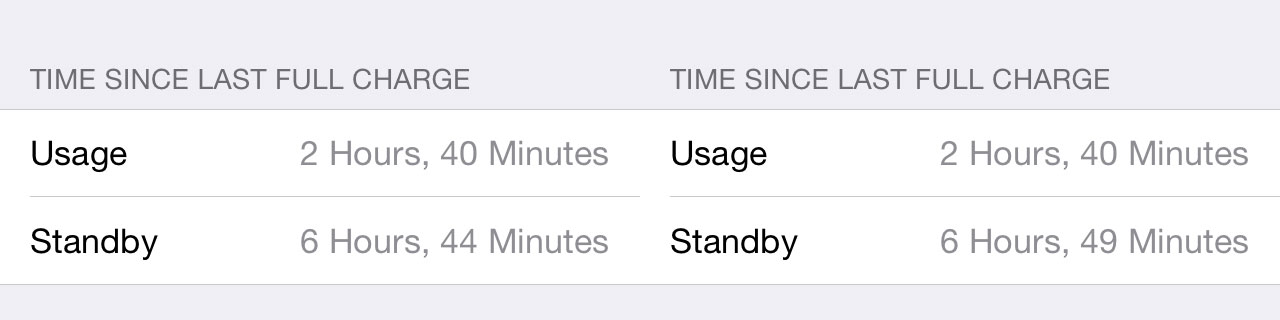
[Write] down your usage and standby time, press the sleep/wake button (or lock button, as some call it) to put the device to sleep, and set the device down for five minutes. When you come back, take note of the change in time. If your device is sleeping properly, then the Standby time should have increased by five minutes and your Usage time by <1 minute . If your Usage time rises by more than one minute, you have a drain problem. Something is keeping your device from sleeping properly, significantly shortening the time it will last.

And here’s what happened on my iPhone:

battery

Those are two shots taken five minutes apart. It’s got to be approximate since there are no seconds – 61 seconds would therefore count as 2 minutes – and this is probably why the two Standby times are 6 minutes apart. My iPhone was sitting on my desk doing nothing for up to six minutes yet look at the usage figure. Something used my iPhone’s battery for up to two minutes.

And it was Facebook. I know because I took the article’s advice and switched off Location Services and Background App Refresh for Facebook (and not for anything else) and here’s what the same test got me:

battery2

My iPhone was again on standby for five minutes and that’s what it shows. But it also shows no usage in that time. None at all.

I’m convinced.


Is Facebook draining your iPhone battery? Looks like.

Sorry to play fast and loose with Betteridge's law – which says the answer to any headline question is no – but of course it is. Of course Facebook is draining your iPhone battery. Everything you have and everything you use on your iPhone drains it, that's what the battery is there for. But a new and very persuasive article says it is draining it a lot. Far more than you'd expect and actually far more than it really needs to.

Apps that can make or receive calls, like Skype, Viber, Tango, Whatsapp, and Facebook are able to check for incoming calls without notifying you. I believe these types of apps sometimes abuse this exception and could have possibly influenced Apple to add Background App Refresh as the sanctioned method for this type of behavior.

I think this is why disabling Facebook's background services is so influential on battery life: I speculate they are abusing the fact that they have VOIP call features to run in the background more than they should. It would provide a better experience for people using Facebook, sure, but people would never know Facebook was the cause of their battery life issues, and would definitely blame the device or iOS itself.
The Ultimate Guide to Solving iOS Battery Drain – Overthought.org

The piece is very persuasive. I don't know the writer Scotty Loveless and hadn't heard of Overthought.org before but he argues this point and many others with exactly the kind of reasoned approach that makes you believe him. Certainly enough that I've immediately switched off Location Services and Background App Refresh for Facebook – and only for Facebook. I particularly liked that the fella repeatedly avoided the kind of ohmygodstopeverything screaming you see in similar articles.

He's more of the school where he says what something is for so you can decide whether you need that feature or not.

With the two Facebook ones, I don't need either. You don't need either. The location service lets Facebook say your post is from New York City or wherever – and if is were there, I'd be writing that in the update. Background refresh has nothing to do with you getting notifications of messages and comments: they work completely separately. So there is no reason to have it on. None. Not for you or me – but seemingly there's an advantage for Facebook. I am okay with denying them this.

That's the thing that makes me pause: it's oddly appealing to think a genuine problem I'm having is somehow Facebook's fault. But I'm trying all the things the article says and we'll see.

Lifehacker: Delete your way to productivity

Often, we don’t notice something until we need it and then it appears everywhere. I’ve spent this weekend deep-cleaning my working life – see I nearly missed an event today – and once I’d deleted a huge amount of projects I’ll never get to, I found this:

Getting things done often has more to do with removing barriers than actually accomplishing a task on your list. Whether you have too much email, too many creative blocks, or a myriad of distractions, it’s time to metaphorically (and sometimes literally) press the delete key and make your work surmountable.

Delete Your Way to Productivity – Lifehacker

It’s possible I also missed this because my mind tuned it out over that wincing misuse of the word myriad. (You can’t believe how many times people get thait word wrong. I must’ve read myriad articles where it was cock-eyed.)

But otherwise, that article is a good read. It makes a fine start with discussing how one can and perhaps should delete emails. Then it extends that into deleting distractions and finally deleting whatever blocks your productivity and your creativity.

I nearly missed an event today

And I have fallen behind on a project I am very keen to do.

I am compelled to make an excuse about the event, at least. It’s one that was rearranged to this afternoon, okay? And I caught it when I checked my calendar at 5am this morning. So when I say I nearly missed it, it’s not like I spilt my tea and had to run for the car. But somehow even though I want to go to this, and I will go to it, for some reason it wasn’t on my mental map of the week.

This is happening to me more often now and part of it is how I think my business is in a bit of a transition. Previously I was almost completely task-focused: I had this enormous list of things to do. It wasn’t event-based: I didn’t have a lot of meetings, for instance. Now I tend to run more talks and workshops – I did ten sessions in March – so my calendar is more important than it was.

I vehemently refuse to join up my tasks and my calendar: To Dos do not belong on certain dates. Or at least, they rarely really do. If something has to be delivered on Tuesday, you could put that on the calendar, fine. But do you then put a date on there that you’ll start the job too? Odds are, you won’t start it then. Instant failure. Instant unnecessary failure. Put the flexible start date in your To Do list, if you must, put the deadline in there too and then everything to do with that task is in one place.

I have zero question about this, absolute zero doubt. If you’re looking at me now thinking you’re not so sure, the strongest chance is that I have failed to convey to you why I think this. That’s how sure I am that I’m right. This is a rare feeling: let me have it. (Unless you really do think I’m wrong and you can tell me. I would prefer to know.)

But right or wrong, it is how I am working and today that isn’t working. So I’m taking steps.

And this has become a kind of live blog as I try to get a handle on it all. The aim is to get back on top of everything and to be creating new work, producing material, instead of losing most of my time to managing it all. And I know that the way this will work for me is in software. That’s just easily obvious because of prior experience. So taking a step back from that overall aim, I think that I can have two contributory aims:

1) Restore my previous excellent grip on all my tasks
2) Find a way to cope with my newfound extra need for handling events

The shorthand for number 1 there is OmniFocus. Much as I love that software, much as it as truly transformed my working life, my copy of it is a mess at the moment.

I think the shorthand for number 2 would be Calendar plus a regime of checking it. I do currently have a task in OmniFocus called “Check calendar for today and week ahead”. That repeats every week on Mondays, Wednesdays and Fridays. I’m not sure why that isn’t working, then. I don’t want to make it a daily task but we’ll see what happens. Okay, it’s 07:47 and I’ve decided to temporarily make checking my calendar a daily task for Monday to Friday.

And I’ve just downloaded the new Fantastical 2 for iPad. I’ve been reading about this since its launch yesterday and I’ve been reading about its iPhone version since, oh, just about the day I bought Fantastical 1 for iPhone and had it superseded. I agree with the consensus that Fantastical is a good, strong app but for me it wouldn’t stay, I didn’t keep using it on my iPhone because I just found the standard Apple calendar better. Not in features, not in ease of use, but both of those are fine and the Apple one has the killer feature that it can include the current date in its icon. I struggle to believe how often I have to check today’s date but with that right there, job done. With Fantastical, I had to go into the app. Job not done.

But Fantastical 2 can show the current date as a red badge notification on its icon. I’m hoping that will be enough for me because I like what I see about the rest of Fantastical. I like how it feels holding your month and week in your hand, seeing the shape of it all. I’ll play with this and try to get it into my habitual working pattern. If it doesn’t work, I’m out £6.99. If it does, I’m out a lot more because I can see me buying the iPhone update and the Mac version too.

For now, though, at 07:52, let’s say that my second aim is at least addressed if not necessarily solved.

So it’s time for aim 1: OmniFocus.

This is going to take some time. It’s going to be a huge change for me. I’ve let OmniFocus sprawl a bit too much, I’ve let it become a repository for everything in my life. Things I want to read, for instance. I save those to Pocket but I often send them straight into OmniFocus: maybe they relate to a project, maybe I just want to remember them and OmniFocus’s mail drop service is too handy. Whatever the reason, I need to use Pocket and Evernote more, and to keep this stuff out of OmniFocus. That’ll take some re-training. But I’ll create an Evernote notebook for it all and get into the habit of using the Evernote equivalent of mail drop.

But things have also changed in my business and life. I am very pleased to say that I am still on Room 204, a Writing West Midlands development programme, but I’ve finished the formal, official year there. So about a year ago, I created OmniFocus projects to do with Room 204 and the eight separate things I was doing with them. I’m still doing them, I’m still doing them with Writing West Midlands, but the Room 204 projects need to go.

I’ve also got very lazy. If a great benefit of OmniFocus is that you know what you need to do now, that works because it hides from you everything you don’t need to do now. Only, for that to work day to day, you have to often review absolutely everything: go through all your tasks and see what’s done, what isn’t but can be, what will never be done and should be deleted. The idea is that you work through every task and you spend time on every task. This is more than an idea, it’s a principle and I have found that it works brilliantly for me.

Except lately.

Lately, I’ll do the review process and see – wait, let me try it right now – okay, I only have 12 projects review. Last time it was 67. (You set this project by project. You have to review everything but one project is my shopping list: I’ve set that to be reviewed once a year. Other stuff has to be reviewed every day.)

Especially when I’ve got 67 projects ahead of me, I’ll look at the list and I won’t patiently dwell on each separate task. Rather than do them right there and then or consciously test the task – why isn’t it done? what do I need to do it? – I just think yeah, yeah, haven’t got to that yet. And then I move on.

I can’t let that continue because I’m missing things and I’m not getting stuff done as much as usual.

So. It’s 08:03 and I am going to pull out the list of projects. I’m going to do a MindNode mind map of everything I actually have to do and compare that with what I’ve got. It’s slate-clean time.

Later…

Four days later. That is a hell of a slate-cleaning. I would like to point out that I did have that meeting to go and then there was something else on Friday, plus I worked the weekend… and all the way through, I was thinking of this. Right now, Monday at 12:12, I’m happier and I think I have proof that I am.

Let me tell you the proof first: I have no overdue tasks in OmniFocus.

And only 16 more things to do today.

It’s funny but having overdue tasks was proving to be a huge weight. It’s not really funny because it isn’t funny but it also isn’t funny because that’s how things used to be. That’s how they were before I moved to OmniFocus. Maybe it was worth letting things slide because I am reminded with extreme gusto that I do not ever want to feel this weight again. It’s paralysing: you feel you can’t clear that backlog, that there’s no point doing anything more.

So you now you’ve got to know how I did it. And it turns out I was right: it was a two-step thing.

The first was the Calendar and it was Fantastical 2 for iPad. I found that I still had Fantastical 1 for iPhone and I’ve been using that too – I’m honestly not sure what the difference is beyond some obvious aesthetic ones – and the combination has been useful. I’ve had to train myself to turn to my iPad whenever something comes up that needs me to look at my Calendar: even if I’m at my Mac, I turn now to the iPad for this. It’s not a habit yet but it’s becoming so and each time Fantastical does something clever, I am that much more sold on it. The most specific clever thing it does is accept natural language statements: typing “Lunch tomorrow with Steph at Birmingham” pops all the details into my calendar in the right spot. It reckons lunch is 1pm and actually I needed to change that but it was easy enough. But it new Birmingham, actually it knew the more detailed place name I put, and it knew what day tomorrow was. It’s very satisfying entering an event like this because it parses what you type as you type it: you see the place name flying off to that section of the appointment, you see the time going there too and you can see the calendar zipping along to the right day.

Also, it turns out that having today’s date as a red badge notification means that my muscle memory automatically makes me open the calendar. See the badge, intellectually know that it’s the date, but still open it as if there is something I need to be notified about. It’s made me open the Calendar about thirty times since last Thursday and as irritating as I suppose that is, it’s helping me to reinforce this new habit of using both Calendars and OmniFocus.

The second thing began with the way that a friend pointed out how casually I had planned her working year for her in a chat one day and she was back now with a pen to do mine.

Terrifying.

And we didn’t finish. But we’re still in play and I’ve been taking her advice to heart. That coupled with the most massively tedious reorganisation of OmniFocus has all proved part of it.

I’ve been using the new OmniFocus 2 for Mac beta because it’s the quickest version and also, I now think, the most pleasant to use. But this reorganisation meant replacing every old project with an entirely new system, then seeing what fitted the new plan and what did not. I have very ruthlessly and with only a little blood deleted gigantic chunks of tasks because I haven’t done them and, William, I ain’t going to. So they’re gone. Kiss ’em goodbye.

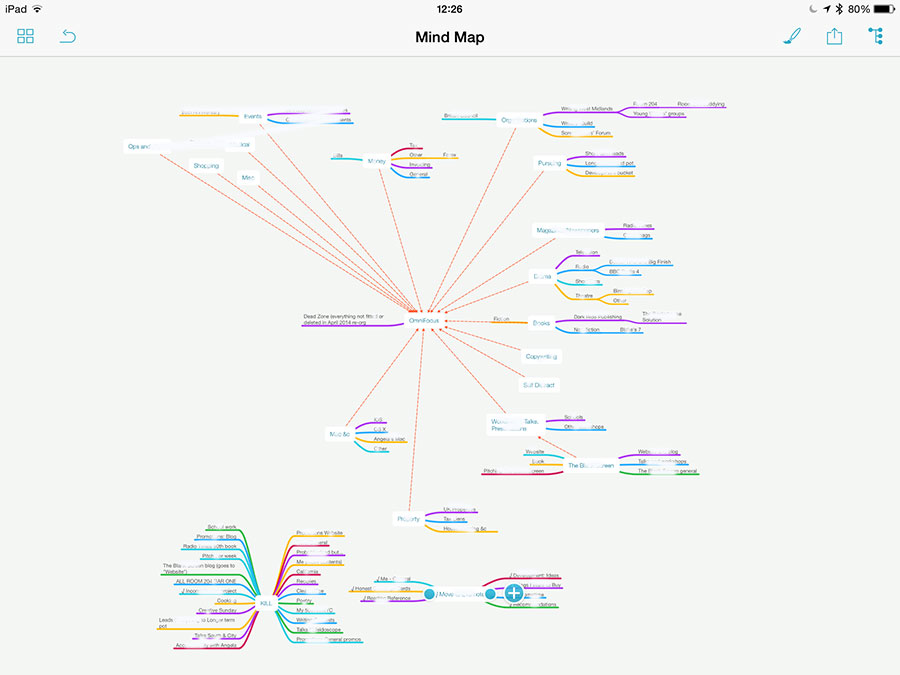
I did a MindNode map as I told you and this is how that looks. You know I can’t let you see the details, there’s plenty of confidential stuff in there but this is the shape of what I was dealing with.
mindmap


Look at that mass of colour in the bottom left corner. The centre word there is ‘Kill’ – these are all the entire projects I deleted as part of this reorganisation. The smaller blog of colour is a set of seven other projects that I have taken out of OmniFocus and put into Evernote: they’re all research jobs, all reading ones where I was amassing things to read but no actual tasks yet.

Then the rest is everything I am in fact going to do. The central word, the white blob around which all the rest of the colours flow, is “OmniFocus”. And that’s apt: this app is that central to everything I do.

I still need to work out a system for tying those Evernote documents in to the tasks as they come up. It’s easy enough technically, you copy one thing from Evernote and paste it into OmniFocus – or vice versa – and are thereafter just a clicked-link away from either. But it’s the mental system that’s hard, the decisions I need to make about putting stuff in OmniFocus or in Evernote.

Similarly, if I get an email from you with a task in, you can bet I forward it on to OmniFocus but when do I then archive that email, when do I put it into my Follow-up inbox to make sure I see it? For that matter, when do I only put it into Follow-up, when do I not bother making it an OmniFocus task?

I’ve still got to work all that out but it will come and right now, I’m exhausted yet much happier. I mean, much. If you’ve read this far, you’re a mensch and I want you to take away this single point: getting on top of everything you have to do – just getting on top of it, not necessary even doing it all – makes you feel infinitely better.
The Blank Screen on Croydon Radio

Hear about the origins of The Blank Screen on Croydon Radio's show From Croydon to Gallifrey, now online as a podcast here.

Janet went to Birmingham to interview William Gallagher author of the Big Finish latest release SCAVENGER as well as The Demons of Red Lodge and Other Stories, Wirrn Isle and Spaceport Fear. William also talks about a new Blake's 7 related book to be published soon.

Doesn't sound like it's about The Blank Screen, does it? But that also doesn't tell you that I got to choose some great music.

You can nip straight to my first appearance at about 30 minutes but then The Blank Screen and how it all began is around 90 minutes in.