Is it a task? Is it an event? No, it’s… er… um…

I was in a meeting last night and was told I had to do something – but only if certain other things happened. Broadly, if any of these things go wrong then I have to do this or that or the other depending on what and where and when.

It all makes absolute sense but it makes sense to me now. I don’t know that it makes so much sense that I will remember it in a year’s time when one of these things goes wrong.

Plus, I got into a state recently because my OmniFocus To Do list was so full of stray ideas and stuff that I will never get around to that I wasn’t getting around to the stuff I needed to do. I was seeing trees instead of wood. I was feeling like I’d lost all control of everything. And while I’m back now, while it feels great to be on top of it all once more, the road to that misery is to bung in things that you shouldn’t.

And I don’t know. I can’t put this particular instruction in my calendar, that’s obvious. But I can put it in my task list. Yet if I do, when exactly do I tick it off? Possibly never, certainly not for a month, probably not for many months. It would sit there forever, really.

This is starting to happen more and more. I don’t know how I’ve coped with it before, I’m not sure that I have coped with it before, but it’s happening now and I need to deal with it now. So what I’m trying is this: I’m creating Evernote notebooks devoted to the organisation or the project. Those instructions are now one note that will stay in Evernote forever. Because that’s what you use Evernote for: it’s for remembering forever. And if I never look up the notebook again, it’ll be because I don’t need to. Fine.

But will this work? It sounds sensible to me. Except in a month or a few months or a year or if ever this thing goes wrong, then will I remember that I have these Evernote notebooks?

I should add a task to OmniFocus that says “Check the Evernote notebooks you created in order to not have tasks in OmniFocus that you need to check”

Three calendars, no waiting

Thanks. I was thinking about how we use calendars and how I have been working to use mine more but there was one exasperating thing. Yet just working out how I would describe it to you may have solved it for me. May.

It’s Fantastical 2. I bought this for my iPad and it sits there right alongside OmniFocus so I can and do work all my tasks and times together. It’s working so well that I’ve been using my ancient copy of Fantastical 1 for iPhone too and this week just bloody well caved in and bought the update to Fantastical 2 for iPhone. Still can’t tell you what the functional difference is but I like the look of it and I like paying for something I am using a lot.

Only, I have had to keep Apple’s Calendar app around too. On both iPad and iPhone, I’ve needed that because event invitations have come in via it. I’ve got notifications of event invitations and had to open Apple’s Calendar to see what they were and to say yes or no. Then I’ve closed Calendar and by the time I’ve opened Fantastical, the accepted event is in place.

That’s just a chore, though. Clearly I would prefer event invitations to come up in Fantastical and save me that trip out to another app and back. But before I said that to you here, I fact-checked like a proper old-fashioned journalist and it appears I’m wrong. It appears that Fantastical accepts invitations and that you can say yeay or nay right there. I cannot see how and I cannot see why it hasn’t happened before. Could you send me an invitation so that I can try it out? But  I am now convinced it’s true because there’s evidence on the internet. (That never goes wrong.) Evidence including screen grabs of it in action.

Mind you, the reason there are screen grabs of Fantastical showing event invitations is because people have been asking why it doesn’t or how the hell it does. So I’m not alone and if I am not yet fully imbued with the knowledge of how to do it, the next time I get a calendar invitation I will take a little time and figure it out.

If that happens, I don’t need Apple’s Calendar any more. Not on my iPhone and iPad. It’s still the calendar I use on my Mac: currently Fantastical for Mac is a menu drop down and I think I heard it may become a more fully-fledged app so while I continue getting used to it, I’ll stick with what I’ve got.

You can’t get rid of Apple’s Calendar on iPhone or iPad, it cannot be deleted. But you can bung it in a Apple folder alongside the weather and stock apps that you never use.

But Calendar and Fantasical. That’s two calendar apps.

And I did say I use three.

I’m using Mynd on my iPhone. No matter what, I would have to use something else on my iPad because Mynd is iPhone-only for now. But as I’ve mentioned before, I did not appreciate that it is actually a full calendar app. It’s just so useful for telling me the very next thing happening and a slew of rather spookily great extra features to help each meeting or appointment go well. But it is a full calendar, you can do everything you do on Calendar or Fantastical. (I don’t know about event invitations. That’s another thing I’ll need to try. Could you hurry up with that invitation? Is that too much to ask?) 

So not only do I have three calendars on my iPhone, two of them are on my front page, the home screen.

It feels wrong, it feels like a waste of space on that screen and it feels like an unnecessary division of mental effort. But I don’t think to use Mynd unless I’m going to a meeting and want all its extra gorgeousness for that one particular event.

Similarly, Fantastical 2 has a lot of features for running your To Do list and I so much, so completely fail to think of Fantastical for tasks that I even tried to switch that off. You can deny Fantastical permission to access your Apple Reminders list but if you do, I found it also wouldn’t let me enter any events. So with reluctance, chagrin and some annoyance, I allowed Reminders and just choose to never use them.

Why would you use Apple’s Reminders either directly or via Fantastical when you have OmniFocus?

Funny: OmniFocus has a calendar in it. Yet I use that. I use it to glance at the day and see how much is going on.

I should get a Venn diagram going here of how these four apps (Calendar, Fantastical, Mynd, OmniFocus) overlap and what I do and don’t use in them.

Or I could just get a life and accept that where I used to eschew all calendar apps, I now have three.

Lifehacker: Delete your way to productivity

Often, we don’t notice something until we need it and then it appears everywhere. I’ve spent this weekend deep-cleaning my working life – see I nearly missed an event today – and once I’d deleted a huge amount of projects I’ll never get to, I found this:

Getting things done often has more to do with removing barriers than actually accomplishing a task on your list. Whether you have too much email, too many creative blocks, or a myriad of distractions, it’s time to metaphorically (and sometimes literally) press the delete key and make your work surmountable.

Delete Your Way to Productivity – Lifehacker

It’s possible I also missed this because my mind tuned it out over that wincing misuse of the word myriad. (You can’t believe how many times people get thait word wrong. I must’ve read myriad articles where it was cock-eyed.)

But otherwise, that article is a good read. It makes a fine start with discussing how one can and perhaps should delete emails. Then it extends that into deleting distractions and finally deleting whatever blocks your productivity and your creativity.

I nearly missed an event today

And I have fallen behind on a project I am very keen to do.

I am compelled to make an excuse about the event, at least. It’s one that was rearranged to this afternoon, okay? And I caught it when I checked my calendar at 5am this morning. So when I say I nearly missed it, it’s not like I spilt my tea and had to run for the car. But somehow even though I want to go to this, and I will go to it, for some reason it wasn’t on my mental map of the week.

This is happening to me more often now and part of it is how I think my business is in a bit of a transition. Previously I was almost completely task-focused: I had this enormous list of things to do. It wasn’t event-based: I didn’t have a lot of meetings, for instance. Now I tend to run more talks and workshops – I did ten sessions in March – so my calendar is more important than it was.

I vehemently refuse to join up my tasks and my calendar: To Dos do not belong on certain dates. Or at least, they rarely really do. If something has to be delivered on Tuesday, you could put that on the calendar, fine. But do you then put a date on there that you’ll start the job too? Odds are, you won’t start it then. Instant failure. Instant unnecessary failure. Put the flexible start date in your To Do list, if you must, put the deadline in there too and then everything to do with that task is in one place.

I have zero question about this, absolute zero doubt. If you’re looking at me now thinking you’re not so sure, the strongest chance is that I have failed to convey to you why I think this. That’s how sure I am that I’m right. This is a rare feeling: let me have it. (Unless you really do think I’m wrong and you can tell me. I would prefer to know.)

But right or wrong, it is how I am working and today that isn’t working. So I’m taking steps.

And this has become a kind of live blog as I try to get a handle on it all. The aim is to get back on top of everything and to be creating new work, producing material, instead of losing most of my time to managing it all. And I know that the way this will work for me is in software. That’s just easily obvious because of prior experience. So taking a step back from that overall aim, I think that I can have two contributory aims:

1) Restore my previous excellent grip on all my tasks
2) Find a way to cope with my newfound extra need for handling events

The shorthand for number 1 there is OmniFocus. Much as I love that software, much as it as truly transformed my working life, my copy of it is a mess at the moment.

I think the shorthand for number 2 would be Calendar plus a regime of checking it. I do currently have a task in OmniFocus called “Check calendar for today and week ahead”. That repeats every week on Mondays, Wednesdays and Fridays. I’m not sure why that isn’t working, then. I don’t want to make it a daily task but we’ll see what happens. Okay, it’s 07:47 and I’ve decided to temporarily make checking my calendar a daily task for Monday to Friday.

And I’ve just downloaded the new Fantastical 2 for iPad. I’ve been reading about this since its launch yesterday and I’ve been reading about its iPhone version since, oh, just about the day I bought Fantastical 1 for iPhone and had it superseded. I agree with the consensus that Fantastical is a good, strong app but for me it wouldn’t stay, I didn’t keep using it on my iPhone because I just found the standard Apple calendar better. Not in features, not in ease of use, but both of those are fine and the Apple one has the killer feature that it can include the current date in its icon. I struggle to believe how often I have to check today’s date but with that right there, job done. With Fantastical, I had to go into the app. Job not done.

But Fantastical 2 can show the current date as a red badge notification on its icon. I’m hoping that will be enough for me because I like what I see about the rest of Fantastical. I like how it feels holding your month and week in your hand, seeing the shape of it all. I’ll play with this and try to get it into my habitual working pattern. If it doesn’t work, I’m out £6.99. If it does, I’m out a lot more because I can see me buying the iPhone update and the Mac version too.

For now, though, at 07:52, let’s say that my second aim is at least addressed if not necessarily solved.

So it’s time for aim 1: OmniFocus.

This is going to take some time. It’s going to be a huge change for me. I’ve let OmniFocus sprawl a bit too much, I’ve let it become a repository for everything in my life. Things I want to read, for instance. I save those to Pocket but I often send them straight into OmniFocus: maybe they relate to a project, maybe I just want to remember them and OmniFocus’s mail drop service is too handy. Whatever the reason, I need to use Pocket and Evernote more, and to keep this stuff out of OmniFocus. That’ll take some re-training. But I’ll create an Evernote notebook for it all and get into the habit of using the Evernote equivalent of mail drop.

But things have also changed in my business and life. I am very pleased to say that I am still on Room 204, a Writing West Midlands development programme, but I’ve finished the formal, official year there. So about a year ago, I created OmniFocus projects to do with Room 204 and the eight separate things I was doing with them. I’m still doing them, I’m still doing them with Writing West Midlands, but the Room 204 projects need to go.

I’ve also got very lazy. If a great benefit of OmniFocus is that you know what you need to do now, that works because it hides from you everything you don’t need to do now. Only, for that to work day to day, you have to often review absolutely everything: go through all your tasks and see what’s done, what isn’t but can be, what will never be done and should be deleted. The idea is that you work through every task and you spend time on every task. This is more than an idea, it’s a principle and I have found that it works brilliantly for me.

Except lately.

Lately, I’ll do the review process and see – wait, let me try it right now – okay, I only have 12 projects review. Last time it was 67. (You set this project by project. You have to review everything but one project is my shopping list: I’ve set that to be reviewed once a year. Other stuff has to be reviewed every day.)

Especially when I’ve got 67 projects ahead of me, I’ll look at the list and I won’t patiently dwell on each separate task. Rather than do them right there and then or consciously test the task – why isn’t it done? what do I need to do it? – I just think yeah, yeah, haven’t got to that yet. And then I move on.

I can’t let that continue because I’m missing things and I’m not getting stuff done as much as usual.

So. It’s 08:03 and I am going to pull out the list of projects. I’m going to do a MindNode mind map of everything I actually have to do and compare that with what I’ve got. It’s slate-clean time.

Later…

Four days later. That is a hell of a slate-cleaning. I would like to point out that I did have that meeting to go and then there was something else on Friday, plus I worked the weekend… and all the way through, I was thinking of this. Right now, Monday at 12:12, I’m happier and I think I have proof that I am.

Let me tell you the proof first: I have no overdue tasks in OmniFocus.

And only 16 more things to do today.

It’s funny but having overdue tasks was proving to be a huge weight. It’s not really funny because it isn’t funny but it also isn’t funny because that’s how things used to be. That’s how they were before I moved to OmniFocus. Maybe it was worth letting things slide because I am reminded with extreme gusto that I do not ever want to feel this weight again. It’s paralysing: you feel you can’t clear that backlog, that there’s no point doing anything more.

So you now you’ve got to know how I did it. And it turns out I was right: it was a two-step thing.

The first was the Calendar and it was Fantastical 2 for iPad. I found that I still had Fantastical 1 for iPhone and I’ve been using that too – I’m honestly not sure what the difference is beyond some obvious aesthetic ones – and the combination has been useful. I’ve had to train myself to turn to my iPad whenever something comes up that needs me to look at my Calendar: even if I’m at my Mac, I turn now to the iPad for this. It’s not a habit yet but it’s becoming so and each time Fantastical does something clever, I am that much more sold on it. The most specific clever thing it does is accept natural language statements: typing “Lunch tomorrow with Steph at Birmingham” pops all the details into my calendar in the right spot. It reckons lunch is 1pm and actually I needed to change that but it was easy enough. But it new Birmingham, actually it knew the more detailed place name I put, and it knew what day tomorrow was. It’s very satisfying entering an event like this because it parses what you type as you type it: you see the place name flying off to that section of the appointment, you see the time going there too and you can see the calendar zipping along to the right day.

Also, it turns out that having today’s date as a red badge notification means that my muscle memory automatically makes me open the calendar. See the badge, intellectually know that it’s the date, but still open it as if there is something I need to be notified about. It’s made me open the Calendar about thirty times since last Thursday and as irritating as I suppose that is, it’s helping me to reinforce this new habit of using both Calendars and OmniFocus.

The second thing began with the way that a friend pointed out how casually I had planned her working year for her in a chat one day and she was back now with a pen to do mine.

Terrifying.

And we didn’t finish. But we’re still in play and I’ve been taking her advice to heart. That coupled with the most massively tedious reorganisation of OmniFocus has all proved part of it.

I’ve been using the new OmniFocus 2 for Mac beta because it’s the quickest version and also, I now think, the most pleasant to use. But this reorganisation meant replacing every old project with an entirely new system, then seeing what fitted the new plan and what did not. I have very ruthlessly and with only a little blood deleted gigantic chunks of tasks because I haven’t done them and, William, I ain’t going to. So they’re gone. Kiss ’em goodbye.

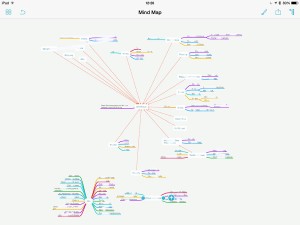
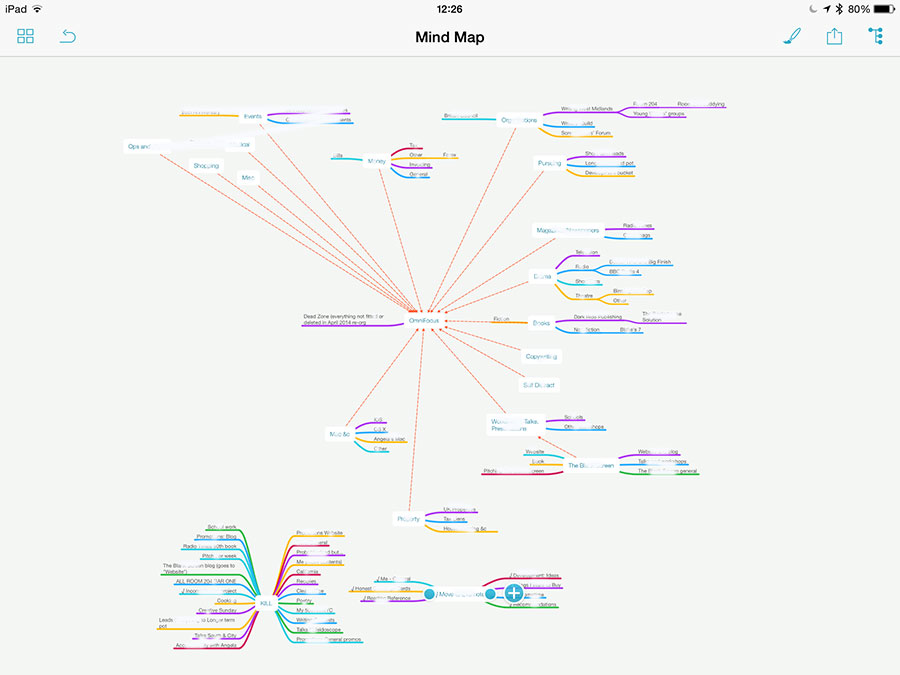
I did a MindNode map as I told you and this is how that looks. You know I can’t let you see the details, there’s plenty of confidential stuff in there but this is the shape of what I was dealing with.
mindmap


Look at that mass of colour in the bottom left corner. The centre word there is ‘Kill’ – these are all the entire projects I deleted as part of this reorganisation. The smaller blog of colour is a set of seven other projects that I have taken out of OmniFocus and put into Evernote: they’re all research jobs, all reading ones where I was amassing things to read but no actual tasks yet.

Then the rest is everything I am in fact going to do. The central word, the white blob around which all the rest of the colours flow, is “OmniFocus”. And that’s apt: this app is that central to everything I do.

I still need to work out a system for tying those Evernote documents in to the tasks as they come up. It’s easy enough technically, you copy one thing from Evernote and paste it into OmniFocus – or vice versa – and are thereafter just a clicked-link away from either. But it’s the mental system that’s hard, the decisions I need to make about putting stuff in OmniFocus or in Evernote.

Similarly, if I get an email from you with a task in, you can bet I forward it on to OmniFocus but when do I then archive that email, when do I put it into my Follow-up inbox to make sure I see it? For that matter, when do I only put it into Follow-up, when do I not bother making it an OmniFocus task?

I’ve still got to work all that out but it will come and right now, I’m exhausted yet much happier. I mean, much. If you’ve read this far, you’re a mensch and I want you to take away this single point: getting on top of everything you have to do – just getting on top of it, not necessary even doing it all – makes you feel infinitely better.
That was March 2014

So last year I earned a place on the Writing West Midlands programme Room 204 and by accident began writing monthly reports for them about what I’d done. It helped me enormously. Now I’m very glad to say that though I’ve finished the official year on Room 204, I am still a part of that programme and continuing to work with them. I’m not just glad, I’m touched.

But the official bits have come to an end and I considered the monthly report to be official. It wasn’t. It was entirely a misunderstanding on my part. But because it proved so useful to me, I’ve been showing it to you. The act of showing it helps me get more done. So as ever – most recently with That was February 2014 – you don’t need to read this but I need to write it.

This was my March:

Writing/editing: approximately 22,585 words
Edited Write On! magazine issue 3
Self Distract: 6 blog posts (including the 300th ever) totalling 7,385 words
Invited on to The Blogging Tour
The Blank Screen: 33 blog posts totalling 14,300 words
Commissioned for a short story project
8 pages copywriting for PR firm

Doctor Who: Scavenger (Big Finish) released to some gorgeous reviews

Pitches:
30 phone calls
Approximately 12 successes
4 rejections

Presentations/workshops: 10

Publicity:
Photoshoot for Writing West Midlands
Interviewed for From Croydon to Gallifrey podcast
Interviewed in Doctor Who Monthly

Attended: Cucumber Theatre Night
Attended: Veronica Mars
Attended: Fiddler on the Roof
Attended: Theatre Cuppa
Attended: TEDxManchester
Attended: The Mother
Attended: Royal Television Society Film & TV Summit representing the Writers’ Guild
Attended RTS summit post-mortem
Attended Guild committee meeting

Other:
Lunch drinks meeting at Comic Con with two Bond girls (why is that a thing? I don’t get it): Catherine Schell and Jenny Hanley

Beta testing software: 2 apps
Asked to judge RTS awards

Joined Creative England crew site

ENDS

What’s so great about OmniFocus part 1: get it in

No enthusing, no evangelising, just straight showing you. I talk about the OmniFocus task software a lot because it means a lot to me and now that a new Mac version is an inch away, one of the barriers to universally recommending it is gone. (There is still the fact that it solely runs on Macs, iPhones and iPads. So Windows, Unix and Android users are out of luck. But I honestly think this means you’re out of luck. OmniFocus is that good.)

Ahead of a video covering this that will be out in time for the official launch of OmniFocus 2 for Mac, here’s the first of a short series.

Before you can do any task, you have to think of it. If you think of it and you can do it right there and then, do it right there and then. But if you can’t, then you need to keep that task. You have to be sure you won’t forget it.

Here’s how you do that in OmniFocus.

Actually, here are the many, many ways you do this in OmniFocus.

1) Type it

In OmniFocus for Mac, iPad or iPhone, just type in your task and hit Save. The iPhone version has a nice button called Save+ which saves the task you’ve just typed and gives you a new blank one to start typing the next one in.

That’s the tiniest of things yet it makes a big difference. You know you’ll whack through entering tasks because of it so you do, you whack through tasks. You don’t think of it as a chore, so you don’t put it off.

There’s a lot of speedy little aspects like this. Most come later when you’re sorting through tasks and thinking about them, but for just straight getting that task out of your head and into a system you know will keep it for you, OmniFocus is very strong.

Screen Shot 2014-04-02 at 08.26.29

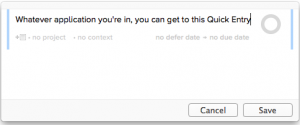
On the Mac version, you can enter a task whatever you’re doing, in whatever application you’re using. Tap a couple of keys and you are entering a task into OmniFocus. Hit return and that task flies off to OmniFocus while you carry on back with your other application.

2) Say itiphone reminder

I probably come up with most of my tasks while I’m driving. So I tell OmniFocus. I say it aloud.

OmniFocus works with Siri so I can say aloud “Remind me to phone Angela when I get home” and it will go into OmniFocus. (And when I get home, ping. Location Reminders are a stunning thing. Apple introduced them in its Reminders app, every decent To Do software has followed along.)

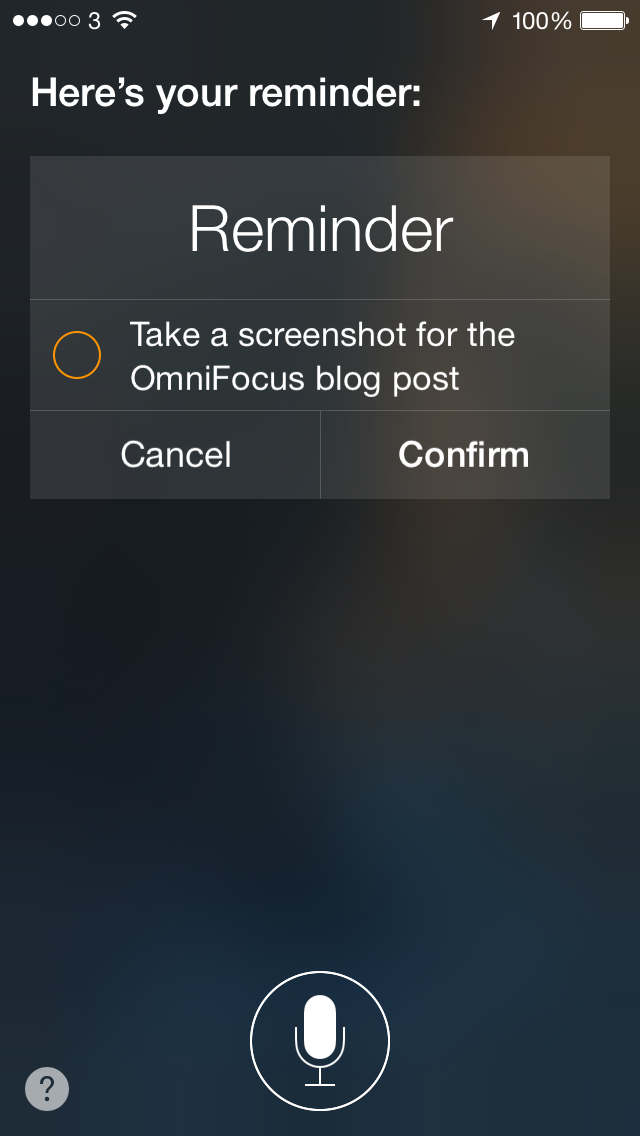
Slight problem. You do this via Siri and so after you’ve said “Remind me to take a screenshot for the OmniFocus blog post”, Siri will say aloud “Here’s your reminder. Shall I create it?” But because I’m driving, I can’t look at the screen to see what it thinks I’ve said. So invariably I say yes.

Usually it’s got it right. Sometimes it is astonishing what it has got right – or strange what it’s got wrong. But once or twice now, I have got home, looked at my OmniFocus reminders list and had not one single chance of figuring out what was so important.

3) Email it

An email comes in with something I need to do. I forward it. Straight into my OmniFocus list. The end.

I’ve just looked into this and it turns out that I have used this feature three times a day since it was introduced in December 2012. That’s 1,411 and I have to tell you that I am astonished it is so few.

Email after email, wallop. Straight in to OmniFocus.

If an email includes several things I have to do, which is common, then I could forward the same email several times. Or I could select a portion of the email, then hit forward – and it only forwards that section. This is a feature of OS X Mail and probably most email services but is especially handy here. Select one task in the middle of the email, press Forward, enter my OmniFocus email address and maybe change the subject heading to something about the task. Send. Gone.

The time it took to say that to you far exceeds how long it takes me to do it. Especially the bit about entering my OmniFocus email address. You get given a secret address, you add it to your Contacts or Address Book, and ever since then I just have to start typing the letters “Om” and Mail fills out the rest for me.


I use all three versions of OmniFocus: Mac, iPhone and iPad. And I use them because they work even better together than apart – and because having the three means I can record or capture any task that enters my butterfly mind. Wherever I am, whatever I’m doing.

Next, I have to actually do some To Dos.

Productivity lessons from Blake’s 7

blakes7logo

In fact this came from Blake himself: Gareth Thomas suggested I do this when I was interviewing him for a forthcoming book about the BBC science fiction series.

Actually, full disclosure, it was more that he couldn’t fathom why I was such an eejit that I wasn’t already doing it.

It’s just this: put your phone calls on speakerphone and tape them.

For all that I said yesterday about finding it hard to make certain types of calls, I have made a fairly constant stream of them throughout my writing and especially journalism careers. With Gareth, I really wanted to phone him over Skype so that I could record the call on my Mac. But he wanted to phone me instead.

I do loathe costing my interviewees any money, I don’t see why they should pay for the call or go out of their way for me, but Gareth couldn’t do anything else. He was on tour in a play and fitting me in on a Saturday morning; he might be able to predict what town he’d be in but there was no way to give me a phone number to ring. I would of course have accepted a mobile number, very happily, but mobile to Skype to Mac has proved tricky before. More than one interviewee has said I sound like I’m in a barrel down a mineshaft.

So I’m genuinely mithered over what to do in order to record the interview. I have to record it. Have to. I’m not going to get a huge amount of time with him and he is somewhat vital to the book, I need to make the most of the chat.

I’ve never actually met Gareth Thomas, I’ve just now done two phoner interviews with him over the years. But even in those short times, I can tell you that he is as charming and funny and interesting as you would expect. Yet I swear I could feel him thinking the word ‘eejit’ before he explained to me that I didn’t need to route the call through my Mac to record it.

Ever get the feeling you’ve been doing something wrong for twenty years? So that happened.

I recorded that man three ways from hell. I rang him on my landline, had my iPhone and my iPad recording the sound from the speaker and I even got my Mac to do it too.

And that’s the productivity lesson: use your Mac or presumably your PC to record calls. You can’t just record anything, it has to be with permission and agreement like I had there with Gareth and a book interview, but you can record anything – in that anything that makes a sound, you can record.

Since that interview, I’ve recorded many calls. Lots of interviews, naturally, but also phone meetings or conversations where I’ve really needed to find out a lot of things and there isn’t much time.

I don’t know how you do this on a PC, though I imagine it’s part of Windows Media Player, but on a Mac you just launch QuickTime Player. Doubtlessly because of its name, few people realise that this Player also records. It can record anything that happens on your screen – so it’s ideal for showing someone how to do something – or it will record your face through your Mac’s camera. Or it will simply record audio.

Choose that, hit the record button. Here’s a second productivity tip, this time discovered by me without the aid of Roj Blake, fictional freedom fighter: identify yourself for the recording. I say my name, the date, the time and who I’ve agreed to record. You don’t think you’ll do this all that often but over the last six months I’ve gathered up a stock of maybe fifteen such calls and being able to identify them in the first few seconds of playback is a godsend.

Especially since QuickTime Player confuses me continually. Once you record something, it is there as an untitled document. Close it and it will ask you for a name to save it under. Or you can just save it and then close it. I say this to you and I cannot see what is so hard. Yet I regularly end up wondering whether I’m going to save or accidentally delete the recording. And I postpone worrying about it by leaving them all there.

So I’ve currently got about seven Untitled phone recordings on my Mac.

I promise to sort through them.

One more productivity tip, this time from my years producing UK DVD Review. That was a podcast from 2005-2010 which I’m proud to say peaked in the top ten of all podcasts, of all genres, across the entire world. I think there were only 11 podcasts then. But I learnt this. If you’re recording a lot, I mean for a long time and maybe just doing a few calls one after another, clap your hands.

I clap three times before the start of a long recording. Interviewees think I am strange. But they suspected that anyway.

This is pointless if it’s just a quick call and even with the much longer one I did with Gareth, it was straightforward: I just transcribed it afterwards from start to finish. Often, though, I will have such a long recording that I need to find parts of it quickly. Usually that’s the start of the next interview. When I was doing this for broadcast, it would be to find the next take or the next section.

These are all things that I would tend to listen to in a proper audio editor instead of just through QuickTime Player. (You don’t have to launch QuickTime Player to listen back to a recording: just find it on your Mac and tap your spacebar. It’s gorgeous how fast that is when you have a lot to look through.) With a proper audio editor, you get wave forms.

And with waveforms, the clap is really distinctive. You get three massive spikes in a row and you can just skip straight to that.

So. With permission, record your interviews or other detailed calls. Do it simply on your computer, label everything, and clap yourself if you’ve done a good job.

You are feeling very sleepy

The Blank Screen is about being productive. I have a section in the book (UK edition, US edition) devoted to the issue that “Time off is vital” and it says:

Apparently.

That’s all I’ve got for you about time off. I don’t do time off, I don’t know from time off.

But I’m learning a hell of a lot about sleeping.

This is still a work in progress and I would like to have figured it all out now but I’ll take anything I can get. Since January 2013 I have been getting up to write at 5am weekdays. (Not every weekday: I’ll book time off for lots of reasons like speaking engagements that mean I’m not home until 1am the night before. I’m not daft. I’m insane, but I’m not daft.) Today was day 223 and it was stunningly hard but as I almost always am, I am glad I did it because I got three big things done that were pressing on me. I’d finished them before 10am so suddenly Monday morning looked pretty good to me.

But.

The big downside of getting up at 5am is – well, okay, it is the getting up at 5am. But the second big downside is how tired I get toward the end of the day. Both the end of the working day and of the real day of the week. Actually, in some ways that’s an improvement for me: I now want and get evenings off where before I’d just carry on working until I stopped. The trouble is that I can be so bone-tired that the evenings are a struggle to stay upright.

It’s not as if you get a choice about stopping working and taking the evening off, though. Tonight I’ve got a Writers’ Guild committee meeting, for instance, and I’ll be home from that around 10pm. I don’t know about you but I can’t just go straight to bed. At least, I rarely can: I’ve had some times in the 5am Years when  I’ve had to crash out instantaneously. But usually I have to wind down a touch so that means tonight it’ll be 11pm before I go to bed.

So 5am to 11pm, it isn’t tenable. Much as I wish it were, I can’t do it. Can’t do it without help. I’ve tried caffeine, I am currently powered by caffeine, but I’m also trying napping.

Even saying that to you feels wrong. Why is that? I don’t work 9-5, I do work for myself, why does it feel so wrong to take a nap? I was struggling today so I slept from about 1:30pm to 2:30pm. It isn’t like having a second day, like getting up entirely refreshed, but where I was finding my mind folding in on itself before the nap, after it I sprang back out of the bed.

It feels like such a waste of time but the work I’ve done since has been better for it. As far as I can tell subjectively, the work I’ve done since that nap has been as good as the work I did first thing this morning. That’s got to be a good thing, that’s got to be a productive thing to pull off.

So we’ll see. There are so many days when I can’t do this – because I’m working in someone else’s office and they’re paying me to, I don’t think naps would go down well there – but when I can, I’m going to try doing it. I should try to do this with some statistical measure so I can assess what’s working regularly and reliably.

One thing that may help is a new app that I haven’t tried yet but wanted to tell you about. It’s called Best Sleep Hygiene and that’s one of those titles that doesn’t make any more sense the longer you know it and that you don’t get used to. It’s not about hygiene, it’s about how long and how well we sleep. I tell you, the title is giving me pause. But it’s a free app and it promises to analyse your sleep patterns. So I want to at least point it out to you even if, like a typical writer, the title is holding me back from exploring it here.

Yes, you do have time

You do. Don't tell me you're busy, I know you have time. Time to start that massive project, time to do something completely new. What you need to get this new or massive thing done is not time, it is involvement. Excitement.

I would say that I've been a bit busy this week yet I've also read – hang on, just checking – 396 pages of The Cuckoo's Calling by Robert Galbraith (aka JK Rowling). I'm reading it in the kitchen while I cook, I'm reading it on tea breaks, I'm catching a few minutes here or there with it. I'm not reading in bed: I've got this novel in paperback and for reading in bed I prefer my iPad. I'm never going to read it or anything else in a bath: I get that it's a relaxed time and that therefore reading should be great, but the idea of holding a book that is getting more sodden by the minute through steam or, god, shudder, shake, dropping it into the water. Eugh. Never.

So my time available for reading must be quite small yet I've read all of this in about a week, maybe a day or so more.

This happens to me regularly: one non-fiction book or novel will take me months to read, another one will zoom by in days. It is down to engagement and involvement: I'm enjoying The Cuckoo's Calling and it's pulling me back.

The great thing about new projects and massive new undertakings is that they are new. That they are side ideas, side projects, at least at the start and there is always the issue that you have other things to get on with. Other priorities, other demands on your time. Let the new project be a guilty pleasure that you enjoy spending time on and you will find the time.

You have the time. You do.

My future is here. Your mileage may vary

First, dictation and voice control of computers and iPads and everything seemed to be something from science fiction films. No, not seemed: they were from science fiction films and nothing like that happened in the real world. Then the future came to our PCs and Macs and dictation could do anything. Except it couldn't do anything. Not a thing. Voice dictation was rubbish and it never, ever worked the way it said it would on the box. That box, by the way, could be equally the software box the things used to coming or the telly in the corner. They both claimed the world, they both lied.

Perhaps that just put me off for a long time but I really think it was also the fact that were voice dictation to work it would mean dictating by your voice. That sounds sensible, but I'm a writer and I don't have to be sensible. I like writing. I like using keyboards. I actually love typing.

So the knowledge that it just simply never worked coupled to the fact that I just simply never wanted voice control, meant I've ignored it all.

Until last night when my wife Angela accused me of having entire conversations with Siri on my iPhone. The thing is, she's right. I do. There are regular things I do with Siri that have taken over the way I used to do things. It's quicker now to search something online by Siri than it is to type into Google, for example. I can no longer find any of the weather apps I've downloaded to the phone because it's become just so much quicker to ask Siri. “What's the temperature?” – that's been a very common thing for me to ask recently as it got very cold. “Is it going to rain?” is another regular. In the end, that is actually pretty much all I ever need to know about the weather. So it's Siri in, apps out.

Then today I had a thing where I was driving and an email came in from a friend. An email I had been waiting for, an email I'd been hoping to get. I asked Siri to read it. That was new and it was good. It wasn't like having my friend in the car but it was like having a conversation.

There was a problem, though. There appears to be a limit on how much Siri will read of your email. It seemed to read about a third to maybe half of a fairly short email.

And now I'm finding another problem: it will only let me dictate a certain amount of text at one time. Because, yes, I think you guessed this already, this entire piece has been dictated through Siri. I do and I don't like it. I'm finding I have to compose an entire sentence in my head before I actually say it. I'm more used to exploring on the keyboard, letting my fingers find the words and then if necessary just deleting. So my flow is different and I think you see that in the writing style: I'm a little bit more staccato, maybe a little bit longer. And I can see that the paragraph structure is different.

It's easy enough to get a new paragraph when you want one but still I find my thought processes are different and I look like I'm a different person writing this. only a writer would care about that but I'm a writer, I care about that.

I think I'm less of a non-fan then I was before. Put it that way. I'm feeling a bit grotty today and being able to say this instead of type it has unexpectedly proved a boom. Thank you for being a test subject as I write to you.

The thing is, it seems to work. I like Siri, I know many people don't, and I do find Siri seems to have good and bad days for no apparent reason. But it's an amazing piece of technology. I am regularly astonished by what it gets correctly when I'm speaking just as much as I am occasionally bemused by what it gets wrong.

I need the keys. I actually need to knead the keys as I write. What this is telling me is that I think I crossed a line, I've crossed a little hurdle, where I now actually accept that voice control and dictation is possible and it does work. If nothing else, I'm going to be happier continuing to have conversations with Siri.

And in fact, as I said that last paragraph, a text came in from Angela and I told Siri yes I wanted to reply. This is becoming science fiction. I am becoming used to controlling my iPads and iPhones with Siri. Part of me still doesn't believe it. But, wow.

I don't think that it will make me more productive, necessarily, at least not yet. But the combination of being able to speak one thing while typing another, that would. That has, actually. Now I think of it, I remember a time quite recently on my Mac when I was so busy typing I couldn't add add something into my calendar so I told Siri on my iPhone to do it instead. That meant it automatically came to my Mac as well. This is the kind of voice control or dictation that would make me faster, would make me more productive, and yet let me keep doing the thing I like doing most: writing on a keyboard.

At long last, wow.