Bad review: Moment for iPhone

I loathe doing this: I think the maker of the new app Moment for iPhone has worked hard to make a slick-looking app and I don’t doubt that it was done to scratch an itch, to do something its creator genuinely wanted an app to do.

But I just ran a story here about how to get a refund from the App Store and I only found out the way to do it because I so wanted a refund on this particular app.

Moment tracks your usage of your iPhone. It does that in time, how many minutes and hours you’ve used it today, and it does a little map of where you went. I was curious about this because I’ve wondered how much I actually use this thing. And – this was entirely my mistake, purely my fault – I believed Moment gave me more detail about what I did. I can only apologise for that: it was a thick misunderstanding of mine and I don’t criticise the app for it.

However, the app costs £2.50 UK or $3.99 US. There is then a paid in-app purchase that gets you a premium edition and for some reason that purchase is free. So I bought it.

Unfortunately, that adds the ability to set limits on how long you use your iPhone and it lets you set how often you get little alarm notifications of how long you’ve been running it. And the unfortunately is that there is no way to switch these off.

And more unfortunately, the app’s primary and nearly sole function of telling you how long you’ve been running your iPhone today is just a pretty version of what the phone already tells you.

Here. First, Moment for iPhone. It’s got a lot of whitespace and I want you to see how good it all looks so, sorry, there’s what looks like a gap before the next bit below:
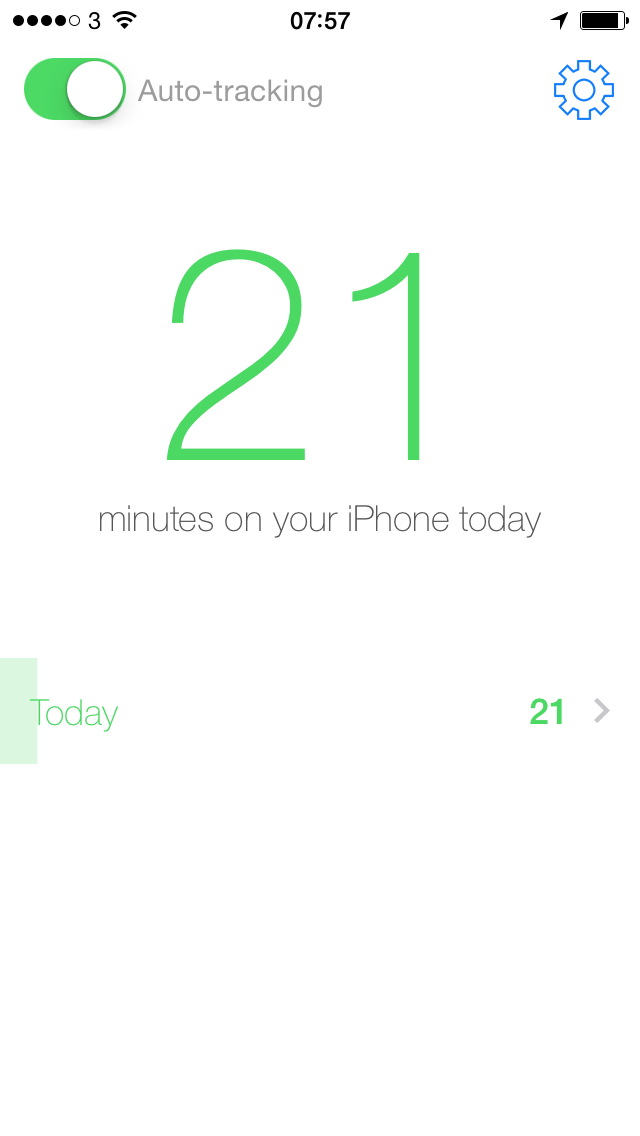
photo 1

And now the same information at the bottom there in this screen grab from iOS 7, exactly what you’ve got on your iPhone right now. Have a look on yours by going to Settings/General/Usage:
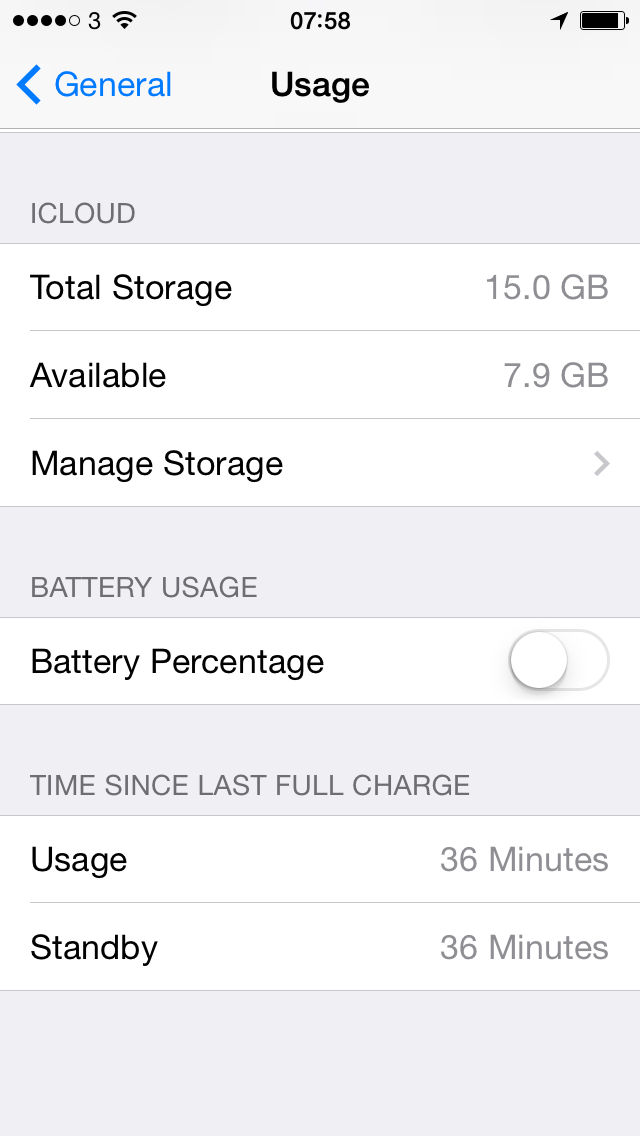
photo 2

You definitely can’t miss that Moment says I’ve been using my iPhone for 21 minutes. Very clear, very good. But look at the system one: that says 36 minutes. I took these shots only a minute or two apart.

And I knew the system was more correct.

So the primary/sole function of the app is already available to you on your existing iPhone and Moment gets it wrong. I believe the accompanying map is accurate, but for the 40 minutes (according to iOS, 23 minutes according to Moment) that I used the app, I was in the same spot.

Sorry. I do believe this app was built from the finest of intentions, but I asked for a refund partly to get my money back, chiefly to send a message to the developer.

Have a look for yourself if necessary, here it is on the App Store.

How to get a refund on the iOS App Store

If you blow a whole 69p on an app that end up not using much, live with it. If it’s a few pounds or dollars, come on: the coffee you drank at lunchtime cost more than that and you ain’t getting the money back from that.

But.

It is possible to buy apps by mistake. It is also possible to be misdirected into buying an app that isn’t what you thought.

So when you do feel the need for a refund, this is how you do it.

1) Go to iTunes on your Mac or PC
2) Go to the Store
3) Sign in and click on Accounts
4) Click on Purchase history
5) All your purchased apps are listed in lines grouping them together by date
6) Click on the arrow next to the one that includes the app you want a refund for
7) You get a detail page for the apps on those dates plus a Report a Problem button. Click.

This is easy to miss. The page with the Report a Problem button changes to a new page that is almost exactly the same: close enough that you can believe it hasn’t changed. But now next to each app on the list, there are the words “Report a Problem”. Click on that.

8) You get to choose one of the common reasons for a refund and there is space for you to write your reason.

Hit Submit and away off it goes to Apple.

Create strong passwords

Lifehacker has an interesting article called Four Methods to Create a Secure Password You’ll Actually Use and I’d like you to read it, but I’m also amused how old-fashioned the whole idea seems to me.

Because I use 1Password. I can barely remember any of my very many passwords, not because they are all very strong ones but because I don’t need to. They’re all in 1Password and right there, securely, when I need them.

But if you don’t use 1Password or any equivalents, check out Lifehacker’s article because you need stronger passwords than you’ve got now. You do.

Productivity detective work – solving mysterious delays

I love this as just a riveting little story but it is also terribly absorbing about productivity and our perception of that too. A New York restaurant has been getting bad reviews that centre on how service there is slow. The owners can’t see what could be causing these – so they looked into it.

We decided to hire a firm to help us solve this mystery, and naturally the first thing they blamed it on was that the employees need more training and that maybe the kitchen staff is just not up to the task of serving that many customers.

Like most restaurants in NYC we have a surveillance system, and unlike today where it’s a digital system, 10 years ago we still used special high capacity tapes to record all activity. At any given time we had 4 special Sony systems recording multiple cameras. We would store the footage for 90 days just in case we need it for something.

The firm we hired suggested we locate some of the older tapes and analyze how the staff behaved 10 years ago versus how they behave now. We went down to our storage room but we couldn’t find any tapes at all.

We did find the recording devices, and luckily for us, each device has 1 tape in it that we simply never removed when we upgraded to the new digital system.

The date stamp on the old footage was Thursday July 1 2004, the restaurant was real busy that day. We loaded up the footage on a large size monitor, and next to it on a separate monitor loaded up the footage of Thursday July 3 2014, the amount of customers where only a bit more than 10 years prior.

Busy NYC Restaurant Solves Major Mystery by Reviewing Old Surveillance – Dineability (undated, probably 12 July 2014)

You will love what they found and what it means. Now, I’d like to direct you to the original post, an entry on Craigslist, but that’s vanished. This article on Dineability includes the full text plus a little stream of comments afterwards, some of which make you hope aliens never learn how thick we really are.

Scratchbuilding your perfect steampunk keyboard

Hey, if it helps you write, I’m all for it. And I am always up for spending a little time now in order to save a lot later or just to make that later time more productive, more useful, more fun. I’m not sure this fits those, but what I lack in patience to do the work, I make up for in fancying the end result.

20140712-213309-77589347.jpg

My goal with this project was to build a retro keyboard that was fully functional and of a sufficient quality that it could be used everyday by a touch typist. In order to achieve this I chose a high quality (though widely available) keyboard as my starting point. This is an IBM Model M “Clicky” keyboard. They were made starting in the mid 1980’s and a version is still manufactured today. This particular keyboard was made in 1989 and shipped with and IBM PowerStation 530, a UNIX box the size of a kegerator.

Besides its overall quality and heft, one of the things that makes this keyboard particularly good for such a mod is the fact that it has removable key caps and the under-cap has a flat surface ideal for affixing a new key top.

Steampunk Keyboard Mod – Jake von Slatt, The Steampunk Workshop (8 July 2009)

Even if you’re no more likely to build this yourself than I am, do go take a gawp at the full feature: it has detailed photos, many videos and so much love that you can’t resist.

Ritot – the world’s first projection watch

This is another Indiegogo crowdfunding product but it’s done, it’s passed its threshold and will be produced. Ritot is a projection watch, reportedly the first such thing, but it’s easier to show you. Have a watch, so to speak:

}

For some reason it reminds me of my very first digital watch where you had to hold down a button to see some red LED readout. The watch band for this is rather nicer than those but still, I’m not sold.

Plenty of other people are, though, so if this is your bag, go pledge on Indiegogo to get it early or cheaper or with some rewards.

Stop making these mistakes at work

I work for myself so day to day I don’t have the regular office shenanigans but I’ve been there and I recognise this advice from Fast Company:

You show up to the office on time, you’ve never missed a project deadline, and you always refill the coffee pot when you’re done.

What could you possibly be doing wrong?

You’re Probably Making These Five Mistakes at Work – Cheryl Lock, Fast Company (8 July 2014)

The mistakes include not asking for feedback except at your annual review – oh, my lights, how I loathed annual reviews. Wow. Flashback. My very first annual review at a company ended with me fighting over every tick box on the form. I couldn’t see why I was being marked down for things I knew I’d done better and it turned out to be an early form of the stack ranking that truly idiotic firms used. (Microsoft used it, then abandoned it. Staff have to be graded as something like above expectations, on expectations, below expectations and it has no connection to how they actually do. Get a team of three dedicated, passionate geniuses and one of them is going to be in trouble because of that system.

With me back then, my boss got progressively more annoyed that I was arguing and how the session was taking hours longer than he expected. I think now and I thought then: tough shit. Eventually he told me that he couldn’t promote everyone, so I wasn’t getting a promotion.

It looked then as though he’d picked me because I wasn’t the sort to complain. But of course I fought and while it took me a long time to get out of that firm, I stopped working that day. He lost a worker who had been exceeding expectations and gained one who did 9-5 for the first time in his career.

So while I’m surprised at the level of passion this memory has brought back – I’m struggling to remember his name, that’s going to bug me – I suppose I’m really saying that bosses can be arses too. And that what goes on in an office is magnified. I’ve forgotten the man but I’ve not forgotten the review and even on the strange contracts I had with the BBC I would have an annual appraisal and I’d go in ready to defend myself.

I want you know now that I never got a review again that wasn’t superb. But the bad one stays. It’s like public speaking; I died at one event and cannot forget it.

But where were we? Fast Company’s list of mistakes you may be making at work – and fortunately how to deal with them all. It’s a good read, I hope it doesn’t bring back bad memories for you too.

Update: Uiee portable power charger

Previously… Uiee is a small and cute and colourful battery charger for iPhone and other devices that’s currently well worth your attention on IndieGoGo. I told you upfront that I want one myself, but these chargers don’t last forever and I wondered about how long this would stay useful. My own current battery charger has radically reduced its ability to top up my iPhone, for instance.

You can’t expect a brand new product to have years of usage data but I asked the makers and they told me:

Uiee is built with top range circuit board components, Uiee is expected to hold its charging capacity for at least 5 years as we will be using Samsung battery supplies giving a substantial life.

I also asked about the name:

With regards to the name Uiee, when starting the company, the owners wanted to start something that would take away the fear that most people seem to have when it comes to technology. Uiee came about while searching for a word that felt simple, friendly and warm to say. Uiee is more like a companion than a product.

Do go check out the IndieGoGo page for Uiee.

Ex-WiFi engineer fixes your problems

Er, with wifi. Alf Watt, ex-Apple engineer, has been speaking specifically about wifi issues, he’s not left the company to become an agony aunt. Mind you, if you’ve ever hung out of a hotel window trying to get a signal, you’d take anything.

He spoke with The Mac Observer and really spoke: they’ve done a podcast interview that goes into a lot of detail. But the MO site also includes a breakout description of the most useful points, including screenshots for those of us who don’t spend a lot of time deep in Wifi dialog boxes.

Have a mug of tea and a read.