When you have two equally urgent things to do

Do one of them.

That’s it. No great debate, no big decision, just do one of them. Either of them. Doesn’t matter which. Try random, try flipping a coin, try alphabetical order. Just try something, just pick something, and start on that right now.

In the most extreme case I can think of, you have two commissions from different places. Both equally important, equally urgent, both equally on deadline, both equally hard to do. And you can’t afford to disappoint either commissioner.

Even then, do one.

The odds are that you won’t really disappoint anyone: even if the other piece is a bit late, often that’s okay. But even if it isn’t, even if choosing to do one commissioner’s job will seriously disappoint the other, you should still do it. Because the alternatives are worse.

The first and most obvious alternative is that you will try to do both pieces in the same time. We can do amazing things under pressure but even if you manage to finish both pieces, neither will be good enough. Cue disappointment from both commissioners and the certainty that you won’t be hired again.

But then the second alternative is that you try being clever. Clever is good. Except in this case you try to prioritise the pieces, looking at which commissioner will be the most valuable to you later, which job is the better. But we’re talking about the most extreme case when there are two exactly equal tasks. Even if they aren’t spot-on equal, though, this truth applies everywhere and everywhen: the time you spend deciding between the two is wasted.

Don’t spend time prioritising, spend time doing.

Twisting Tina Fey’s improv rules into productivity tips

Tina_Fey_Muppets_Most_Wanted_Premiere_(cropped)I didn’t do this, but I wish I had. I’ve just been re-reading Tina Fey’s Bossypants – read my bubbling enthusiasm for it from when I first read back in 2011 – and I was really looking for a way to tell you the best bits. Or at least to say: read Bossypants (UK editions, US editions).

But a blog called Scrubly has parsed the whole book and come up with advice we can apply to everything. I’m not surprised, I admire her book just as much as I relish it: there is huge strength in the wit and the cleverness. That makes it sound technical or contrived, I think, and that’s not at all how it reads. It reads like this smart woman is two inches in front of your face and talking directly and only to you. But it does also have these great nuggets, such as the one Scrubly picks out first:

“You can’t be that kid standing at the top of the water slide, overthinking it. You have to go down the chute.”

Tina Fey had to learn how to stay productive and get things done on deadline mainly because of her work on SNL. When a show is done weekly there’s no time for fooling around with work. There’s no such thing as being a day late when a show airs live at the same time every week — you get it done.

And keep in mind, as Fey said, “You can’t control things by being nervous about it.”

Do take a read of Scrubly’s article but, really, Tina Fey’s Bossypants. That’s the thing to read (UK editionsUS editions).

Making more of small things – like iPhone tones

My iPhone rings, I answer it. Other people, they turn it into art. This is the reason to tell you this today: a music producer named MetroGnome has released this:

He looks like he’s working an LCARS computer from Star Trek, but he also looks a bit talented. Nonetheless, I do prefer this slightly older piece by Mars Argo:

Lying on Facebook

notificationsPreviously…  about six weeks ago I told you of a new iPhone app that scanned your calendar and researched details on all the people you are due to meet. It’s called Refresh and as yet it is still not available in the UK. My quick summary review was that Refresh is astonishing, if not a little creepy. It suggests conversation topics (“Say, haven’t you just been to Cuba?”) and that was far too far.

Now, read on.

I’ve not used Refresh since I finished the review but I also didn’t delete it. Chiefly because I forgot all about it. But last weekend I it prompted me. I had a calendar event called just “Alan and Cathy” and Refresh prompted me with extensive details about Cathy. Without my asking or even realising, it was parsing the calendar and it recognised which Cathy even though the entry didn’t include her surname. I have no idea why it didn’t pick up on who Alan is. I also have no idea why it prompted me then when I must’ve had a dozen meetings in the past six weeks.

Nonetheless, it was fascinating: it had culled details from Facebook, LinkedIn and I think other places but I can’t tell what. I really did learn things I hadn’t known about Cathy. And I was able to start a conversation. “Say, did you know you share the same birthday as Emmylou Harris?”

“Yes,” she said.

“Well.”

Yesterday I had four meetings and Refresh nudged me with a notification for two of them. One of which was startling because while it was with someone I haven’t really known all that long, I had no idea she was a Philosopher with a particular company, I had no idea she lived in Bulgaria.

She hasn’t. She isn’t.

She’s friends with a security consultant who winced at her Facebook profile and said she was saying far too much, she was making identity theft far too easy. So she tells me that she had a quick run through her Facebook page and changed everything to a lie.

I love that Refresh has this almost alchemy-like ability to ferret out information and that it is stymied by good, old-fashion porky pies.

Refresh is free on the US App Store here and the company says it will be coming to the UK.


Elizabeth Gilbert: Success, failure and the drive to keep creating

A smart, funny, quick TED talk by the author of huge hit Eat, Pray, Love (UK book and film, US book and film) – and specifically about how you have to keep creating, how you need to survive both success and failure. She has a particularly thought-provoking idea about what she calls going home to your creativity.


Why it’s worth grabbing free apps

The rule is that Android users get free apps, iPhone users pay for them. I am an iPhone user and I am more than fine with paying for apps. The amount of use I get from them, the pitifully cheap prices, it’s not a debate. But I do get free iPhone apps and specifically I do often grab paid ones that are briefly on offer as freebies. I’ll do that in part because all those 69p purchases add up and I’ll do it mostly because I’m often poking around an area, looking for a type of app rather than a specific one. And then I also do it because there is a specific advantage:

Free is cheaper than paid.

Okay, there are two specific advantages:

Once you have an app, you have it forever

Actually, three:

Once you have an app, you typically get free upgrades

So if an app that I definitely want then I’ll just buy it. But if there’s one I fancy trying or that I think I will need at some point, I’ll grab it when it goes free – and I may even delete it immediately. Without opening it even once. Because I’ll open it when I need it and all I have to do now is download the thing. Actually, you don’t even have to do that: starting to download it is enough, as I found when I went through the Channel Tunnel part way.

Once you have officially bought the app, you can delete it and know that you are able to get it again whenever you want. For free. Even after the price goes back up, most of the time also after the app has been upgraded later. Some apps make their new versions completely new apps that you have to pay for again and there are apps that do vanish forever. You’re out of luck with those but otherwise, this all works. So, for instance, Lonely Planet made a lot of its travel guide apps free last year and I grabbed the lot, deleted the lot – and then brought back ones when I was actually going travelling.

Quick story? I once advised on an app that was so bad I gave the maker a list of 19 reasons it could not be released. They ignored me, submitted it to Apple, and Apple rejected it with 20 reasons. I still kick myself over the one I missed. But the maker sort-of addressed those 20, enough to get it on sale anyway, and I was required to have it on my iPhone. But it was so bad, I mean it was still so embarrassingly bad that I deleted it. Whenever I’d be in a meeting when I was asked a question about it, I’d just re-download it from the App Store, slog through trying to work out the answer, then delete it again. One day I was asked a question by one editor in the company and couldn’t get it back: another editor had approved it being removed from the App Store forever. I don’t know who that was, but he or she made me look bad in that meeting. And I applaud him or her for doing it. That’s how bad the app was.

But you want to know how to find when apps go free. Try an app way: download the Apps Gone Free

This is what George RR Martin writes on

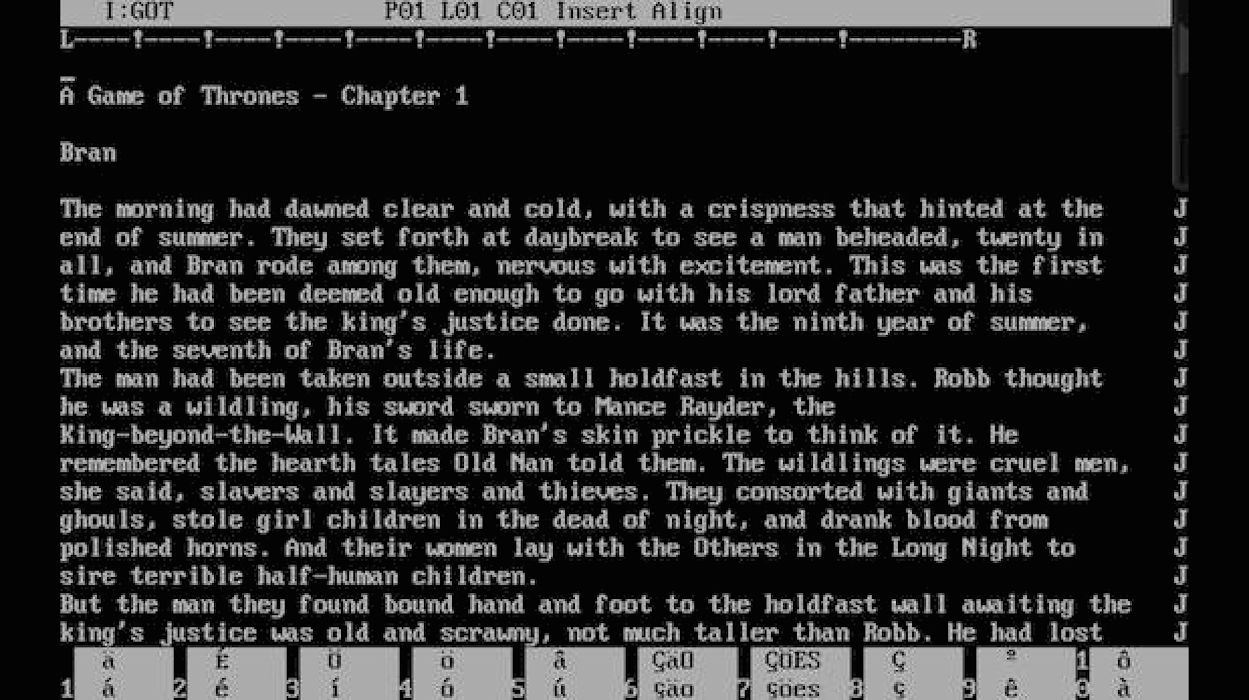
The Game of Thrones (UK books and films, US books and films) writer this week revealed that he still works on a DOS PC. BBC News quaintly explained that “disk operating systems were popular” but, seriously, DOS? Now?

Here’s where he revealed it, but then hang on for what that really means to do this.

The tech website Geek.com did a nice job researching this and brought us a screen grab of what that probably looks like:


Screen-Shot-2014-05-14-at-7.45.06-AM


But it’s one thing seeing an image and thinking, okay, well, not pretty but it works. And it’s another thing seeing WordStar in action. This is a YouTube video of WordStar 3.0, the version before Martin’s favourite, but substantially the same. Now imagine writing thousands of pages in this.

The Productivity Dash

I spent some while earlier looking for the best place to send you when I mentioned a fella named Merlin Mann: he does a lot of productivity work, he is very entertaining, but he’s also hard to pin down. Strictly speaking his current best place is probably his Back to Work podcast but I don’t honestly enjoy the format of that. So instead I pointed you at his old website, 43Folders, which he hasn’t updated in years upon years but still stands and is still replete with great ideas.

Including the Productivity Dash.

Hand on heart, I’ve read his site many times over the years and I simply missed this. And I like it so much that I want to show you:

My favorite tonic for procrastination—which I have mentioned in passing previously—is what I call a dash, which is simply a short burst of focused activity during which you force yourself to do nothing but work on the procrastinated item for a very short period of time—perhaps as little as just one minute. By breaking a few tiny pebbles off of your perceived monolith, you end up psyching yourself out of your stupor, as well as making much-needed progress on your overdue project. Neat, huh?

Kick procrastination’s ass: run a dash – Merlin Mann (8 September 2005)

He wrote that nine years ago. Tell me I don’t bring news to you quickly. There’s not a gigantic amount more to that article than you’ve just read or that you can readily infer, but do read it all and do take it as a good starting point to explore that whole site. Amusingly, Mann says somewhere in it that you shouldn’t be reading a site about productivity, you should be being productive. I want to agree with him, but…

Quick and completely unrelated aside? I’m listening to iTunes Radio and a station I made by picking 4 Non-Blondes as the starting point. It is a terrific station, I am addicted to it now, and as I typed that title above – Kick procrastination’s ass – and specifically as I was on the last word there, I was listening to You Get What Give by the New Radicals and the lyric:

Come around
We’ll kick your ass in!

I just wanted to share that with you. Carry on.

¿ Best calendar tip ever ?

You noticed that headline, didn’t you? It’s because of that ¿ and how remarkably it stands out.

Incidentally, this doesn’t work at all if you happen to be reading this on a screen that doesn’t display Spanish-style upside down question marks. But if you can see them, you can use them and they are remarkably useful in calendars.

I have more and more events or meetings to go to and it’s rare that I know immediately when they’re on. If it’s that the meeting will be ‘in a few weeks’ or ‘early in June’ then I’ll put a To Do reminder in OmniFocus to find out and confirm the date then. But the most often thing is that I’ll either offer or be offered a particular date and time and it has to be confirmed later.

You can’t risk agreeing to a date and then double-booking yourself but where possible you also don’t want to block out some time that may not be used. So I’ll use a ¿ at the start of the name.

I did this just now: went to Fantastical, tapped the + sign to add a new event and typed this: “¿ Yasmin tea 1-4pm tomorrow at Yorks Bakery”. There are two elements there: I know the range of times I can get to a meeting with Yasmin, I’m waiting to see if she can do any of those. So that’s why it’s “1-4pm”. But the key thing is that ¿ because, wow, it stands out.

¿ Yasmin tea 1-4pm at Yorks Bakery

See? You can’t miss that.

If you’re on an iPad or iPhone then the ¿ is on the standard keyboard: just press and hold on the regular ? key to get it. (I use a Belkin external keyboard on my iPad and on that I need to press Alt/option and ?.) On a Mac it’s Alt-Shift-? and if you’re on a PC, hold down the Alt Gr key (to the right of the spacebar) and on the keypad type the number 168.

This idea is stolen, by the way. I believe I got it from David Sparks and Katie Floyd on MacPowerUsers who I believe may have got it from Merlin Mann. Now you’ve got it too