Very, very snap review: RescueTime

You know how you hear about something and then suddenly it’s everywhere? I’ve been hearing of RescueTime like it’s a new thing but it’s been around at least for a while and it does this (click to see it better):
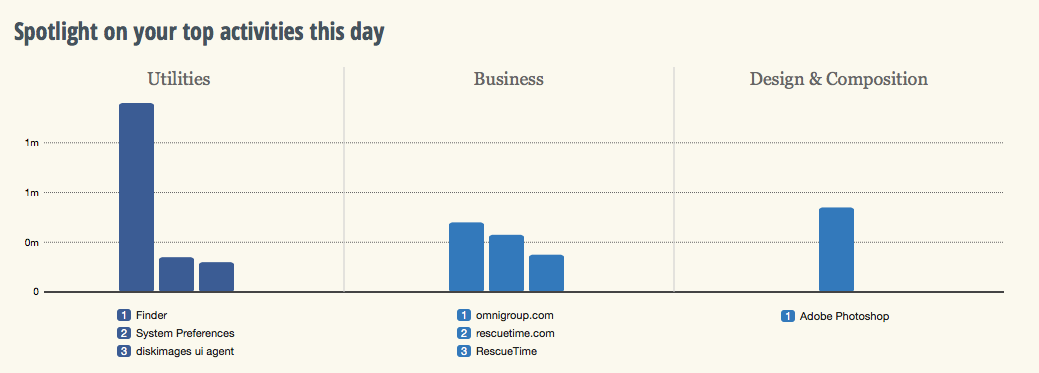
 

Screen Shot 2014-02-18 at 11.37.46

If you didn’t click – and honestly who has the time to click? – then what it says is that I have spent about a minute and a half in Photoshop today. And that was the result. A cropped screen grab you can barely see. Oh, and also the wee cropped-even-closer graphic in Save a Whole Second When You’re Installing Software on Macs. A minute and a half. Wasn’t worth it, really, was it?

But it also tells me I stopped by the Omni Group website – not a shock, Omni does my long-beloved To Do manager OmniFocus and my recently-becoming-beloved OmniOutliner – and some stuff about how I piddled about in my Mac’s Finder. As you do.

But if that looks a bit rubbish as a snapshot of my entire working day – it’s now 11:45 and I’ve been writing since 5am so I promise I’ve accomplished more than that – it is a terrific snapshot of the three minutes since I installed RescueTime.

In the free version that I’m trying out, RescueTime does this logging so that you can see where in the world you spent your time. I’m looking forward to how it describes my bacon sandwiches at lunchtime. But armed with all this, you can see where you are effective and where you are procrastinating. You can see what on your computer keeps you working and what keeps you from working too. There’s a paid-for Premium version which lets you work with that information directly: it assigns scores to how distracting various sites or activities appear to be to you and then you can say no more. For the next thirty minutes, or whatever you choose, the premium version of RescueTime will deny you access to what most distracts you.

The premium version has other features and costs $9.99 US/month. The free one is impressing me, a whole four minutes in, so I’m going to keep it around for a time longer. I wrote in The Blank Screen (UK edition, US edition) about software that blocks distracting websites by actually blocking the whole internet but I have never used any of it. This might change my mind.

Two years is lightning fast

Your mileage will vary, no doubt, but this or something like it has happened to you, will happen again and may be happening today. Right now, I need a cable. I need an old iPad 30-pin cable, the type that Apple used for every iPad and every iPhone and every everything else for a decade or more and now doesn’t.

I actually don’t have a problem with Apple changing to the new slimline Lightning cables. Ten years with one type, shrug. But the cables are expensive enough that I hesitated over buying a spare for my travelling bag. In the end, a close call with a low battery convinced me to do it and the discovery that the cables cost less in the States convinced me to replace a damaged one while I was in San Francisco.

But today is the first time I’ve noticed I can’t find any of my old cables. I had oodles of these. I haven’t sold them or given them away, but they ain’t nowhere to be found. Unless they’ve gone to the same planet that old Biros do, they are right here with me and I can’t find them.

All I can find are lots of new Lightning cables.

Apparently these little suckers were introduced on September 12, 2012 and now, less than two years later, all traces of the old ones are gone.

I’m minded of this because I need the cable and I thought telling you might bring it back to mind where in the hell I’d left one. But also, I was in a chat the other night with some folk I’d not talked to in about the same length of time. And they asked me what I’d been up to and I told them nothing, really, couldn’t think of anything, and they pressed, and no, honestly but they pressed. Until I worked it out that when we’d spoken before, I’d done maybe one presentation to a group and this week I’ll be doing my fifty-something one.

I wanted to do this, I didn’t believe I could do it, and it’s done. And I can’t remember when I didn’t do it.

I need to find a cable, yes, but I think I also want to find more virtual cables and things I don’t believe I can do and go do those until they’re part of me too.

Pattern weeks part 6 – not so much

Previously… in an attempt to get more done in huge week, I've scheduled some important slots. I'll do certain things for certain projects at certain times so that they are done and I know they are done and they are always progressing instead of ever coming to a pause. I call this schedule the pattern for the week and it's named after the term 'pattern budget'. That's the money you've got to spend on each one of many things, like episodes in a TV series. In practice, you shovel that cash around so your first episode can be really big. You just save the money later and it works out. Similarly, my pattern weeks get disrupted by other events: if I'm booked somewhere for a day, the people who booked me get me for the day. I don't go off taking meetings or phoning other people.

Sudden memory: Hays Galleria, London, by the Thames. I'm working on a magazine and every lunch time would go out to a nearby phone box with a pile of pound coins to make as many calls as I could. That would've been early 1990s and I wonder now if that's the last time I used a public phone box. The magazine was a technology one, long gone now, and I was one of the people reviewing the earliest of mobile phones. A brick with a handset. I can picture me standing by the Thames late one gorgeous evening, phoning people because I could.

Anyway.

I've been working away from my office a lot lately and that's disrupted the pattern twice over: I obviously lose the time I'm somewhere else but it also means getting ahead with some things before it, catching up with other things afterwards.

So the pattern has failed a bit since Part 5 when I said it was working. It still is, I think, and my only real grumble is that the chart I made of the pattern is so amateur that it hurts me. And it hurts me often. I replaced my beautiful iMac wallpaper with this horrible thing and it is also on my MacBook. Hate it. But for now and especially while I'm finding it hard to keep up because of disruptions, I'm going to keep it there.

More urgently for me, I think, is sorting out email. I have a follow-up mailbox that I bung in things I need to respond to and sometimes I also forward the mail right into OmniFocus, my To Do manager. Yet still, especially when weeks break apart, I let things go through cracks.

This week I'm using Polyfilla.

Evernote and Pocket – together they fight crime

If it is always risky to rely on one piece of software – companies shut them down often enough – then relying on two is either doubly risky or twice as smart. But sometimes two totally separate applications from unrelated companies just happen to go together and produce something new. Ity that hydrogen and oxygen get together; two gasses team up to become a liquid.

This is what you can do with Evernote and Pocket: the former being the note taking application and the latter a Read It Later one.

Evernote is excellent for collecting notes but sometimes you don't want to keep them. If you just want to have a read and then decide whether you need to keep something around…

The solution is to dump all of the clippings from the web, Twitter, and your RSS reader to Pocket. Pocket makes it easy to check off the things you've read. Then, if you want to save the article for future reference, send it to Evernote. This way, Evernote becomes more of a long-term yet uncluttered storage tool.P

Evernote comes with a we clipper that is handy for grabbing pages yet somehow I only use it extremely rarely. It's just handier to save to Pocket. It's become automatic for me to do that where I have to positively think to use Evernote. Funny how some things stick with you and others don't.

Read more from writer Jamie Todd Rubin.

Feel great about reading this

Tell yourself you can have a treat afterwards. If I could get it to you, there is a biscuit here with your name on it. And doubtlessly you can find or think of many treats and rewards for yourself – and this is reportedly one way to get yourself to do stuff.

…my father created a system of small rewards to help me get through schoolwork. The fundamental basis of the system is counter-intuitive: If you want to get five tasks done, my father always said, first find five additional but enjoyable tasks to do.

Sidin Vadukut writing on Quartz. He makes it sound there as if you have to reward yourself with another task and I like the way that works but he's speaking more broadly than that. He's saying that you can, for instance, research something you're interested in buying. That could be your treat for doing the horrible thing. It doesn't have to be caffeine- or sugar-related.

You can read his whole piece with good and strong arguments here and I must also tip my hat to the 99U site which spotted this.

My only thing against it, really, is that I can see myself ballooning up under the amount of tea or chocolate biscuits I'd end up eating. Actually, that's one serious concern but my only other thing against this is that sometimes it's good to do lots of bad things. If I have a lot of calls to get out of the way, I will do them better and faster by just whacking through the lot one after another. If I stopped between them, for any reason, I would find it just a bit harder to pick up the phone again.

I have to fool myself into cold phone calls so perhaps that's just a weakness of mine. I'll think about this.

Review everything so you don’t have to see it all

Yesterday's post about reviewing one's Evernote notes each day got me a message about how OmniFocus rocks reviews. It does. I even said so. In fact, I said it was because I'd felt the huge benefit of reviews in OmniFocus that I was going to give this similar Evernote one a go. But I didn't say what OmniFocus's review is.

I'm not sure I've even said what OmniFocus is. That's rare. Usually you can't shut me up about this software. It even comes up in my otherwise application- and platform-agnostic book about productivity for creative writers, The Blank Screen (UK edition, US edition)

Songs will be sung of the day I finally shut up about it. OmniFocus is a To Do manager but as I'm sure I've said before, that's like saying War and Peace is a stack of paper with some ink on it.

So, you may guess, I'm a fan. Rather than fan on at you about it now, though, I want to make sure we're clear on what a review is in this context. If you have OmniFocus, great. If you can get it – it only runs on Macs and iOS so Windows and Android users are out of luck – well, that's great too. But if you don't have it, you can still do this part.

Maybe not so well.

Actually, no, there's not a maybe about it. OmniFocus does reviews really well, most especially in the iPad version.

But you can and even more than I would go on at you about OmniFocus, I would go on at you about reviews.

Here's the thing.

Right now I have several hundred tasks in my To Do manager, arranged in probably a couple of dozen different projects. Everything I ever have to do, everything I ever think of gets chucked into OmniFocus. Now, many of them never get done. If it occurs to me, I'll add it to OmniFocus and think about it later. When that time comes, often I've done the thing already. Very often I'll find it occurred to twice so it's in there twice. And fairly often I'll look at it and decide no, I'm not going to do that.

But otherwise, it's all in here and it's all live.

Except.

I have a busy day today and OmniFocus is showing me 24 things. Just 24. Actually, hang on… I see I've done four of them this morning. Okay, that's 20 left. But as much as 20 is, it's nowhere near as much as several hundred. I can completely forget all the rest of them, I can pretend they don't even exist and because I do that, I am doing these twenty – wait, just remembered another one I've done, it's now 19 left – I am doing these 19 at a clip.

That's nice for me.

But the reason I can do it all is that OmniFocus is hiding the rest until I need them. And the reason OmniFocus can do that is because I review regularly.

On Mondays, Wednesdays and Fridays I open up OmniFocus and check every task in every project. If you think ticking one thing off as done is good, imagine how great it was just now ticking off five or doing a review and seeing you've already done thirty tasks. I look at every task and if it isn't done yet, I have a ponder about why. Do I need to do something else before I can get that done? Fine, add another task. I rattle through these remarkably quickly and at the end I still have the hundreds of tasks but I know what they all are.

And most importantly, I know they're being dealt with. Those things I have to wait for Bert to call me back, they'll wait there until he rings me or I chase him. Those things I know I have to do on Tuesday, I'll see the list on Tuesday and not before.

You end up trusting your system, whether it's OmniFocus or anything that works to David Allen's Getting Things Done ideas (UK edition, US edition). And that trust is amazingly liberating. Knowing that you list is only showing you what you need to know now, it means that the list is doable.

And that means you do it.

This is one of the key things that makes a To Do list something I use rather than hide away from. And it's just this simple idea of a review.

Seriously, you don't need OmniFocus to do this. But, seriously, OmniFocus could just be the finest piece of software I've ever used and it is certainly the one thing that has made me productive. You'd think they were paying me.

That was January 2014

You don't need to read this but I need to write it. For about the last year, I've been on a Writing West Midlands programmed called Room 204 and through a misunderstanding, I got into the habit of sending them a monthly report of what I'd been up to. They were very patient with me. But I found that writing it all down and actually remembering to make the odd note during the month, meant I didn't forget things. And where I would naturally dismiss most things I do, forcing myself to put it in black and white truly helped me.

January, for instance. I'd walk away from January thinking I'd had a good time but hadn't really achieved anything. It's true. But I had a right good bash at things. While I need a practical benefit to writing it down – so I use these lists to check I'm not repeating a pitch or to see how long it's been when I want to chase one – the real benefit isn't practical at all. It's just that I feel better for doing it.

I'm about to leave Room 204, my year is up, and I need to continue this report for the sake of my very soul. I have to write it but, seriously, you don't need to read a word. If it's a choice between me and a biscuit, even I am already munching.

One thing. I have to summarise and edit this list because a lot of things are confidential. It would be nice if that were as dramatic as it sounds, but you know you can't name names when you're still negotiating and you definitely won't name names when they've said no.

With all that in mind, this was my January 2014:

Phone calls: set a target of 30, did 56

Writing: approximately 30,000 words
Radio proposals: 3
Television proposal: 1
Self Distract personal blog: 5 entries
The Blank Screen news blog: 63 entries
Guest blog on two sites
Assorted promotional material

Pitches: 25
Success: 7
Rejection: 4
Ongoing: 14

Workshops/schools/talks: 9

Attended:
Big Finish Day 4
Room 204 funding workshop
Rep Foundry Showcase day

Other:
Officially launched the new williamgallagher.com site
Wrote and shot “Ye Olde 3G” 30-second video promo: won an iPad Air
Edited gorgeous 40-second video
Begun issue three of Write On! magazine
Room 204 buddying with Sarah Leavesley
PR discussions with Gigi Blum Peterkin in US
Clipped my and friends' radio appearances
Liaising between RTS, Writers' Guild and Screenwriters' Forum continued
Planning poetry app for Jeff Phelps' River Passage and funding application
Read and edited more chapters from Catherine Schell
Quoted by online newspaper WriteSoFluid
Interviewed for Doctor Who Magazine
Novel discussion with my agent Paul Moreton
Devised a pattern week: a regular timetable for office days; made me more productive

ENDS

Give yourself a Paddington stare

The New York Times has a piece about a restaurant owner who turned his business around chiefly by giving himself a hard look in the mirror. It's a nice story and they use it to illustrate what they believe is a key business point which can apply to all of us:

In interviews we did with high achievers for a book, we expected to hear that talent, persistence, dedication and luck played crucial roles in their success. Surprisingly, however, self-awareness played an equally strong role.

I've read as many pieces about aiming high as you have so it's nice to have one that says there's value in stopping to look at yourself as you really are right now.

Read the whole piece including what happened with that restaurant and while you're at it, do please give Lifehacker a nod for spotting it.

Presidential Productivity

TO DO LIST

Argue with Congress
Pick up laundry
Avoid a land war in Asia

As President Obama gives his State of the Union speech, take a look inside how he works. If POTUS isn't the busiest person in the world, I don't know who is. And you know you can learn from how he physically does the job – regardess of your politics.

Last year, 99U went through detailed articles about the President's day to day regime in Vanity Fair and The New Yorker, amongst others. Culled from those pieces is a straight list of just five things to do when you're juggling the fate of the free world in your hands.