Seriously, who are these people? Treehouse drops all managers

This is the company that hires people at full, good pay to work only four days a week. I wrote about this in January:

Ryan Carson of the technology firm Treehouse proposes that maybe we can work four days a week and do more with it. He’s not trying to save money: you get paid your full, normal salary, you just don’t work five days a week. It sounds like he’s a productivity guru looking for a startling yet appealing angle, but the fella has his reasons and he’s put them to work: this is genuinely how his company is run.

– A Four-Day-Week With Pay (The Blank Screen), 7 January 2014

The real kicker for me, the reason to tell you about it, was that this was revealed after many months so the idea was tested. It wasn’t just a theory. Now the firm has revealed that there was something else going on:  you knew there was a catch, didn’t you? No, there isn’t. They were just doing something else and not telling one: they were getting rid of all managers.

If you are a manager and just paused with a biscuit at your lips, they didn’t fire them. They got rid of the role and of the title and everyone who was a manager now works alongside everyone else. Carson says it’s as if they hired six new workers.

Now rather than the standard model of how a business runs, Treehouse has a holacracy: anyone in the firm – anyone – can have an idea and try to get it done. Rally support, get others in on the idea, and if enough do, it gets done. If they don’t, it doesn’t. (Holacracy is a new term to me: if you don’t know it, think of how bittorrent works by spreading the work between many peers instead from a central source. Or think of bees. Carson says it’s like a beehive. And Wikipedia gets serious on the topic.)

Carson says:

It was a bold move and one that not everyone was convinced of. We proposed to change the way the company operated and give all employees 100% control of their time and let them decide what they work on each day. From now on no one would tell anyone what to do, not even the CEO. (Me!) – See more at: http://ryancarson.com/post/61562761297/no-managers-why-we-removed-bosses-at-treehouse#sthash.JbjTp3SW.dpuf

He says that in his blog, The Naive Optimist, where he has begun a whole series of articles about this. You would expect that he’s going to tell you at length how great this idea is and, actually, fair enough. If it hadn’t worked, you have to assume we’d never have heard a word about it and Treehouse would’ve gone back to the old system. So yes, there is a lot about how well it’s working. But it’s fascinating and most especially so when he gets into why it isn’t. Why it fails, when it fails, and what they have to do about it.

Oh, and Treehouse is a firm doing online teaching for coding. Like you cared. You just want your firm to do the same.

Email hacks – create a temporary group in OS X Mail with TextExpander

File this under I Needed To Know But Couldn’t Find It On the Internet. So here I am putting it on the internet.

My problem was that I now have to regularly email the same group of about 25 people, a good dozen or more are not in my address book. OS X Mail remembers who you’ve emailed before, whether or not they’re in your address book and that is remarkably confusing. I’ve just been slogging through this and discovered the strangest people are not in my address book: people I email often, people I like enormously, they ain’t in there.

They are now.

Side tip: in Mail, choose the Window menu and the entry for Previous Recipients. You get a long list. A long list. But if somebody is in your book, you get a little contact-card-like icon next to their name. And if they aren’t, you don’t. Click on the first one who isn’t there then option-click on each other one you want. Thump the Add to Contacts button and you’re done.

But with my group, I don’t actually know that many of them. Certainly not enough that I could glance down that list and know who was in the group, who isn’t. So I thought I was faced with adding each one separately and then collecting them into a group.

I was. Except I had a Damascus moment: I’ve got TextExpander.

So this is what I did – and I apologise for how geeky it sounds, I promise that it took seconds.

1) Found the last email to the group

2) Hit Reply to All

3) Selected all the names in the To: field and dragged the lot into the body of the message. They turned from the familiar blue-button names into names plus email addresses. They looked like this: “William Gallagher <wg@williamgallagher.com>” except with twenty-five more of them, all in one massive lump with commas between them.

4) Copy and paste into Word.

5) Search and replace “>, ” (the closing bracket, comma and space that is at the end of every address) and replace with “^p” (Word’s code for a paragraph)

6) Set a tab halfway across the page.

7) Search and replace ” <” (the space and opening bracket that is at the start of every address) and replace with “^t” (Word’s code for a tab)

8) That got me what looks like two columns: the first with people’s real names, i.e. “William Gallagher” and the second with their addresses, “wg@williamgallagher.com”

9) Option drag to select the column of names and the white space over to the start of the addresses.

10) Delete.

11) I was left with one column of addresses.

12) Search for “^p” and replace with “, ” (comma, space)

13) That got me back to one massive block of text that was every email address separated by a comma. Select and copy the lot

14) Open TextExpander and create a new snippet, a piece of text I want to use often. Paste my massive block of addresses and commas in to that and set a short key combination for the lot

So now whenever I’m writing an email message, I can type “;swf” (with the semicolon but without the quote marks) and the To: field is filled out with all of these nice people.

Now, truly, if you read out the above at the standard speaking speed of three words per second, it would take you a minute and forty seconds. I’ve just worked through the instructions again to check and the whole shebang took me… oh… a minute and 35 seconds. Okay. That was rubbish.

But next time I want to email this group, it will take me a seventh of a second. No searching for the last one, no adding some from the address book, some not, just “;swf” and wallop.

There is the downside that the people who weren’t in my address book still aren’t in my address book. As I talk with any of them individually, I’ll have to remember to add them. And I could have continued to just find the last email and Reply to All. I definitely could’ve done that and I have done for a month or more now. But each time I do it, I have to check the list because some people have asked to be taken off the group. Now I can forget that and just email everyone in one go. If anyone new asks to come off the list, it’s a moment’s work to edit the TextExpander snippet.

No, face it, William, this was a five-pound hammer for a one-cent problem. But it’s done now, get off my back.

WHAT YOU NEED

Definitely TextExpander. But then you need that for everything. Promise. Read more about TextExpander on its official site.

Microsoft Word. Any word processor would probably do this but I turned to Word – even though I don’t use it so much any more – because I knew the codes for paragraphs and tabs. See more about Microsoft Word on its site. I used the Mac version which takes a little more digging to find on Microsoft’s site. Can’t imagine why.

How to Get Rejected – I didn’t think of this bit

The Blank Screen book (UK edition, US edition) and particularly the workshop I do based on it has a particularly popular segment called How to Get Rejected. Without fail, everyone thinks it’s a joke at first – and I’ll do anything for a laugh, it could easily be a gag – but then sees both that I’m serious and that it’s useful.

This is about what to do when you are rejected. It’s how to best deal with rejection and it’s how – sometimes – you can make it a good thing. Let’s not get daft about it. A slammed door is a slammed door. But just often enough, there is something more and the rejection is the first step rather than the last hope. I’ve even pitched things knowing that it will be rejected because it was useful. Also, I’m an idiot.

The one-line summary is that when you’re rejected, let it go. Because it’s already gone. The decision is made and you cannot change it – but you can change the future. Not always, not anywhere near always, but sometimes and it’s better for your anxiety pill intake as well as being good for your career:

Be the one writer who’s nice about all this. Steven Moffat had a particularly good line in Press Gang: ”It’s nice to be smart but it’s smart to be nice”. It’s also just easier. See a rejection as personal and you get tied up in knots; ask them for feedback and you get tied up with the reputation of being a whiner – without getting any advice that was of any use to you. Either way, you get tied up and the whole point of this book is to show you how to be more productive. So be more productive by being nice about the things you can’t control and putting your effort and your time into the things you can. 

But.

I had a rejection yesterday that mattered. I responded the way I say we all should and it was particularly easy to be nice because I knew for a fact that the guy who brought me the news was not the one who’d made the decision. I knew he’d wanted the project to go ahead too, he’d gone to bat for me. So it was extremely easy to reply gratefully to him.

Only, this is the first time I’ve then had to pass the rejection on to other people. I still can’t tell you what the gig was because within an hour I’d thought of something else I could do with it so it’s still live, but it’s one where I’d had to get rights sorted out before I could pitch. Now I had to explain the gig was up to the rights owner.

It was a weird position to be in: I had been rejected and I was now rejecting – not literally but effectively. Just as the fella who told me wasn’t the one who made the decision, I obviously hadn’t made the decision either but he was the one telling me and now I was the one telling the rights owners. This is a project that matters to us all very personally as well as artistically and professionally so I didn’t enjoy dialling those numbers.

But the main rights owner, while as disappointed as I am, was nice about it. She took the rejection in exactly the way I believe we all should. She was nice and she understood that it wasn’t me. (We did then have a little shared grumble, because we could.) She was a pro and it reinforced for me that this works. I left that call feeling better and even energised to find a new route for the project. I’ve seen before that my being relaxed and nice about this has worked for me but now I felt it from the other side and I understand.

Being nice about a rejection doesn’t change the rejection. It may never change anything, ever. But it’s always better for your soul and your stomach. And I now believe that it is always better for the person who is rejecting you. There’s nothing wrong with making things better for them: they’re going to reject you regardless, it’s not like you’ll make them think they’ll reject you because you’ll take it better than other people. And often enough, it leads to other work in the future. That’s obviously great, that’s obviously what you want, but I see it as a bonus.

Leave ’em laughing, it’s the only way.

Very, very snap review: OmniDiskSweeper for Mac

I tells you, right, I’ve got a 3Tb hard drive in this ‘ere iMac and it got down to just 15Gb free. Without my noticing. How dare it.

If you go below around ten percent free space on your hard drive, you pay for it in a dramatic slowness and that’s what I’ve had lately. This is the fastest machine I’ve ever owned, it is so much faster than my last Mac – a Mac Pro that officially ran for six years but actually I’m still using sometimes – that I could design books using the Adobe CC suite. But suddenly it was a molass at opening a folder.

OmniDiskSweeper saves the day. It’s a tool from the Omni Group and it chunders away across your drive, totting up the figures and tutting a bit, then showing you the lay of the land. You’re spending how much space on movies? Everything’s detailed and shown in such a way that you can quickly zero in on the – in this case – more than a terabyte of files to do with one old job. I am at this very moment copying that lot off to an external drive and intend to luxuriate in an iMac that is restored to life and which has enough room to paddle about in.

OmniDiskSweeper is free. Get it where many fine applications are sold, over at The Omni Group. It interests me, mind, that I would not have heard of or found or considered OmniDiskSweeper if I didn’t happen to be an ardent user of one of the firm’s other products and a pretty ardent user of a second. The Omni Group makes the To Do manager OmniFocus and the outlining software OmniOutliner. I am actually waiting for the chance to give them more money for the next versions of OmniFocus, I like it that much.

RescueTime interview feature

What was I saying about seeing RescueTime everywhere? Just after I posted my Very, Very Snap Review of RescueTime, I found this on Lifehacker: it’s an interview with the creator and is a particularly interesting read. I recognise a huge number of the things he says about why the software was created:

Do you ever have those days where you know you’ve been working hard all day, but then can’t remember what you did by the time 5pm rolls around? We found ourselves in that position way too often and it was really frustrating. It felt like hours of our day were falling into a black hole. I could usually remember some things I did, but trying to account for a full eight hours always ended up with a bunch of blank spots in it. I ended up feeling really guilty about it, figuring that the missing time must have been spent screwing around on Twitter or reading blogs or something.

Robby Macdonnell of RescueTime, talking to Lifehacker.


Very, very snap review: RescueTime

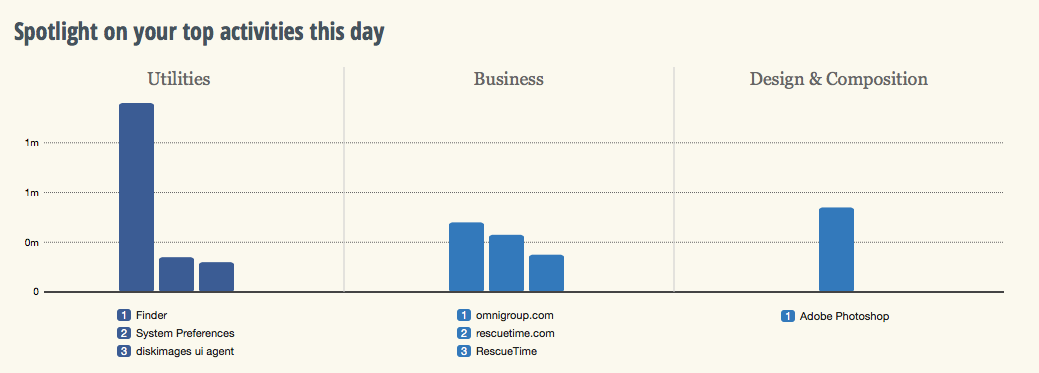
You know how you hear about something and then suddenly it’s everywhere? I’ve been hearing of RescueTime like it’s a new thing but it’s been around at least for a while and it does this (click to see it better):


Screen Shot 2014-02-18 at 11.37.46

If you didn’t click – and honestly who has the time to click? – then what it says is that I have spent about a minute and a half in Photoshop today. And that was the result. A cropped screen grab you can barely see. Oh, and also the wee cropped-even-closer graphic in Save a Whole Second When You’re Installing Software on Macs. A minute and a half. Wasn’t worth it, really, was it?

But it also tells me I stopped by the Omni Group website – not a shock, Omni does my long-beloved To Do manager OmniFocus and my recently-becoming-beloved OmniOutliner – and some stuff about how I piddled about in my Mac’s Finder. As you do.

But if that looks a bit rubbish as a snapshot of my entire working day – it’s now 11:45 and I’ve been writing since 5am so I promise I’ve accomplished more than that – it is a terrific snapshot of the three minutes since I installed RescueTime.

In the free version that I’m trying out, RescueTime does this logging so that you can see where in the world you spent your time. I’m looking forward to how it describes my bacon sandwiches at lunchtime. But armed with all this, you can see where you are effective and where you are procrastinating. You can see what on your computer keeps you working and what keeps you from working too. There’s a paid-for Premium version which lets you work with that information directly: it assigns scores to how distracting various sites or activities appear to be to you and then you can say no more. For the next thirty minutes, or whatever you choose, the premium version of RescueTime will deny you access to what most distracts you.

The premium version has other features and costs $9.99 US/month. The free one is impressing me, a whole four minutes in, so I’m going to keep it around for a time longer. I wrote in The Blank Screen (UK edition, US edition) about software that blocks distracting websites by actually blocking the whole internet but I have never used any of it. This might change my mind.

Save a whole second when you’re installing software on Macs

It’s only a second, but it adds up. Next time you download some software to your Mac, don’t wait for the Verifying. Just immediately click Skip.

skip-button

After all, what exactly are you going to do if it fails to be verified? If it’s going to die on you, take that gigantic gamble of waiting until you run this software. It will always be fine. If there were every anything that would’ve stopped the thing being verified, the application won’t run now and you are no further behind than you were.

I’m wondering if this is all a hangover from the days when we would lose disc 6 of 19. Do you even remember the prehistoric days when you used to have to buy software on disc? I know. Crazy.

Two years is lightning fast

Your mileage will vary, no doubt, but this or something like it has happened to you, will happen again and may be happening today. Right now, I need a cable. I need an old iPad 30-pin cable, the type that Apple used for every iPad and every iPhone and every everything else for a decade or more and now doesn’t.

I actually don’t have a problem with Apple changing to the new slimline Lightning cables. Ten years with one type, shrug. But the cables are expensive enough that I hesitated over buying a spare for my travelling bag. In the end, a close call with a low battery convinced me to do it and the discovery that the cables cost less in the States convinced me to replace a damaged one while I was in San Francisco.

But today is the first time I’ve noticed I can’t find any of my old cables. I had oodles of these. I haven’t sold them or given them away, but they ain’t nowhere to be found. Unless they’ve gone to the same planet that old Biros do, they are right here with me and I can’t find them.

All I can find are lots of new Lightning cables.

Apparently these little suckers were introduced on September 12, 2012 and now, less than two years later, all traces of the old ones are gone.

I’m minded of this because I need the cable and I thought telling you might bring it back to mind where in the hell I’d left one. But also, I was in a chat the other night with some folk I’d not talked to in about the same length of time. And they asked me what I’d been up to and I told them nothing, really, couldn’t think of anything, and they pressed, and no, honestly but they pressed. Until I worked it out that when we’d spoken before, I’d done maybe one presentation to a group and this week I’ll be doing my fifty-something one.

I wanted to do this, I didn’t believe I could do it, and it’s done. And I can’t remember when I didn’t do it.

I need to find a cable, yes, but I think I also want to find more virtual cables and things I don’t believe I can do and go do those until they’re part of me too.

Pattern weeks part 6 – not so much

Previously… in an attempt to get more done in huge week, I've scheduled some important slots. I'll do certain things for certain projects at certain times so that they are done and I know they are done and they are always progressing instead of ever coming to a pause. I call this schedule the pattern for the week and it's named after the term 'pattern budget'. That's the money you've got to spend on each one of many things, like episodes in a TV series. In practice, you shovel that cash around so your first episode can be really big. You just save the money later and it works out. Similarly, my pattern weeks get disrupted by other events: if I'm booked somewhere for a day, the people who booked me get me for the day. I don't go off taking meetings or phoning other people.

Sudden memory: Hays Galleria, London, by the Thames. I'm working on a magazine and every lunch time would go out to a nearby phone box with a pile of pound coins to make as many calls as I could. That would've been early 1990s and I wonder now if that's the last time I used a public phone box. The magazine was a technology one, long gone now, and I was one of the people reviewing the earliest of mobile phones. A brick with a handset. I can picture me standing by the Thames late one gorgeous evening, phoning people because I could.

Anyway.

I've been working away from my office a lot lately and that's disrupted the pattern twice over: I obviously lose the time I'm somewhere else but it also means getting ahead with some things before it, catching up with other things afterwards.

So the pattern has failed a bit since Part 5 when I said it was working. It still is, I think, and my only real grumble is that the chart I made of the pattern is so amateur that it hurts me. And it hurts me often. I replaced my beautiful iMac wallpaper with this horrible thing and it is also on my MacBook. Hate it. But for now and especially while I'm finding it hard to keep up because of disruptions, I'm going to keep it there.

More urgently for me, I think, is sorting out email. I have a follow-up mailbox that I bung in things I need to respond to and sometimes I also forward the mail right into OmniFocus, my To Do manager. Yet still, especially when weeks break apart, I let things go through cracks.

This week I'm using Polyfilla.

Evernote and Pocket – together they fight crime

If it is always risky to rely on one piece of software – companies shut them down often enough – then relying on two is either doubly risky or twice as smart. But sometimes two totally separate applications from unrelated companies just happen to go together and produce something new. Ity that hydrogen and oxygen get together; two gasses team up to become a liquid.

This is what you can do with Evernote and Pocket: the former being the note taking application and the latter a Read It Later one.

Evernote is excellent for collecting notes but sometimes you don't want to keep them. If you just want to have a read and then decide whether you need to keep something around…

The solution is to dump all of the clippings from the web, Twitter, and your RSS reader to Pocket. Pocket makes it easy to check off the things you've read. Then, if you want to save the article for future reference, send it to Evernote. This way, Evernote becomes more of a long-term yet uncluttered storage tool.P

Evernote comes with a we clipper that is handy for grabbing pages yet somehow I only use it extremely rarely. It's just handier to save to Pocket. It's become automatic for me to do that where I have to positively think to use Evernote. Funny how some things stick with you and others don't.

Read more from writer Jamie Todd Rubin.