Year planning in May

If you didn't even make it in time to have New Financial Year's Resolutions, do it now. Sketch out your next year and make me feel more sensible for how I'm doing it.

I did a rough year plan last December or perhaps really I had a thought about making a rough plan. I definitely helped others with theirs and they definitely tried to help me back, but I resisted. Mostly through being a bit focused on the month, the week, the day, the hour and occasionally the minute plan. But also because a year seemed a bloody big thing.

The year has got shorter now we're in May, but I'm not specifically planning 2014, I'm looking 12-18 months ahead now. And the reason I think I can do this is that my work has changed. I'm much more tied to a calendar now: I just did a gig at a festival and that was on a certain day, it was arranged many months before. It used to be that everything I did was task-based in that I'd get some work, I'd do it, I'd go straight on to the next. There were usually deadlines but they were always short ones and the quicker I could turn something around, the better.

With festivals and events taking over, I feel like I've got these tentpoles ahead of me. I can't do much in early October, for instance. Knowing that now, here in May, is weird but I like it. And whenever you find something you like, enjoy it, exploit it a bit. I've already used that October tentpole to say I can't do this other particular thing until December. I know that the two events need to be separated by a fair time, I know how long it will take me to finish up one and get the other going, I know how much time that will leave me for the short-term work I rather live for.

When did I get this organised? Today. And the thing with being organised around tentpoles in your calendar – I'm just making up terms now, aren't I? – is that the constraints are liberating. Knowing that I've just this week done one event means I can wipe that from my head and concentrate on one I've got for 31 May and then I can forget that until the next one in August.

I'm losing the anxious uncertainty I had when people would ask if I were available for something and I'd always say yes regardless of how hard or sometimes impossible that would make my month.

I keep saying this. As writers, we create characters and we set rules – our blind watchmaker can't suddenly see just because it solves a plot problem – and setting ourselves just a few rules, a few plans, helps.

Go plot out your next 12-18 months, would you?
Wonderful

I'm British, I can't do this. Actually, I'm British so that means I can and I do but I don't tell anyone. It's just the way we are. But I'm going to tell you. You've got that face, I can tell you anything.

Alongside my email Inbox, I have the things I recommend in The Blank Screen (UK edition, US edition): a Follow Up mailbox and an Archive. Also a trash and a junk and I'm both ruthless and quick about sending things to either of those. I do also have a Travel Bits mailbox that holds train and plane ticket emails. Much as I use and rather adore TripIt, it recently couldn't parse a plane ticket and there are some operators like National Express who want to see their own format emails when you wave the phone at you.

None of this is difficult to tell you.

This is.

I also keep an email mailbox called Wonderful.

When an email arrives that really lifts me, I'll put it in there and cherish it. Certain commissions I've longed for. Gorgeous messages from people about enjoying The Blank Screen (UK edition, US edition). There's more, I'm not telling you. But you get the idea. Lately I've also started an Evernote notebook called Wonderful for things like this that don't arrive via email. Letters I have scanned in anyway, I'll put in there. Tweets, facebook messages. I'm not very consistent but I do it.

And the result is that every now and again I can go take a look and feel better.

If you want to get techy about it, I suppose I could just tag these things with the word 'wonderful' and leave them wherever they be, but I like having this growing pot of people I like saying the most amazing things. When you see them all lined up like that, it's overwhelming enough that I can't process it so easily. I can't rationalise that she was just being polite, that he wanted something, that they got the wrong man.

So I want to recommend this to you.

Do it yourself, go on. Have your own Wonderful inbox. Just pretend like it was your idea and not mine, okay?

Pattern Weeks #5 – the conclusion(ish)

Pattern Weeks #5. (Here's #4 and if you want to hear my Secret Plan to Take Over the World, here's Pattern Weeks #1.) Now, read on. So, did it work?

No.

I'd like to say that my laying out a pattern for a typical week failed only because I haven't had a typical week in a while. This is true. Not only have I had many talks or other events but I have to factor in the day beforehand when I get paralysed with nerves and the ten minutes afterwards that I am (usually) elated. (I've done 71 gigs since records began back in late 2012 and 70 of them went brilliantly. That 1 makes my nerves churn and the 70 also make my nerves churn.)

But it really failed because I let it.

I've been more Pavlovian lately, usually when I get an iMessage: I seem to be good or at least better than I was at not reacting to emails, at not even reading emails so instantaneously, but not iMessages. It may be the red notification badge. I've switched that off on Mail but haven't seen how to do it on iMessages.

Actually, I can't see how to do it on Mail either. On my office iMac, it's bliss: no red badge unless I get an email from someone I've said is important or urgent. On my MacBook, not so much. I can choose between a red badge for everything or a no red badge for anything, I can't see how I did it in my office.

Also, by the way, I've let myself get distracted by tiny puzzles like that.

Overall, though, the problem is more that working hard is hard work. It has to be done, I want to do it, but it's still hard. Some days are harder than others. And if you think I'm now saying the most obvious thing you've ever heard, here's one to top that: I must get down to working harder.

I'm going to restart the Pattern Week – and that is one good thing about all the productivity stuff I tell you, you can pick it up and start again any time – and I'm going to get on with it.

I just felt I should be honest with you and admit failure. Not defeat, not yet, but failure.

Scrivener on sale for 50% – but hurry

I sound like an advert there. But hurry – stocks can’t last forever! Before I say “but you do have to be quick”, remember that Scrivener has gone on sale before. Usually only through bundles or other deals as it has today with MacUpdate, but it has gone on sale.

So presumably it will again and I loathe how the words “but hurry” work on our minds: a company sets a completely self-imposed deadline and it works. But every firm does that and this one has a great product which is briefly on sale. At time of writing you have one day and about 13 hours in which to buy Scrivener for 50% off.


scrivener-logo


Here’s what it is:

Scrivener is a powerful content-generation tool for writers that allows you to concentrate on composing and structuring long and difficult documents. While it gives you complete control of the formatting, its focus is on helping you get to the end of that awkward first draft.

Literature and Latte, makers of Scrivener

That’s a “yeah, but” kind of description: it does tell you something but it doesn’t convey much. It’s also a “yeah, and” kind of description because it doesn’t convey why you would want such a thing. So let me have a go, with one caveat.

I don’t have Scrivener.

I bought a copy for my wife Angela Gallagher and I tried it out with her. At first it felt like just another word processor but then its way of letting you throw thousands of things – text, articles, websites, images, anything – together into a project and sort it out was really impressive. I’m working on a book with someone and after lots of oddities in our email conversations where some chapters just wouldn’t arrive she’d have to resend them and it’d be out of order. Or often she rewrote some parts and sent me the new versions. I was really struggling to get a grip on what had been written and what was ready, what hadn’t and what wasn’t. Scrivener let me piece it all together in the right sequence and have an actual book at the end of it.

I’d have gone upstairs to my office iMac and bought my own copy there and then.

Except.

I am still working on this book. We are still working on it. Chapters go back and forth plus, the day I was doing this compiling of materials, I was doing it because I was going to stay with the writer and we needed to go over a lot of things.  You can’t collaborate in Scrivener. I had to take everything out and put it into Word so that we could work together and I could track changes. Actually, I put it into Word for her and Pages for me, but it couldn’t stay in Scrivener. Actually II, it was Scrivener that made it particularly easy to output the work to Word and Pages. Without it I’d be copying and pasting to this day. With it, the whole process felt relaxed and enjoyable.

So much so that I know I will buy Scrivener for my next project. But that’s not here yet.

All of which was by way of explaining to you why I feel I can enthuse about Scrivener as much as everybody else does, even though I haven’t got it. I was going to tell you all that and then go into why Scrivener is so good. But I think I’ve told you now.

So go take a look at the deal while the clock is running, okay? The regular price is £31.99 UK, $44.99 US so if you get in before the MacUpdate deal ends, you’ll have it for about £15.99 UK, $22.50 US. But you have to go now and you have to go via a deal on MacUpdate here.

Now this is handy – iOS compass trick

I don’t often publish what you might call tips and tricks here. Too often I read features called something like “10 Things You Didn’t Know Your iPhone Could Do” and one of them will be “It can make phone calls!”. But I read this one and actually said aloud: “That’s handy”. So I want you to know it too. It’s about the compass in every iPhone with iOS 7:

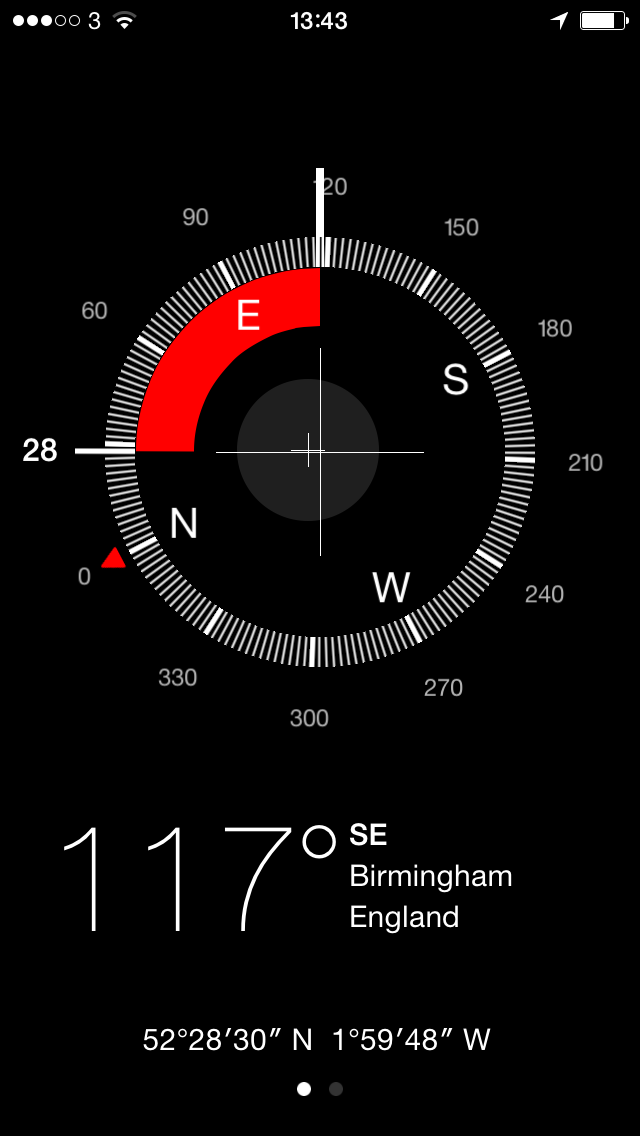
With the needle locked into a position, straying from the set (locked) direction will cause the compass to turn red, indicating the degree of sway and helping to course correct. Whether you’re directionally challenged or not, this is helpful for navigation for many reasons.

Lock the Compass Needle Position on an iPhone for Better Navigating – OS X Daily

So I just pointed my iPhone toward Birmingham city centre, tapped on the compass and turned away to one side. This is what the screen shows me now:

compass


So you line up on what you want to get to, tap on the centre and every time you deviate from the route, you get that big red warning. OS X Daily goes through the instructions in more detail but that’s it really, open Compass, point, tap, walk.

David Sparks on using technology to help meetings

The best use of technology for when you’ve got to go to a meeting is pulling the battery out of the back of your phone. Or ‘accidentally’ thumbing it into Airplane Mode. That’s not David Sparks’s advice, though I’ve read his books and he’s as up for avoiding unnecessary meetings as I am. Assuming that you want to go to them and you want to get things out of ’em too, he has recommendations.

There is a certain dance that goes on between people trying to set a meeting via email that makes me crazy:

David to Hans: “Let’s do lunch”
Hans to David: “Great. When is good?”
David to Hans: “I’m not sure. You go first.”
Hans to David: “I’ve got some time next week.”
David to Hans: “How about Tuesday at noon.”
Hans to David: “That doesn’t work. Give me another day.”

This just goes on and on. Instead, when I’m setting a meeting with a single person, I write and say, “Let’s have lunch together. How about next Wednesday at Cardiac’s House of Cheese at 11:45AM?” By putting not only the idea of lunch in the first email but also the details, I’m usually able to cut out a lot of later email traffic. The surprising thing is that most people accept my proposal in their very first reply.

Scheduling success: four tech tricks for planning meetings – David Sparks, Macworld, May 2014

Since the day I read that in a book or I heard the fella say it on the MacPowerUsers podcast, I have done exactly that and it has worked for me exactly like that.

Try his other three suggestions, though: they cover scheduling meetings, preparing time for them and also a very nifty TextExpander way of writing emails reminding people about the meeting and its agenda.

Boil it down: iPhone users have more money

I’m an iPhone user. Can I have more money, please?

A report by Battery Ventures – I’ve not heard of them but they’ve a nice website so they must be serious – examined who buys iPhones and who buys Android phones. It’s oddly hard to get the full report to examine but many, many sites are all picking up on coverage of it by Re/code. As am I. The Re/code piece is unusually light on details but its headline analysis reads:

Android Users are More Likely to Take the Bus, While the Frequent Flyers Choose iPhones

Then:

“You would think iPhone users are all pinot-drinking yoga enthusiasts,” said Jonathan Sills, the Battery Ventures entrepreneur-in-residence who conducted the firm’s study. Well, that’s at least partially true.

It turns out more iPhone users do in fact prefer wine to beer. They are also more likely to own stock and to have flown on a plane in the past year. Meanwhile, Android users are more likely to rely on public transportation, describe themselves as religious, have eaten McDonalds in the past month or to smoke tobacco.

Re/Code

I use public transport a lot – I mean, a lot – and it’s certain that the convenience is a big factor. I live in a city, I can do this. But money is also an issue: for me, a car would be a handy indulgence, I simply don’t need it. Would I have one if money were no object? Probably. Not definitely. But probably.

I don’t own stocks, I can’t remember the last time I was on a plane but it’s 50/50 whether it was within 12 months. I’ve never tried tobacco. I have often eaten McDonalds.

I need to buy me an Android phone, clearly.


In this week’s newsletter

The iPhone case that tells you when your friends are happy or sad. The Louis CK solution to choosing between two similar things. Plus why Google doesn’t like hiring experts and, separately, what it’s like being an expert dealing with eejits. That last one is a video and as funny as it is, it’s nails-on-chalkboard uncomfortably true.

Read more in this week’s The Blank Screen email newsletter.

And sign up to get it emailed right to you every Friday.

Annie Dillard: how we spend our days is how we spend our lives

Jack London claimed to write twenty hours a day. Before he undertook to write, he obtained the University of California course list and all the syllabi; he spent a year reading the textbooks in philosophy and literature. In subsequent years, once he had a book of his own under way, he set his alarm to wake him after four hours’ sleep. Often he slept through the alarm, so, by his own account, he rigged it to drop a weight on his head. I cannot say I believe this, though a novel like The Sea-Wolf is strong evidence that some sort of weight fell on his head with some sort of frequency — but you wouldn’t think a man would claim credit for it. London maintained that every writer needed a technique, experience, and a philosophical position.

The Writing Life – Annie Dillard (UK edition, US edition)

Dillard examines the idea of order – “a scheduled defends from chaos and whim” – but I think she’s less recommending that we set a timetable than that we become aware of what we’re doing. I want to rush you every line from her book but instead I’m going to be honest first and say that I learnt of it from an absorbing article on Brainpickings.org. Read that for more of Dillard’s writing and writing style.

Just five more minutes – or how we don’t like to stop

Even I think you need to stop working some times. For a bit. Not for long, obviously. But I work for myself and I wouldn’t swap this job for anything – seriously, I get to natter with you, what would I want to replace this with? – so you would imagine that people with office jobs don’t look at it the same way. I didn’t when I had an office job. Well, I did a bit. But the poll company Gallup says only 2 out of 10 workers in America think working late is a bad thing.

They were asked specifically about working remotely, so that’s checking your emails and using your phone rather than having to stay in the office, but still, it’s only 21% of those surveyed who said nah. Don’t wanna do that. Actually, it was 8% who folded their arms and 13% who were disgruntled.

While a strong majority of working Americans view the ability to work off-hours remotely in a positive light, far fewer say they regularly connect with work online after hours. Slightly more than one-third (36%) say they frequently do so, compared with 64% who say they occasionally, rarely, or never do. The relatively low percentage who check in frequently outside of working hours nearly matches the 33% of full-time workers who say their employer expects them to check email and stay in touch remotely after the business day ends.

Among those who frequently check email away from work, 86% say it is a somewhat or strongly positive development to be able to do so. However, this is only slightly higher than the 75% of less frequent email checkers who view the technology change positively. Even among employees for whom staying connected is compulsory, 81% view this development it in a somewhat or strongly positive light.

Most US Workers See Upside to Staying Connected at Work – Gallup (30 April 2014)

There is a stereotypically predictable slant in that young men are more likely to be happy with checking their emails EVERY BLOODY SECOND but also broadly the more you earn, the more you’re happy about working out of hours.

This is an American survey so it could of course be different here in the UK but one suspects not. And one suspects that there are few employers who won’t take advantage of this.