Watch: “Lucy and the Efficiency Expert”

The full episode from The Lucy Show, first aired 12 December 1966 – 47 years, 5 months and 15 days ago – this is a Lucile Ball comedy about what happens when a Time and Motion kinda guy interferes at work.

Apparently it is now out of copyright – if you know that’s wrong for any reason, do tell me so I can remove this.


It was written by Ray Singer, Milt Josefberg and directed by Maury Thompson. Starring Lucille Ball and Phil Silvers.

To sleep, perchance to put the screen down and snore

If I’m only sometimes good about adding contact phone numbers right after we speak, I’m terrible at this. I am atrocious at switching off my iPad or any screen. And I should fix that. You should fix that.

Put – the – screen – down.

Do it at least an hour before you go to bed and you will sleep better.

Promise.

Pinky promise.

A pinky promise that I swear to stand by for myself too.

Add numbers to your phone as soon as you get them

I’m not great at this but I try. If you give me your phone number or I’ve found you on some research thing, I will add you to my Contacts list. I don’t like the word Contacts, I’m not suddenly thinking of you as a contact instead of a human being. But I am adding and I will add you to my Contacts app. Whatever machine I’m near at the time – iPhone, iPad or Mac – I will try to enter your number right after we’ve spoken.

Given how easy it is to get photographs of people now too, I will often drag a photo to your contacts page too. That usually happens if I’m on my Mac and you’re not obscure. Or have the same name as someone who turns up a lot on Google. If all of this is true, one drag and you’re in my book.

Which is why today I got a call from a charmingly modest woman who wondered if I remembered her – and of course I did. She rang on my mobile, there was her name in big letters and there was her photo from her website. I hope that I would’ve remembered anyway but I’m suffering under a cold not terribly with it today, so this was a real boon.

All because when we spoke a couple of weeks ago, I put her name and photo into my contacts app. Right away.

Reeder updated with background refresh

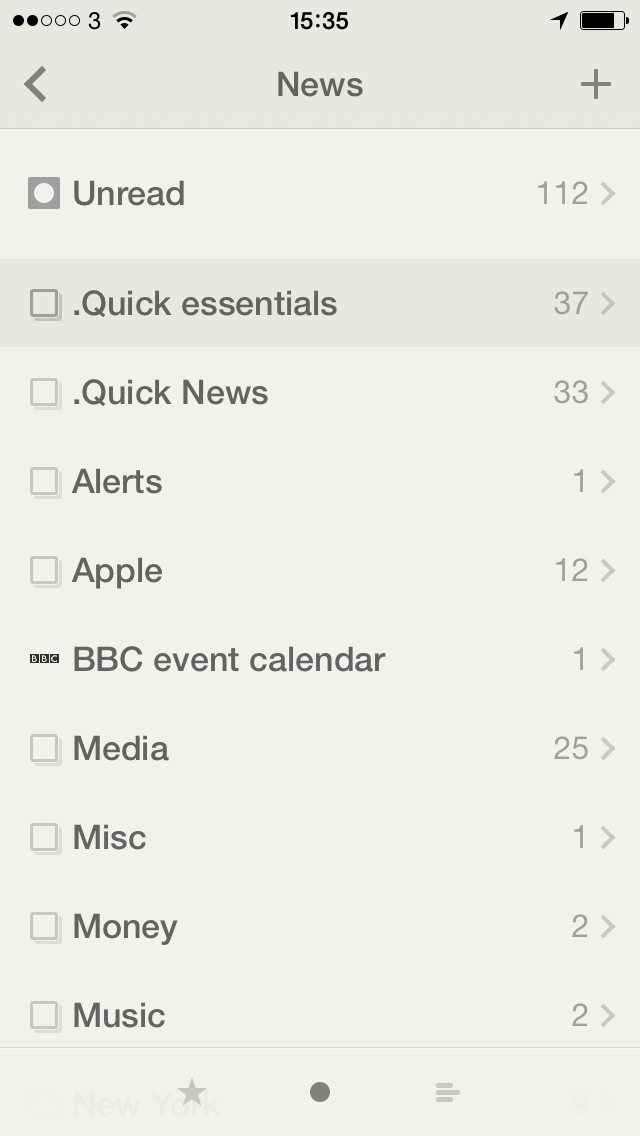
reederMy favourite newsreader app for iPhone and iPad has today been updated to version 2.2. It includes a lot of bug fixes (can’t say I ever noticed any bugs in my daily, near hourly use) and behind the scenes differences to how many news feeds it can handle. But the biggie, the reason to mention this instead of just update it on my iOS devices and forget about it is this:

Background app refresh (per account setting, disabled by default)

It sounds like such a small thing and perhaps it will be but I’m looking forward to trying it. Background app refresh means that Reeder will get news stories for me behind the scenes. I won’t even have to be in the app. So instead of opening it and refreshing the list for myself, I can pick up Reeder and know that it us up to date right now.

But.

You saw that bit about it being “disabled by default”. It took me a minute to find out where to switch the thing on.

To do that, go to Reeder and swipe left-to-right until you reach a screen with a settings cog wheel. Tap that, choose your account name toward the top of the screen that appears. In there, tap on Sync and change it from On Start or Manually to Background refresh. Then tap the < arrow to get out of that screen and the √ tick to confirm the change. Reeder for iOS is a universal app (so it’s for both iPhone and iPad) and costs £2.99 UK or $4.99 US. The Mac version is currently still free in beta but reportedly not for very much longer.

Don’t be evil (terms and conditions apply)

Is this true?

Just over 15 years ago, two Stanford University students set out to commercialize PageRank, a brilliant new search engine concept they'd developed to organize the Internet's vast array of information. However, the same intellectual property rights Google now opposes in regard to Android would have prevented Larry Page and Sergey Brin from ever having got their company off the ground back then.

Google's Current Stance on Patents with Android Would Have Prevented Google from Ever Having Existed – Daniel Eran Dilger, AppleInsider (25 May 2014)

It's a detailed and interesting article that takes not only that headline argument but goes into specifics of when Google allegedly played with less than saintly techniques.

Personally I'm still annoyed they killed off Google Reader, though after a year or more I'm finding things have sorted themselves without Google. And I can cut through all the Android vs iPhone arguments and who created what by just glancing at the difference in all smartphones before and after the introduction of the iPhone.

Oh, and I think Google Docs is clunky. And actually Gmail is a bit ugly. But powerful.

Still, I want Google to have and to stick to this “don't be evil” mantra.

Quick trick for getting your chair height right

Put a dot (a simple sticker or piece of tape will do the trick) in the center of the top 2/3rds of your computer screen. Now, adjust your desk and chair until your eyes are in an exact perpendicular line with this dot.

The same idea holds true if you prefer a standing desk. Add the dot to your screen and adjust your desk height, while standing in comfortable shoes, until your eyes are in the appropriate line of sight.

The Easiest Way to Figure Out the Perfect Desk Office Chair Height – Apartment Therapy

Via Lifehacker UK.

I won't be doing this. I don't fancy marking my gorgeous 27in iMac screen with a dot and I can't pop some paper Post-It Note on it because I have papyrophobia.

But I like the concept and will be squinting at my iMac to guess it because my office chair is the most gorgeous thing except for how it sinks during the day.

Rumour – Apple to launch home automation

My story's headline begins with the word 'rumour' and there'll be a quote in here with the words “according to people familar with the matter” so I wouldn't hold your breath. But if fancy doing that, you only have to stop breathing until around 10am Pacific Time on 2 June when Apple makes its next announcements.

And allegedly one such announcement will be that:

Apple is readying a new software platform that would turn the iPhone into a remote control for lights, security systems and other household appliances, as part of a move into the “internet of things”.
Apple plans to take on rivals Google and Samsung and make a “big play” in the world of smart home technology at its Worldwide Developer Conference on June 2 in San Francisco, according to people familiar with the matter.

Financial Times

The full Financial Times article requires registration to read but you get the gist.

I don't know if I want Apple to let me control my house. If I did, there are many, many ways of doing it already.

But I do remember seeing a Sony image of the future at a house show a few years ago. Whizzy lights, expensive props, and a journey through the imagination of everything that will be possible soon with Sony's PCs and Sony's technology.

I can't remember the details now but I remember wandering off, disappointed, because every single thing that was promised in this wonderful future I was already doing with my Mac and had been for a long time.

I don't know how that story came to my mind but I wanted to share it with you. Apple doesn't introduce much that's actually new, it just tends to find the way to make things right, so I'm not joining you in holding my breath.

Actually, I'm not holding it for much this time: I like Apple's Worldwide Developer Conference announcements and I'm sure I'll be paying attention to what they say about the next versions of iOS and OS X, the two operating systems that run my life.

I just don't think I want them to run my house too.
Tackling an illiterate government

Britain's Education Secretary doesn't want people reading. That's not the way Michael Gove has or would spin it, but he is trying to prevent people reading in general and specifically about poverty, social injustice and the how mobs can be led. Specifically, he's taking Of Mice and Men, To Kill a Mockingbird and The Crucible – my personal favourite – off the UK schools' syllabus.

So let's just keep buying them. Buy them for ourselves, buy them for our children, buy them for our schools.

Of Mice and Men (UK editions, US editions)

To Kill a Mockingbird (UK editions, US editions)

The Crucible (UK editions, US editions)

Five ways to start your day right

The always excellent site Asian Efficiency – I've followed their OmniFocus advice before – has some pointers about getting started off well:

Picture this: you show up at the office and think, “now what?” Unless you have a meeting, are working towards a deadline, or have something on your mind that morning, your first inclination may be to peek into your email inbox and see what wonders (work!) they day might hold. This is perfectly normal.

Starting your morning with email however, is not how we start our workdays the right way.

Neuro-research shows that, for most people, the morning is the best time for creative thinking, learning, and comprehension.

If you want to make the most out of each morning’s peak brain power, you need to create and set a routine that will allow you to get your most important work done first.

5 Powerful Ways for Starting Your Workday Right – Asian Efficiency

I'm disappointed that they don't link to the research they mention but the full five things to do are all good. They include tackling your most difficult tasks first and planning breaks. For more detail and the three other thing so do read the full article.

1Password for Android coming 10 June

From the official Agile Bits blog:

1Password 4 for Android arrives on Tuesday, June 10. It is an entirely new and full-featured app, built for both phones and tablets!

It is also an experiment. All new features will be unlocked and free for everyone to use through August 1, 2014. After that, 1Password 4 for Android will go into a reader mode, and all features can be unlocked for an in-app purchase.