Make a quiet spot in your day

I love newsrooms, I love production offices, I utterly adore popping in to schools where 100 bored kids and 3 stressed-out teachers expect me to perform in some useful way. I love being busy, busy, busy. But I do get more done when I am alone.

Actually, this is becoming a theme day. I write the most and I think I write my best when I get up at 5am in the morning – and today is the 250th day I’ve done that.  Plus I’ve mentioned before that there is a single quiet moment for me on Christmas Eve that I look forward to. And now I read this in Psychology Today:

Creating pockets of solitude is a powerful way to refuel and energize your life. Make it a priority. Build it in. You’ll feel better and more equipped to manage the challenges of your day.

5 Ways to Find Quiet in a Chaotic Day – Polly Campbell, Psychology Today (10 December 2013)

That’s an article in the site’s Imperfect Spirituality section and, just as an aside, isn’t the internet great? I’m not a spiritual person, I have no faith, I wouldn’t have looked in this section at all. Wouldn’t have occurred to me that I’d find anything there of interest. But a noodling Google search as I felt for this issue that’s been on my mind today, led to this. I like it.

…My ability to be well in this world is dependent on a certain amount of solitude. It’s where I find my balance.

It’s good for all of us: Solitude is the root of innovation and creativity. It is restorative. Quiet time eases stress and promotes relaxation and concentration. Often it fosters greater appreciation for others and enhances social relationships. It also delivers a dose of perspective and helps us become better problem solvers.

Campbell talks a little about the benefits but then acknowledges how hard it is to get this type of quiet time and gives plenty of advice about it. Examples:

There are only two (and-a-half) rules: Be alone. Be quiet. And here’s the half – be still at least part of the time. A quiet walk, gardening alone in the silence, cooking alone without music or the television are all powerful ways to access your alone time. But it’s also important to just stop doing, to be still and to notice what comes up.

Here are five other tips that can help you carve out a few moments of quiet in your day:

1. Plan for it. Ask for it. My husband is always willing to help me find time because he knows now that most times, an hour or two to myself each week (more if you can get it) keeps me from becoming a raging, crazy woman.

2. Make it a priority. Like brushing your teeth or taking a shower, 10 minutes of quiet time a day packs health benefits that will contribute to your peace and well-being. This is not a luxury. It is part of taking care of your body and cultivating your spirit and it’s just as important as eating vegetables and working out.
Read the full piece for much more.

Free mindmapping software for Mac (but hurry)

The new mindmapping application for Mac OS X, Quick Node, is temporarily free on the Mac App Store here.

I haven’t used it, I just learnt of the price drop from £13.99 UK and $19.99 US and wanted to tell you.

But I do use mindmapping now and I do sometimes find it very useful. I had a project I was late starting recently and I used Mind Node on my iPad to let me whack down every thought I could muster about it. Then I could see that okay, those two ideas could go together, if I find another one for here than that’ll sound better, and then I just wrote up what was in front of me. It worked too.

So visual thinking can be good but it isn’t for everybody and I find it isn’t for everything I do. So the chance to try it out for free has got to be a boon.

Note, though, that Quick Node doesn’t support OPML: you can’t very easily create a mindmap and then export it to something like an outlining app or a To Do manager. You can save in Quick Node’s own format plus TIFF image or PDF but effectively this makes it a personal-use-only tool. I only use Mind Node personally, I have yet to share any of the maps with anyone else, but I do regularly export to OPML so that my To Do manager, OmniFocus, can import it.

Quick Node – Easy Mind Maps and Diagrams for OS X is free today (July 3, 2014). If it’s gone off sale by the time you look for it, the price will probably be that aforementioned £13.99 UK and $19.99 US but in its short life the app’s price has bounced around a lot so it may yet be more.

Work while you sleep

Sounds perfect: where do I sign up? Sleep is for tortoises, except at 5am in the morning when only the insane are up, alongside the nightshift, suffering parents and all farmers.

From The Muse:

…What if you didn’t have to say goodbye to sleep in order to be productive? What if you could utilize your sleeping hours to actually get chores and tasks done?

8 Ways to Get More Done While You Sleep – Catherine Jessen, The Muse (12 June 2014)

I’m listening. Go on.

We decided that you should be able to be productive while you sleep, so we’ve rounded up these eight awesome links that will inspire you to dive under those covers and catch come Z’s (while still getting stuff done).

O-kay… and an example? Give me one example of the 8.

1. Develop creative solutions by allowing the intrinsic part of your brain’s pattern recognition systems to assess what it saw during the day and spit out innovative answers in the morning.

2. Do you need to remember something important? Studies show that we can reinforce existing memories during deep sleep. Make sure you’ve already reviewed or learned the material you want to memorize at least once before conking out.

3. Make money while you sleep by siphoning off a portion of your paycheck into an account where it can grow thanks to compound interest.

That’s three, but thanks. The last one is specific and financial, the first is a psychology way of saying give it a rest and the second is the kind of optimistic thinking I employ the night before a deadline. But each one of these and the other five tips is really just a heading and then includes a link out to more detail and more research. Do give the full piece a read, then.

Quick fixes for a slow Mac

spinning beachballIf you’re getting that wretched beach ball it means your Mac is struggling – and you’re getting it while doing something as intensive as just opening a folder – then do this:

1) Quit your browser
Especially if you’re not actually using it. And especially, most especially, three times most especially if you the sort to leave a lot of windows and tabs open. Each one is taking up some effort from your Mac as it tries to keep each one updated all the time.

For your own sanity, get into the habit of closing a tab when you’re done with it. Bookmark it if you’re going to come back to it later, but close it now.

In the meantime, though, quitting the browser is a one-click device for speeding up your Mac.

2) Delete things and then empty the trash
I believe the general consensus is that you need to keep about 10% of your hard disk space clear in order for your Mac to work away merrily. (Because it uses some space as it’s going.) If you can possibly do it, go for a third instead.

It makes the most enormous difference, says William who this morning found he had 200Mb of space left on his MacBook Pro’s 250Gb drive. Which Wolfam Alpha tells me is 0.08%.

Yep, I beach balled a lot this morning.

Time and space

I got up at 5am this morning to write but I also came to a certain spot. Instead of my office, I am in my living room working on my MacBook Pro with its endearing keyboard fault. (There’s something wrong with the W and Q keys so every time you’ve read w or q I have actually keyed Apple-1 or Apple-2: I set a Keyboard Maestro shortcut to save me having to take the keyboard apart or take the time to bring it in for repair.)

But the reason I’m here is that here is where I started writing a short story. I’ve been commissioned to write one and as part of the job, I had an evening with a readers’ group. When I got home that night, I had an idea pounding away at me and I had to get it down, so I sat on my couch and typed a few notes. That was the intention. I ended up writing around 500 words of story, feeling it out, experimenting, testing whether the idea was really a story.

And every now and again, I come back to this couch to continue it.

It just feels right. I had this with The Blank Screen book which I wrote primarily on my iPad while working on a massive non-fiction title in my office.

Location matters more to me than I realised and I think it might mean more to you than you’ve thought. I don’t know, but I’m surprised at the depth of difference it’s made to me and if it helps me this much, in some intangible way, then I want to see if it helps you.

Follow. I don’t consider myself a journalist any more but I certainly was one for a long time and as part of that I grew the ability and the preference to write wherever I happen to be and for however long I happened to have. A sentence here. An article there.

Part of moving to drama is that I’m having to reach further inside myself and somehow what’s around me physically is getting in the way.

I still can and I still do write wherever and whenever I can. But coming to this couch to write the short story, going to the Library of Birmingham to do my regular OmniFocus reviews, it helps.

I’ve found this through accident. Can you try it deliberately? Try writing your next thing somewhere else and see if it helps you.

And then explain to me how I can claim this helps me write my short story when I’m visibly not writing it, I’m visibly talking to you instead.

The 5am anniversary

Today is the 250th day I’ve got up at 5am to write. That doesn’t feel like much given how long I’ve been a writer and it will feel feeble if you’re a farmer. But I want to mark this little anniversary in some way.

I only just thought of that this morning as I lurched very slowly out of bed. Yesterday I fair bound up out of there, today was tougher. Perhaps I should’ve kept a record but very broadly I think the 240s have been some of the hardest since the very first 5am starts.

It definitely goes in cycles, though.

There were patches even during the 20s and 30s where I would bound upright and not think about all this. There were times somewhere around 80 mornings in that I would come close to turning over.

I don’t think you need my sleep diary, if I had one, but the 5am start idea was difficult for me and I don’t think that even I can find a way to say I’ve failed at it. So there is discipline, there is effort, there are lessons.

But most of all there are results.

That’s why I do this thing. I’m not advocating getting up early as some kind of health advice. Look at me: I don’t know from health advice. And I’m not even recommending that you get up at 5am per se. What I did before all this began was to experiment with looking for when I wrote the best. Also the most, I was on various deadlines so most was an important issue, but chiefly the best. When did I write the best and preferably not have to rewrite quite so much.

It’s just an astonishingly awful thing that the answer is 5am.

But, okay, at least I know.

And now, 250 mornings in, I know these things too:

1) Bribery and threats
For the first 180 days I used my own Brutal £1 Pot Trick (as covered in my book, The Blank Screen, UK edition, US edition) to trick me into getting up. (The short summary is that I did bribe myself each morning but I also threatened. There was a treat for doing it but also a very big penalty for not.) I’d probably carry on using this, I had intended to and lately I’ve wondered whether it would help to try again, but it’s an expensive kind of thing and I wanted an iPad.

2) Alarms
I love my iPhone but there are times I hate my iPhone. Specifically at 5am. Or rather at about 6:30am when I’d wake up feeling great, feeling refreshed, feeling amazed that I could be so renewed and reinvigorated by a night’s sleep that was ending at 5am. And then seeing that my iPhone’s alarm was going off.

The alarm has to be very quiet so that I’m the only one it wakes, being right on top of it and able to switch it off quickly, but it does have to make a noise and sometimes it doesn’t. Not because I’d turned the volume down too low, not because I’d switched some setting.

Just because.

Yes, I had a moment of worrying about deafness. There was the screen with its Snooze button on that white alarm banner, but no sound.

After this had happened a few times – I have no idea what caused it, there’s no pattern I could see – I gave up setting an alarm for 5am.

Instead, when I’m going to bed, I ask Siri to wake me at 4:59am. And then to wake me at 5:01am. Two alarms. Many days they both work, just once or twice neither has. And for the rest of the time, one of them has and that’s enough.

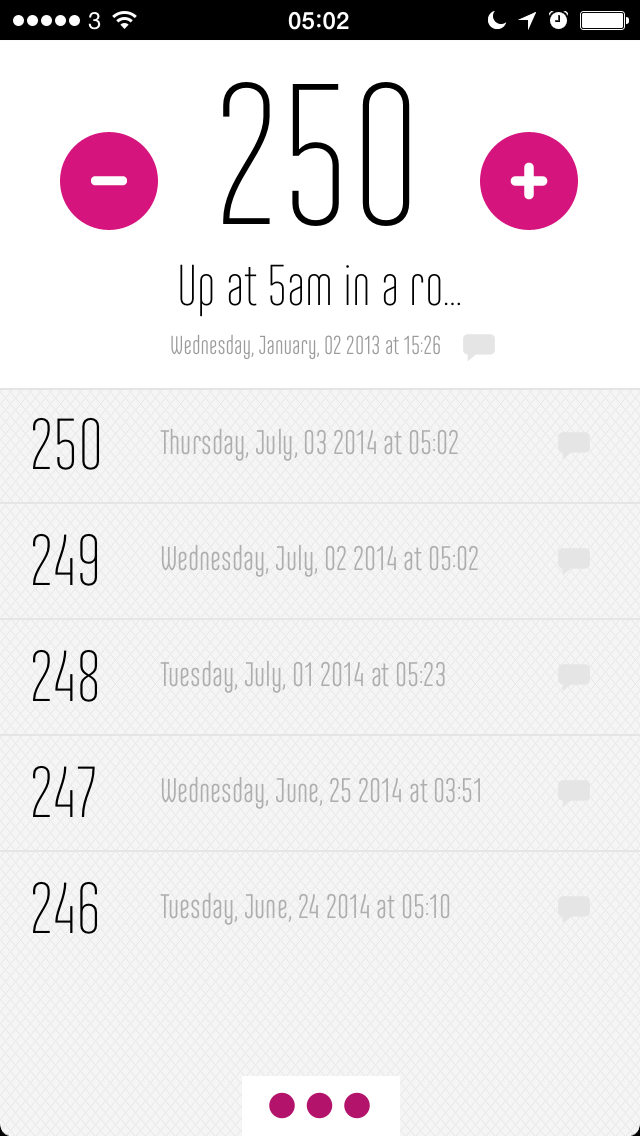
kount3) It’s worth counting
I often forget until hours later, but just tapping a + on a counter app is a little bit satisfying. If it’s a choice between the satisfaction of a tap and the joy of another hour in bed, the bed wins. Let’s be clear there. But as it’s really a choice between bed and all the benefits that getting up early bring, the counter wins.

4) Do something. Have something to do
It’s like laying out your clothes the night before. Have something that you are going to do first. You won’t always do it. Right now, I’m not doing it. I had a plan for what I need to do and instead I’ve come to you. But this isn’t about the discipline of making plans and sticking to them. I get up at 5am, that’s discipline enough for anybody. It’s about using this Stupid O’Clock time and making it count.

Doing anything is fine. But it must be done. Easily the worst mornings of this whole 250 run are the couple where I had nothing to do. I had plenty I could do but nothing that was vital, nothing that made me ill with worry.

It was truly, deeply, insanely awful.

There is just little so stupid as wasting time at your desk at 5am. You don’t even spend some time deciding what to work on, you start checking emails and reading news.

So if there is not a particularly pressing deadline already, I will choose something the night before and make it the thing I will work on first. The aim is to get straight to the keys, to do the fastest shower in Christendom (I often re-shower later), get some tea (I definitely re-tea later) and start writing.

Today for example, I made a note in OmniFocus that I would finish a short story I’ve been commissioned to do. Hello. This is not a short story. This is you and I talking. But it is me writing and that is the sole aim of getting up at this time.

It’s a simple aim but it works for me and I find it very difficult. So, nuts to it: today is my 250th day of getting up at 5am to write and I’m proud of myself.

The only type of update you’re going to see about Aperture

It’s a weird one, isn’t it? Apple’s pulled big applications before – it ditched Final Cut Pro in favour of what was initially a much reduced Final Cut Pro X – but the death of its photo software Aperture is odd. Apple didn’t announce this death, they just rather let it be known.

And now they’ve just rather let a little more be known. Apple has given Ars Technica an update about what will happen next. We know that Aperture and iPhoto are dead, that they will both be replaced by a new application called Photos in OS X Yosemite. And we gathered that Photos would not be a professional tool the way Aperture was. But:

Update: When asked about what Aperture-like features users can expect from the new Photos app, an Apple representative mentioned plans for professional-grade features such as image search, editing, effects, and most notably, third-party extensibility. The representative also clarified the timeframe when Aperture development will end, along with an announcement about its other Pro app offerings receiving updates today.

Apple to cease development, support of pro photo app Aperture [Updated] – Sam Machkovech, Ars Technica (original story 27 June, update 2 July 2014)

If I liked Lightroom more, maybe I’d swap to it. But this makes me think that it will be worth hanging on to see what Photos is like. Afterall, just because Apple won’t update Aperture, that doesn’t mean the copy I’ve got will stop working today.

No. Please, no: an app for rating your colleagues

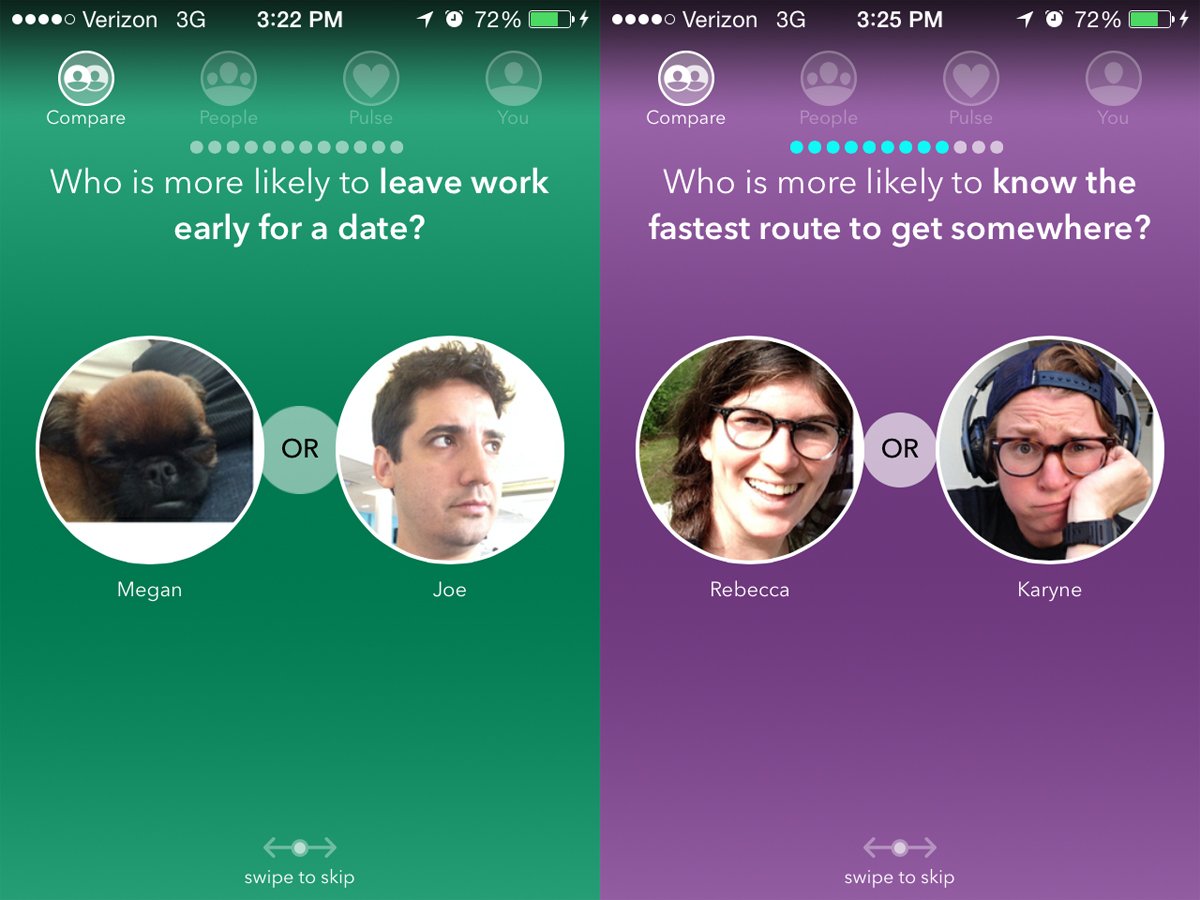
It’s called Knozen and thank goodness I can’t test it for you: you have to have a company of at least seven people who have all signed up. It’s just you and me here and I think you’re great.

But if you were to have seven people and you were to use this service, this is the type of thing Knozen would pop up with on your iPhone:

knozen

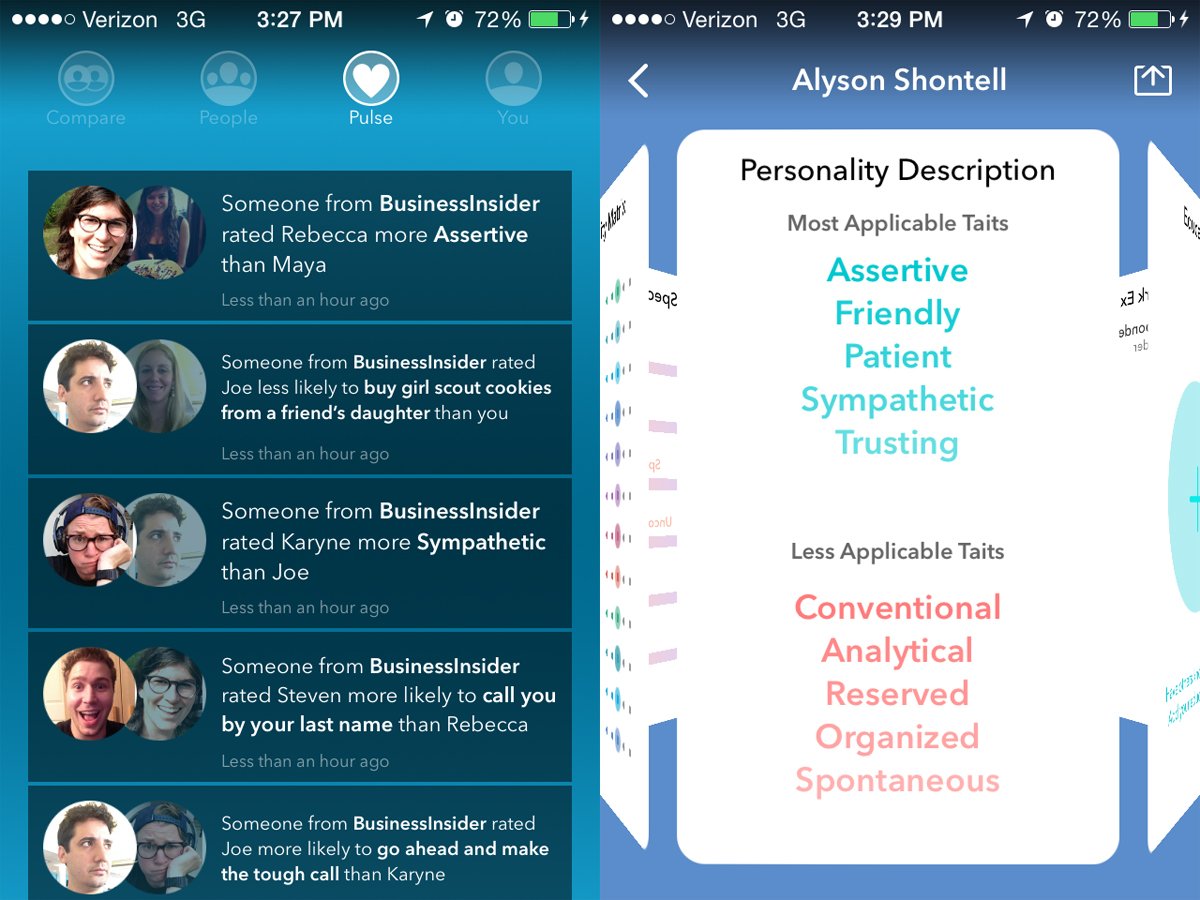
Those shots are from Business Insider which was able to test it out and so also got screens like this:

knozen2

That’s the data for Business Insider journalist Alyson Shontell who wrote the article about Knozen that gave me a double take. From her piece:

Knozen is a new iPhone app that lets coworkers rate each other’s personalities anonymously. It’s like Lulu is for men, or Yelp is for restaurants.

Founded by former Ladders CEO Marc Cenedella, Knozen pits two coworkers against each other and asks the user a series of questions such as, “Which person is friendlier?” or, “Who is more likely to buy cookies from a girl scout?”

The user then selects which coworker best fits the description and is told how many other colleagues voted the same way. At least seven people from an organization need to sign up for Knozen before they’re allowed to start rating each other to protect everyone’s identity.

Knozen might sound like a recipe for disaster, but Cenedella argues that it’s merely a way to “bring personality to the internet” and that the content is always “positive and upbeat.” You won’t find questions about a co-worker’s appearance, for example

New App That Raised $2.25 Million Lets You Anonymously Rate Coworkers – Alyson Shontell, Business Insider (30 June 2014)

I’d not heard of Lulu – other than the apparently completely separate printing and publishing company – and I also can’t seem to get you a link. But it’s reportedly a women-only app that takes your Facebook friends list and lets you rate the men you and mutual friends know.

But I’m minded more of the Bang with Friends app which became famous for upsetting the delicate sensibilities of Apple for the word Bang and reportedly for having problems with games manufacturer Zynga whose apps include “Words with Friends”. It renamed itself Down and says it’s “the anonymous, simple, fun way to find friends who are down for the night” and you’re saying yeah, sure, and why exactly is it anonymous?

Like Knozen and Lulu, it presents you with a list of people you know – this time solely through Facebook – and you can say whether you would like to get down with them. Look, we’re talking sex. It’s a who-do-you-fancy app. The thing of it is that if they also have this Down app and they have also said they fancy you, sparks are automatically messaged back and forth and either very good or very bad times happen.

I know this because I was hugely amused by the naming problems: with Apple disliking the ‘Bang’ and Zynga objecting to the ‘With Friends’ bit, there wasn’t a lot of the name left. Obviously I don’t know this because I use the app myself and nobody fancies me.


It’s possible this isn’t serious

The Onion’s new Buzzfeed-like mocking site has a perfect deadpan article about success which I might even have linked to if it were real. I wince admitting that.

Life is short. If you wait too long to go out and do what you want with your life, you’ll never get a chance to see your dreams come true. That’s why I tell people to stop letting the fear of failure hold you back.

Take me for instance. For years, I dreamed of just reaching out and grabbing a police officer’s gun right out of its holster and running away as fast as possible, but I never even tried because I was afraid of failing. What if I wasn’t able to pull out the gun fast enough? What if the cop yelled at me? What if he caught me and sent me to jail? There seemed to be an endless number of things that could go wrong, so I never even gave things a chance to go right.

Then one day, I decided to just go for it. I saw a cop standing on a nearby street corner and he was kind of zoned out, so I snuck up on him very quietly and reached out for his gun. Was I afraid? Of course I was—but this time, I didn’t let my nerves get the better of me. I just grabbed his gun and I booked it as fast as I could.

Stop Letting The Fear Of Failure Hold You Back – Trey Pagels, self-help expert Clickhole (30 June 2014)

See how that works out for him.

That was June 2014

Last month – see That was May 2014 – I had entirely forgotten to make any notes about what I’d been doing as I was doing it. That was a big jolt for me because I’d been reasonably diligent about it during the whole year before. And it helps. It helps me feel I’m not standing still. Plus, as I near the end of the month and see there’s bugger-all in the list, it helps me go do something.

So the first thing I did in June after realising this was that I wrote a wee thing for Drafts and Evernote that means I can quickly make a note and know that it will automatically be appended to a list. Then today I spent about twenty times longer writing you a note about how I did this.

That is great for letting me extremely rapidly jot down something I’ve done or am doing, but it’s less brilliant at the end of the month. I’ve got this pleasingly long list of things but it needs some sorting for me to get an idea of the type of work I’ve done. To understand the quality rather than the quantity.

But having sorted through it and obscured the usual confidential details and totted up the various word counts, I can tell you and myself that June 2014 for me meant:

Writing totalling approximately 77,485 words
2 ecourses on productivity issues (9129 words)
2 presentations (971 words)
1 Radio Times reviews (100 words)
1 Lifehacker UK article (500 words)
Edited novel opening and pre-circulated to new group
156 news stories for The Blank Screen (approximately 43,000 words)
4 Self Distract entries (5,211 words)
4 The Blank Screen email newsletters (5,195 words)
Four iPad software tutorials (11,029 words)
Outlined Resistance stage play
Wrote first five pages of Resistance – but all five rubbish and thrown away
850 words of new non-fiction book but also rubbish, also thrown away
1,500 words of new short story, fate to be determined

Talks, appearances and performances
Page Talk panel discussion at the Royal Shakespeare Theatre
Directed “Murder at Burton Library” for the Burton Young Writers’ group
Represented the Writers’ Guild and the Screenwriters’ Forum in the House of Commons for Parliament’s Birmingham Day
Visited two schools as guest of Royal Television Society
Promoted the Writers’ Guild at two RTS Mini-Summits including one at BBC Nottingham
Guest at Winterbourne Young Writers’ Group
Spoke at Combrook Readers’ Group for short story I’m writing for them

Pitches &c:
22 phone calls
7 specific pitches with 1 rejection but an open door and only 1 non-response

Attended:
Writing Begets Writing – three two-hour briefing/training on mental health work
1x wedding
Curzon Street Station exhibition
Women in Mind at the Birmingham Rep
Frequently Asked Questions at the Birmingham Rep
Writers’ Networking drink (if only for 17 seconds, very rude of me)
Bold Text at the Birmingham Rep

Other:
Produced video for Parliament Day and the Writers’ Guild
Promoted the move to get Alan Plater a blue plaque
Formally invited to join the Royal Television Society’s committee; going through nomination process now
Phone meeting with author re book I’m publishing
Reading/editing her latest two chapters