Thank you: Google Docs and Drive explained

Because I’ve been getting these confused.

Google’s recent upgrades to Drive have made clear the company’s going head-to-head with Microsoft on productivity services. Unfortunately, in its efforts to emulate the industry standard, Google’s made its cloud-based apps every bit as Byzantine as Office365.

Google’s services overlap and their names aren’t self-explanatory. This problem is aggravated by the company’s propensity to change those names, consolidate services under one moniker, or simply discontinue them.

Fortunately, underneath the confusing nomenclature you’ll find that Google is currently offering three major productivity services to the public. (While you’ll find dozens of additional products on the company’s master list of products , we aren’t focusing on non-productivity business services like Google AdWords, Google Analytics, Google Payments, and so on in this story.) Here’s an analysis of each to help you decide whether one (or more) is right for you.

You don’t know Docs from Drive: Google’s productivity apps, explained – Christopher Null, PC World (7 July 2014)

Read the lot, do.

Go somewhere boring to write

I’ve had recommendations via friends-of-the-site before, I’m having a recommendation from wife-of-the-blog.

That sounds dreadful. That sounds like a 21st Century version of phrases like “her indoors”. My wife’s name is Angela Gallagher. You and I are having a recommendation from Angela which is this piece she got from traveller Chris Guillebeau:

Don’t go to paradise to get something done. Go to Bali, or any place like Bali, for lots of reasons. (I went there for a birthday by myself.)

But if you want to find a place to write, don’t go to an interesting place. Go somewhere where you can withdraw from the world, fully free of engagement. Go somewhere where there’s nothing to do.

If You Want to Write a Book, Go to a Boring Place – Chris Guillebeau, The Art of Non-Conformity (7 July 2014)

Do read more but don’t just read more: delve on in to his The Art of Non-Conformity, and when you’re fully engrossed, remember to thank Angela. I can pass messages on.

The 29 reasons you’re reading this article

Medium writer Gilad Lotan argues that as addicted as we are to lists in articles, we are particularly prone to odd numbers. Especially 29.

And I thought the reason we saw so many of these articles was just that they are easy for the writers. Write a list, forget bothering to have a structure or any reason for the reader to read on through the whole piece. I have obviously never done this ever, ever.

But if I were to do it, I would use lists. Let me give you 29 reasons why:

You make a Listicle. How long should it be? 5 items feels a bit short. 30 Feels a tad long, and way too even. But 29 seems like a good, shareable length. What if I tell you that using data we’ve found statistically significant difference between performance of odd vs. even numbers? Sounds odd? Read on.

Lists have been around for a long time. From the Bible to the Billboard charts, packaging items in lists is an effective way to gain heightened attention from a broader audience. The format makes content more easily consumable, promising an effortless way to get through a finite amount of information. Choosing the right length involves a dash of voodoo magic and a lot of speculation.

The 29 reasons you’re reading this article – Gilad Lotan, Medium (1 July 2014)

For once, the speculation seems sound and backed up by experimental data. Do have a read of the full piece.

The 5 tools you need for writing, definitely

Actually, you could do this with three and those would be:

1) Computer
PCs are cheaper, Macs are better. I vote Mac because I put a big value on the time I no longer have to spend piddling about getting Windows to damn well work. But Macs don’t suit everyone; if you like piddling, save yourself some bucks and get more geeky enjoyment with a PC.

But.

If you’re buying a PC, you have a million options and every one ends up with you having to make a choice between models that have some clear and obvious difference like a 1Mhz speed increase or something. Ignore salespeople, they will – seriously – just read you the spec sheet you were already puzzling over. Instead, ask a friend who has one, get their recommendation and then see if you can find it on the end of this Amazon UK link. That way, if it all works out for you, I get some pennies from your having bought this way and if it doesn’t, it’s your friend who gets your support calls. Everybody wins and it costs me nothing.

If you’re buying a Mac, you’ve fewer options and they always end up with you needing to make a choice between two very similar models. In all cases, save money by buying the cheaper processor speed and spend money on extra RAM and extra storage space. You’ll thank me later, which is nice as I am going to suggest an Amazon link – here it is, do check this out – but I also think you should go into an Apple Store and ask there.

If you’re looking at me like that for the bit about processor speeds and RAM, Apple Store staff will just tell you straight what Macs are good for and not so good for. They’ll ask what you expect to be doing with Mac: be honest. Tell them straight that you should be writing but you’re going to distract yourself with a photography habit that you only do to be social, that you can stop any time.

They will translate processor speeds – actually, no, they won’t bother translating, they’ll just tell you what it means in terms you can use. And Apple Store staff are not on commission so they’ll push this stuff but it’s more from genuine enthusiasm.

Last, if you’re havering between a laptop, desktop or tablet computer, they all work, they all do the job. You will just typically get more done on the desktop, you will be substantially freer with the laptop and the iPad will do everything, everywhere but you need to think about it more as you go.

2) Word processor
Microsoft Word if you have to, if it’s already on your computer or if you know you like it. Google Docs is fine, if a bit clunky looking. If you did buy a Mac, you’ve just got yourself a word processor called Pages and the odds are that you may never need anything else.

3) Email
How else are you going to deliver work? It’s also great for pitches. Just for god’s sake make sure you get a sensible email address.

Get and use these three and you’re away to the races. But I’d recommend two more:

4) Somewhere to track what and where and when your work is
I track invoices in the Numbers spreadsheet and jobs in Evernote. I track tasks in OmniFocus and I keep an eye on my week with Calendar in Mac OS X.

So this would be one of the five tools and I’m saying it’s – wait, counts on fingers – four different applications. Yes. You could do it all in your word processor though. And the time it would take you to pick up and figure out all these applications would probably be better spent at first on learning what your word processor can do. You’re smart, you can use anything but they all have nooks and crannies that are worth exploring for how they may be able to speed up your work.

When you know your word processor well, though, then start branching out into these others.

5) Kettle
Enough said.

8 Simple Tricks That Will Help You Ace A Job Interview But Rob You Of Your Innocence

Job interviews are stressful, but here are some time-tested tips to impress any potential employer and render you unable to look at the world in the same unsullied light.

1. Prepare Ahead Of Time
Rehearse answers to common questions a few days beforehand to trick the interviewer into thinking your answers are genuine reflections of your thoughts. This is a lie all job seekers participate in.

2. Give A Firm Handshake
A firm handshake is an effective way to make a good impression, but will also destroy your inner child a little each time you do it. You’re a manipulator of people now.

8 Simple Tricks That Will Help You Ace A Job Interview But Rob You Of Your Innocence – Clickhole (24 June 2014)

Read the other six on the full feature.

Writers: decode the criticism you get

The Blank Screen (UK edition, US edition) has a particularly popular section on How to Get Rejected. In part because it explains why a ridiculous proportion of criticisms your writing work gets is bollocks.

But you have to read it all, you have to take it all, you have to smile all the time.

Nonetheless, things are moving on in the criticism world. Previously we used to get what were called praise sandwiches. Your critic starts with something great to say about your work and ends with something really fantastically constructive. But you and they know the only thing that is true is the abuse in between the two.

Now the Harvard Business Review is advising critics to cut this crap out entirely:

Never, ever, ever feed someone a “sandwich.” Don’t bookend your critique with compliments. It sounds insincere and risks diluting your message. Instead, separate your negative commentary from your praise, and don’t hedge.

Everything You Need to Know About Giving Negative Feedback – Sarah Green, Harvard Business Review (30 June 2014)

O-kay. You’re thinking that you’re going to miss the praise sandwich now, aren’t you?

Read the full Harvard Business Review piece. Put yourself in the shoes of a critic, see what they’re being advised to do, and you’ll be armed enough to nod politely before you DESTROY THEM AND ALL THEIR FAMILIES.

Free video tutorial for OmniOutliner for iPad

This is the product that turned me into an outlining user. Not an outline fan, but definitely a user and appreciating the value of the things.

And this is a free tutorial on using the iPad version. It’s from Screencasts Online which is normally a subscription service but does the odd freebie. I’m not sure this is their best but there’s a lot in OmniOutliner and I learnt from watching it:

Writer’s Notes: How to Invoice

The Blank Screen (UK edition, US edition) is all about keeping us writers creative but making us more productive. But if there is one thing we put off more than writing, it is invoicing.

Nobody tells you how to do this and we hate doing it.

So here’s how to write an invoice and if you take a squint down and think this is a long job, know this one thing:

1. It just took me 8 minutes to write my first invoice for a new company

2. It then took me 2’42” to write one for an existing client

I’ll tell you now, these were very small invoices but the amount doesn’t affect the time it takes. What you should take away from this is that for a pixel over 10 minutes work, I’d written and sent – notice that, also sent – invoices to the value of £120.00. I won’t pretend that either writing job took very long but without that 10 minutes invoicing at the end, I wouldn’t be being paid.

So it is a chore, yes, but it’s incredibly quick to do and without it you don’t get to eat.

This is when you do what:

1) When you get the commission
Know how much the fee is. If you don’t know, ask before you do the work. Your editor deals with this every day: when I’ve been a commissioning editor, I’ve known my freelancers’ fees better than my own.

Ask how the company needs to be invoiced: actually, just ask exactly this: “Do you need purchase order numbers?”

If they do, they’ll tell you the number and they’ll also tell you anything else. That new client had also assigned me a vendor number. You don’t care, I don’t care, if they give you purchase order numbers, vendor numbers, anything else numbers, you just keep a note of them and copy them out onto the invoice.

Ask specifically how you are to deliver the invoice: “Do you need invoices posted or can I email them – and what’s the best address?” Cross your fingers that they’ll say email is fine because it’s so much faster and more convenient for you.

Some firms will send you a tonne of forms to fill out with your bank details. Schlep through the lot and get it done.

2) When you’ve done the work and delivered it
Invoice. Don’t wait. The invoice has nothing to do with whether the editor will ask you to do some more work on it. Send the writing, send the invoice.

It does not help you sitting on a pile of invoices – and it doesn’t help them, either. A magazine issue will have a budget allotted to it and ready to spend. In theory you should always be paid whenever you get around to invoicing but in practice, good luck getting cash if you let it slide past the end of the financial year. Or perhaps, good luck getting commissioned by the firm again if you do.

So invoice promptly.
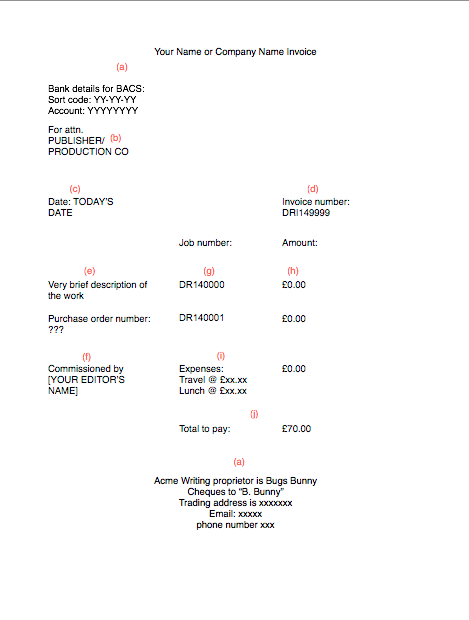
DRI149999 Example


(For a larger version, download the annotated example invoice PDF.)

And this is how you write that prompt invoice:

a) Your name or company name at the top
You could include a company logo if you like, but don’t try to make this pretty, work to make sure that it is clear.

Definitely include your bank BACS details so that they can pay in directly. You want this. You really want this because it’s a right pain getting cheques, losing time going to pay them in and then waiting for them to clear. Encourage companies to pay by bank transfer and do so by giving them your business account’s sort code and account number.

You do also have to give them the ability to send cheques. That means listing your postal address and stating specifically how cheques should be addressed. That’ll be your name, your company name or a combination of the two: “Bugs Bunny trading as Acme Writing”.

Many people argue that you should write a line like “Payment in 30 days” and as long as some of those many people work in accounts departments, you might as well listen to them. Strictly speaking the presumption is that payment is due within 30 days so I’ve never bothered to say it but it does give you something point at when you phone up on the 31st day.

b) “For attn. Accounts Department” and their address next

c) Today’s date. This is the date of the invoice, not the work

d) Number the invoice. It’ll help if you have a system so you just know that number 12 is next

e) Describe the work
Some clients will give you the text they need for this. They’ll call it the brief or they will specifically tell you to say this or that for the invoice. It will be very short. If you’re invoicing for several things at once, the description can include an explanation of the fee: “3 days writing workshops @ £450/day”. This is where you list any purchase order numbers, vendor numbers or the like. If the client gives you any of these, use them. If they don’t, shrug.

State the date of the work here. If you’re doing an event, say, then the date is the date of that event. For a written project, it’s the date you were commissioned. That’s sometimes hard to pin down, especially when you’re doing all this months later. Find an email and use the date of that.

State any date or other detail given you for when the work will be published. If it isn’t a specific date, then it’ll be something like “Acme Magazine October Issue” or “BBC week number 12”.

f) Who commissioned you
If there’s a problem, this is who the accounts department will go to first. Usually your editor’s name.

g) Number the job
This will certainly help when you’re invoicing for several things at once – “3 x 2-page tutorials” – because you or the client can then query a specific job if necessary. But just do it anyway. Do it always. Number every job as you get it.

It helps you when you’re doing the invoices because you can see and then state each job quickly. It also means you don’t miss one out by mistake and never get paid for it. But it also helps you psychologically as the number of jobs keeps on going up.

It’s up to you whether you write a separate invoice for each job but only do that if you know it will affect when you get paid. Maybe three jobs are for the March issue of a magazine but one is a Christmas special. If the company states that it will pay 45 days after publication, invoice the Christmas one separately or you could end up waiting until next February to get your money.

h) Money
Next to each separate job number, write down the fee.

i) Expenses
If you have expenses and it’s agreed that the client will pay, write those down too. If you are VAT registered then make sure your VAT number is listed somewhere on the invoice and specify how much money that VAT is.

j) Total.
That’s the complete total for everything including the fee, the expenses and the VAT if you have that.

k) Save as PDF and email to the accounts department

Once you’ve done this once, keep a copy of that first invoice and use it as a template.

One more thing
This is a chore and you are a writer, you do prefer writing. But you also like technology so use it. I have one monthly gig in Burton upon Trent and when I leave there, my iPhone knows I’ve gone and OmniFocus pops up a reminder to do the invoice. I might not do it then, but sometimes I have done it on the train on my way home.

I don’t actually do that gig for the money, I’d pay them to let me do it, but that doesn’t change that it is paid, I do need to invoice, so I should invoice promptly.

One in seven would give up friends before smartphone

There’s a flaw in this survey of American smartphone users: they say this about giving up friends but they also say that they leave their phones on all the time so that they can be contacted. By whom?

Re/code got the whole survey this came from and that’s the statistic they pulled out but there are others. Of this poll of US users:

74 percent keep their smartphones within reach throughout the entire day
60 percent sleep with their phones and that number increases to 84 percent in the 18-29 year olds demographic, while their European counterparts are more likely to keep their devices in the next room
17 percent of women would give up their best friend for a week instead of their smartphone
53 percent keep their phone sound on even while they sleep

There’s more on the survey page.