I’ve changed my mind, he said lying

If there is one good thing about me, it is I am saintly about admitting when I’m wrong and truly Godly about changing my mind when you persuade me. Admittedly, I do it because you cannot believe how it throws people. Yes, I can look like a fool, but whoa, their faces. Love it.

However, I am unusual. Brainpickings.org looks at the issues of changing one’s mind and in particular how one book talks about it:

David McRaney explores [this] in You Are Now Less Dumb: How to Conquer Mob Mentality, How to Buy Happiness, and All the Other Ways to Outsmart Yourself [UK edition, US edition] — a fascinating and pleasantly uncomfortable-making look at why “self-delusion is as much a part of the human condition as fingers and toes,” and the follow-up to McRaney’s You Are Not So Smart, one of the best psychology books of 2011. McRaney writes of this cognitive bug:

“Once something is added to your collection of beliefs, you protect it from harm. You do this instinctively and unconsciously when confronted with attitude-inconsistent information. Just as confirmation bias shields you when you actively seek information, the backfire effect defends you when the information seeks you, when it blindsides you. Coming or going, you stick to your beliefs instead of questioning them. When someone tries to correct you, tries to dilute your misconceptions, it backfires and strengthens those misconceptions instead. Over time, the backfire effect makes you less skeptical of those things that allow you to continue seeing your beliefs and attitudes as true and proper.”

But what makes this especially worrisome is that in the process of exerting effort on dealing with the cognitive dissonance produced by conflicting evidence, we actually end up building new memories and new neural connections that further strengthen our original convictions.

I fancy the book now but Brainpickings writer Maria Popova writes an interesting piece about this.
NowDoThis and take it seriously

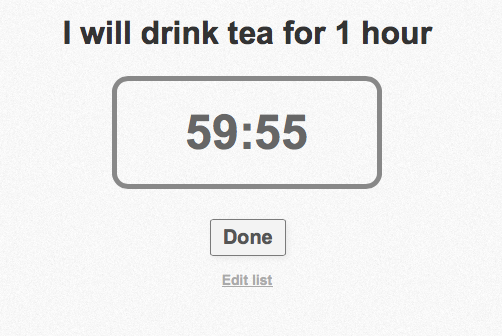
There’s a new online To Do service called NowDoThis. Go to a website, type in your To Do list right there and watch it look at you. It sits there, the list on your screen in a nice font. And if you’ve included a time – such as “I will do press ups for 1 hour” – then it will also automatically include a countdown clock.

You can hit Done early or you can wait until the clock runs out but then it’ll sit there with a Time’s Up reminder and a ping. Click and you’re on to your next task and it sitting there on the screen, watching you.

If you’re wedded to something like Things, Asana or OmniFocus then it won’t work for you, it just looks you in the eye and backs away, defeated. But for fast turnaround tasks, it’s a strong prod. So long as you take it seriously and don’t do anything like this:

Screen Shot 2014-05-12 at 12.24.33

Excuse me, I’m off to make tea. I have to. It’s right there on my list. What, you thought I’d really do press-ups? You’re adorable, thank you.

Practice like an expert, not an amateur

Creativity Post has an article about the methods successful people use for practicing whatever it is they do. The article is chiefly about sports success and what I don’t know about sport would fill every sports book, channel, magazine, blog and stadium. But the idea of having an aim, a purpose that requires practice to attain and to sustain, that applies to us all.

What do the fittest people do that I’m not? How are their workouts different? Are there key things they do while they’re working out that provide a bigger payoff than the things I do? In other words, are they extracting disproportionately greater results from their time in the weight room than I am?

The same can be said for our practice time. What do top performers do when practicing a skill? What do the less effective practicers do? Are there any differences?
Indeed, it appears that there are.

Two Things Experts Do Differently Than Non-Experts When Practicing – The Creativity Post (8 May 2014)

You’re wondering what the two expert things are. I feel if I told you both, it’d be stealing from them. Let me tell you the one that chimed with me: have specific goals. Now take a look at both the other thing and at more of the reasoning behind why they work.


Must do better

If you had to criticise someone, you’d probably use what’s called the criticism sandwich. “That was an excellent idea, admittedly the execution was unbelievably amateur and I wish we’d hired someone else, anybody else, but you know, you typed it up beautifully.” That kind of thing. But when you’re criticising yourself, you don’t look for any bread to wrap it up in.

Sometimes you refuse to eat the baloney in the middle and sometimes you wish you’d started this with a more robust analogy that could stand any chance of lasting the distance.

So I could’ve chosen my analogy better but let me take that criticism and change it to how I’d address anyone else being as slack with their writing. “We got the point you were making, you made it clear and obvious, but you should really have got out of Dodge at the end of the first paragraph.”

Incidentally, usually I’d be saying to myself that: “I bollocksed-up that, didn’t I?”

You can see the difference, can’t you? It’s not that one is positive and one is negative, it’s that one is third- and one is first-person. From the Wall Street Journal:

When people think of themselves as another person, “it allows them to give themselves objective, helpful feedback,” says Ethan Kross, associate professor of psychology and director of the Self-Control and Emotion Laboratory at the University of Michigan.

‘Self Talk’: When Talking to Yourself, the Way You Do It Makes a Difference – Wall Street Journal (5 May 2014)

That’s from a piece that is laden with sports analogies that I can barely understand but it’s a persuasive point. And I thought it was persuasive or I wouldn’t be here telling you about the full feature, but telling you made a difference. I look at this and in particular I look at the way I usually criticise myself. I wanted to find an example of how I usually am compared to how this lot say I should be and that searching, that thinking, fixed it in my head more. It’s like you’ve told me to lighten up and I’m listening to you. So thanks.

Use your email as a To Do manager (no, no, no)

There is no right or wrong way to get productive, but sometimes it feels like there is. Here’s an article for you if you fancy using your email inbox as your To Do list. I bring this to you and what you do with it is of course entirely up to you, but I’ll be off way over here with tea, a mint chocolate Aero and saying la la la. For:

They say your email inbox is a terrible place to manage tasks. I’d disagree. I think it’s the perfect place. After all, most of my tasks come in via email, and any app that can share information can share it via email. Why bother dickering with an extra app, keeping all that important stuff in two places, when it can all be easily managed in one spot?

I’ve been doing exactly this ever since I ditched OmniFocus, which is so long ago I can’t remember how long ago it was.

Wait, what, whoa, excuse me? Ditching OmniFocus – OMNIFOCUS – for your email inbox. Can I get some whisky for this tea?

Also, incidentally, I say your email inbox is a terrible place to manage tasks. That means I am they. I’ve never been they before. I can live with this.

Anyway, here’s the crux and the thrust of the article:

With a little bit of setup in your everyday news and browsing apps, you can turn your inbox into a proper universal task list. Here’s how.

This tutorial will use your email account, Mr. Reader (for RSS news items), Twitterrific and Drafts, plus one simple mail rule to organize things behind the scenes. You can gussy things up with all kinds of extras, but the core system is both solid and flexible. Like I say, I’ve been using it for months and it’s way better than anything else I’ve tried.
Email is ubiquitous, so it’s the perfect place to keep your task list.

If you make use of lots of separate projects, or have specific needs for metadata and GTD contexts, then maybe you should stick with something like OmniFocus or Things. But you’d be surprised just how far my mail-based system can stretch.

Okay, writer Charlie Sorrell gets points for that small reversal and allowing that proper To Do managers have their place. But points are removed for saying you can use one spot rather than muck around with two apps and then casually mentioning you actually need four. (Twitterrific, Drafts, Mr Reader and your email.)

But go on, if you must, read more at Cult of Mac.

By the way, did I mention that doing this could create aparadox, the results of which could cause a chain reaction that would unravel the very fabric of the space time continuum, and destroy the entire universe? Granted, that’s a worse case scenario.

Seriously, nuts to what anyone else thinks

Go ahead and do it. Whatever it is. If they really like you or they really matter, they’ll catch up.

“Fear of what other people will think is the single most paralyzing dynamic in business and in life. The best moment of my life…was the day I realized that I know longer give a damn what anybody thinks. That’s enormously liberating and freeing, and it’s the only way to live your life and do your business.”
— Cindy Gallop

That’s the entire quote I found on the Swiss Miss website but I’m linking to that anyway because it’s so good. It’s a design site that I just find engrossing and delighting and actually inspiring too. So do go take a look at Swiss Miss and then on to Cindy Gallop’s Creative Mornings talk.

OmniFocus clone on Android

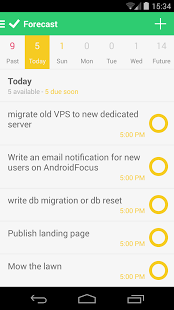
androidfocusOmniFocus – have I mentioned this To Do manager recently? Like, in the last hour? – is solely available for Macs, iPhones and iPads, nothing else. But as of this weekend, there is AndroidFocus: a completely unofficial Android version.

It’s not really OmniFocus, it’s more a quick way to enter or to see OmniFocus tasks on your Android phone. It has fewer features than the real iPhone one and you it depends on your having an account with the Omni Sync Server. That’s free but you get it when you buy a real OmniFocus. So if you are, say, a Mac user with an Android phone, this could be for you. Note that the Omni Group isn’t trying to get the clone removed but it does warn:

An app named AndroidFocus recently appeared in the Google Play Store. This app calls itself “An OmniFocus client for Android”, and can connect to an Omni Sync Server account in order to sync with the OmniFocus database that is stored there. To be clear, AndroidFocus is not an Omni Group product and we are unable to assist customers with using the app.

We believe that you should have control of your own data, and OmniFocus therefore uses an open file format just like the rest of our applications. Customers need to be aware, however, that reverse-engineering sync in the way that AndroidFocus appears to have done can make for unpredictable results. That means it’s theoretically possible that using AndroidFocus will cause data loss which our Support Humans are not equipped or able to help you recover from. For this reason we can’t recommend using AndroidFocus.

Using AndroidFocus with OmniFocus – Omni Group Support Document 

So it doesn’t do a lot and it could well break the next time the Omni Group changes anything or updates anything in the real OmniFocus. Yet still I would be buying this now if I had Android.

AndroidFocus official site and Google Play Store: £4.10 (UK), $6.99 (US)

Vague is good. Or something.

It is great to know where the nearest pizza place is. (The other night I was RAVENOUS and every else was closed. My iPhone found an open Pizza Hut and gave me precise details of where it was, how long it would take me to walk there and exactly how soon I'd arrive after its closing time.) Then it's reportedly great to have Facebook say where you are. I don't do that so much, I don't tend to check-in to places, but oodles of others do and they love it. I like getting an update that someone I know is somewhere amazing. But I don't need and I don't want to know which room, say, they're in at Buckingham Palace or how high up the Statue of Liberty they've got. That's too much and Macworld's Mike Elgan says companies know this. They know it and after all these years and all this work and all that effort designing systems that can tell us location details, they are choosing to be deliberately vague.

In every case – Foursquare, Facebook, Twitter, Safari for iOS and Google Chrome “Canary” – the companies have access to perfectly specific data and could easily show it to you. But as a service to you, as a user benefit, they're presenting you with vague information in place of specific information.

Why is vagueness a user benefit? Simple: Vagueness is humanizing.

I'll give you an example. People in real life don't say: “Wow! I just spent one-hundred and ninety-seven dollars and forty-two cents at Costco.”

They say: “Wow! I just spent a couple hundred bucks at Costco.”

People round numbers, guestimate how long things will take and speak in generalities. And they do it on purpose. Vague information is easier to receive and comprehend.

The Rise of Vagueness as a Service – Macworld 10 May 2014

It's a smart observation and I hadn't made it.