Take that, email-as-To-Do-list people

Previously on The Blank Screen… Cult of Mac writer Charlie Sorrell argued that you should stick to email (and a few other things) for your To Do list. I shook. I had to have tea. But in the same spirit of showing you Sorrell’s arguments when I don’t agree with them, I want to show you other people saying much the same as I do about how this is A TERRIBLE IDEA AND THEN SOME.

A to-do list contains only items you put on it. Your inbox, on the other hand, is like a spout with no spigot. You have no control over incoming items, except to consider them one by one and delete them—a highly ineffective way to cultivate a to-do list. Messages turn up at all hours of the day. They can come from anyone with no regard to the hierarchy that may determine your actual to-do list. And more likely than not, only a fraction of them will reflect what you need to get done.

Jill Duffy, PC Mag (12 March 2012)

and

If you’re conflating email and task management, then the job of simply communicating–reading and replying to your messages–gets bogged down by all the emails you leave sitting in your inbox simply so you won’t forget to address them. (And there are probably a few to-do reminders in there that you sent to yourself!) This approach also makes managing your to-do-list problematic: when you need to quickly identify the right task to take on next, nothing slows you down like diving into your inbox to scroll through old messages.

Alexandra Samuel, Harvard Business Review (7 March 2014)

There. I’ll shut up now. Probably.

Fold-up phone concept

I so clearly remember saying I would only ever buy flip phones. It’s not that I’m usually an angry kind of guy but it is that I so regret the fact how we have given up the ability to slam a phone down. At least with flip phones you can say “Here’s what I think of your idea” and scrunch the phone closed. What can you do with a non-flipping mobile? You can yell “Take that rejection and shove it, scum” but then you get your pinky out and tap a tiny button. If I have to have bleeps, I want it to be because this is a family show.

Nonetheless, I changed away from flip phones and have not once looked back since 2007. Can’t imagine why.

And now I think I would change to this. Or I’d change to what it’s going to become once manufacturers get to it, once designers take the raw idea and include it a complete system that works as well together as this concept does on its own. In other words, right now it looks awful – but it also looks fantastic.

Read more about it – quite a bit more – on the Human Media Lab website. And a nod of the hat to @GuyKawasaki for the link.

Must do better

If you had to criticise someone, you’d probably use what’s called the criticism sandwich. “That was an excellent idea, admittedly the execution was unbelievably amateur and I wish we’d hired someone else, anybody else, but you know, you typed it up beautifully.” That kind of thing. But when you’re criticising yourself, you don’t look for any bread to wrap it up in.

Sometimes you refuse to eat the baloney in the middle and sometimes you wish you’d started this with a more robust analogy that could stand any chance of lasting the distance.

So I could’ve chosen my analogy better but let me take that criticism and change it to how I’d address anyone else being as slack with their writing. “We got the point you were making, you made it clear and obvious, but you should really have got out of Dodge at the end of the first paragraph.”

Incidentally, usually I’d be saying to myself that: “I bollocksed-up that, didn’t I?”

You can see the difference, can’t you? It’s not that one is positive and one is negative, it’s that one is third- and one is first-person. From the Wall Street Journal:

When people think of themselves as another person, “it allows them to give themselves objective, helpful feedback,” says Ethan Kross, associate professor of psychology and director of the Self-Control and Emotion Laboratory at the University of Michigan.

‘Self Talk’: When Talking to Yourself, the Way You Do It Makes a Difference – Wall Street Journal (5 May 2014)

That’s from a piece that is laden with sports analogies that I can barely understand but it’s a persuasive point. And I thought it was persuasive or I wouldn’t be here telling you about the full feature, but telling you made a difference. I look at this and in particular I look at the way I usually criticise myself. I wanted to find an example of how I usually am compared to how this lot say I should be and that searching, that thinking, fixed it in my head more. It’s like you’ve told me to lighten up and I’m listening to you. So thanks.

Use your email as a To Do manager (no, no, no)

There is no right or wrong way to get productive, but sometimes it feels like there is. Here’s an article for you if you fancy using your email inbox as your To Do list. I bring this to you and what you do with it is of course entirely up to you, but I’ll be off way over here with tea, a mint chocolate Aero and saying la la la. For:

They say your email inbox is a terrible place to manage tasks. I’d disagree. I think it’s the perfect place. After all, most of my tasks come in via email, and any app that can share information can share it via email. Why bother dickering with an extra app, keeping all that important stuff in two places, when it can all be easily managed in one spot?

I’ve been doing exactly this ever since I ditched OmniFocus, which is so long ago I can’t remember how long ago it was.

Wait, what, whoa, excuse me? Ditching OmniFocus – OMNIFOCUS – for your email inbox. Can I get some whisky for this tea?

Also, incidentally, I say your email inbox is a terrible place to manage tasks. That means I am they. I’ve never been they before. I can live with this.

Anyway, here’s the crux and the thrust of the article:

With a little bit of setup in your everyday news and browsing apps, you can turn your inbox into a proper universal task list. Here’s how.

This tutorial will use your email account, Mr. Reader (for RSS news items), Twitterrific and Drafts, plus one simple mail rule to organize things behind the scenes. You can gussy things up with all kinds of extras, but the core system is both solid and flexible. Like I say, I’ve been using it for months and it’s way better than anything else I’ve tried.
Email is ubiquitous, so it’s the perfect place to keep your task list.

If you make use of lots of separate projects, or have specific needs for metadata and GTD contexts, then maybe you should stick with something like OmniFocus or Things. But you’d be surprised just how far my mail-based system can stretch.

Okay, writer Charlie Sorrell gets points for that small reversal and allowing that proper To Do managers have their place. But points are removed for saying you can use one spot rather than muck around with two apps and then casually mentioning you actually need four. (Twitterrific, Drafts, Mr Reader and your email.)

But go on, if you must, read more at Cult of Mac.

By the way, did I mention that doing this could create aparadox, the results of which could cause a chain reaction that would unravel the very fabric of the space time continuum, and destroy the entire universe? Granted, that’s a worse case scenario.

Seriously, nuts to what anyone else thinks

Go ahead and do it. Whatever it is. If they really like you or they really matter, they’ll catch up.

“Fear of what other people will think is the single most paralyzing dynamic in business and in life. The best moment of my life…was the day I realized that I know longer give a damn what anybody thinks. That’s enormously liberating and freeing, and it’s the only way to live your life and do your business.”
— Cindy Gallop

That’s the entire quote I found on the Swiss Miss website but I’m linking to that anyway because it’s so good. It’s a design site that I just find engrossing and delighting and actually inspiring too. So do go take a look at Swiss Miss and then on to Cindy Gallop’s Creative Mornings talk.

OmniFocus clone on Android

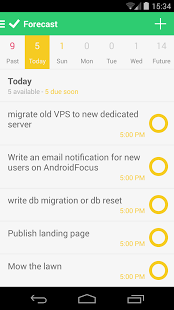
androidfocusOmniFocus – have I mentioned this To Do manager recently? Like, in the last hour? – is solely available for Macs, iPhones and iPads, nothing else. But as of this weekend, there is AndroidFocus: a completely unofficial Android version.

It’s not really OmniFocus, it’s more a quick way to enter or to see OmniFocus tasks on your Android phone. It has fewer features than the real iPhone one and you it depends on your having an account with the Omni Sync Server. That’s free but you get it when you buy a real OmniFocus. So if you are, say, a Mac user with an Android phone, this could be for you. Note that the Omni Group isn’t trying to get the clone removed but it does warn:

An app named AndroidFocus recently appeared in the Google Play Store. This app calls itself “An OmniFocus client for Android”, and can connect to an Omni Sync Server account in order to sync with the OmniFocus database that is stored there. To be clear, AndroidFocus is not an Omni Group product and we are unable to assist customers with using the app.

We believe that you should have control of your own data, and OmniFocus therefore uses an open file format just like the rest of our applications. Customers need to be aware, however, that reverse-engineering sync in the way that AndroidFocus appears to have done can make for unpredictable results. That means it’s theoretically possible that using AndroidFocus will cause data loss which our Support Humans are not equipped or able to help you recover from. For this reason we can’t recommend using AndroidFocus.

Using AndroidFocus with OmniFocus – Omni Group Support Document 

So it doesn’t do a lot and it could well break the next time the Omni Group changes anything or updates anything in the real OmniFocus. Yet still I would be buying this now if I had Android.

AndroidFocus official site and Google Play Store: £4.10 (UK), $6.99 (US)

Call it like it is. It’s crapware

Apparently Samsung recently boasted that a feature of its latest phone (this was some minutes ago so there'll have been another latest phone since) was that it came with only 40 pre-installed apps instead of 50 or so. I don't know the details because I haven't the patience for Android – every time I see an Android phone that looks great, I use it for a mo and it feels like it'll be brilliant when it's finished – so I also didn't know how bad this crapware problem is.

Kinder people, or ones with stronger filters on their website than I have, tend to call it bloatware. It's the apps that come on your phone from the manufacturer and you can't get rid of them. I'm an iPhone user and I find it irritating that Apple won't let you delete any of the many apps it provides. Just taking a quick look now, I can see my iPhone 5 has about 22 and I'm using 12. The rest are tucked away in a folder but I can't delete them.

That's actually much more than I expected to find. I am including the Settings app plus the Phone one, the one that you use to make, like, actual phone calls. So there are ones without which it isn't a phone, I don't mind those. And I use the Camera, Photos, Mail, all sorts. But there are about 10 I simply never open. Stocks. Weather. All that.

Still, even if we said I never used any of them, that's 22 Apple pre-installed apps versus a whoo-hoo newsworthy 'only 40' Android ones. You would be hard-pressed to come up with another 20 or 30 apps that you could think a manufacturer would include but that's because you're smart and sensible. You wouldn't put, say, three text message apps on, would you?

You're not Samsung, plainly. Buy a new Samsung phone and you get Samsung's text message app. Fine. But you may also get one made by your mobile phone carrier and you definitely get Google Hangouts, which also does text messaging.

It's the same with many others and the argument in favour of it all is that you get choice. Bollocks. The apps are there because of deals and contracts that benefit the makers and not the customers. I've nothing against the makers getting benefits: if they don't, they cease to be companies. But at least let me swear at you once on the day I buy your phone and spend an hour deleting all the crapware.

Time magazine says:

Users aren’t completely powerless to fight back, at least. If you’re bothered by bloatware, you can go to Settings > Applications (or Apps on some phones), then swipe over to the “All” section. Tap on any app you don’t want, and press “Disable.” Ignore the message that says it may misbehave if it’s a built-in app. As long as it’s an actual app, represented by an icon in your app tray or on your home screen, you shouldn’t have any problems. But even this isn’t a perfect solution, because these apps are still hogging space on your device, and removing them is still a chore.

Friday Rant: The Ever-Sorrier State of Android Bloatware – Time magazine (9 May 2014)

Reportedly there is likely to be a special version of Android that is sold without bloatware. You'll have to pay extra, naturally. Wasn't there a version of Windows that came without the crap too? It is a funny world where the absence of something is a unique selling point and you get charged extra for it.

At least Android phones don't come with all those stickers on the front.
Vague is good. Or something.

It is great to know where the nearest pizza place is. (The other night I was RAVENOUS and every else was closed. My iPhone found an open Pizza Hut and gave me precise details of where it was, how long it would take me to walk there and exactly how soon I'd arrive after its closing time.) Then it's reportedly great to have Facebook say where you are. I don't do that so much, I don't tend to check-in to places, but oodles of others do and they love it. I like getting an update that someone I know is somewhere amazing. But I don't need and I don't want to know which room, say, they're in at Buckingham Palace or how high up the Statue of Liberty they've got. That's too much and Macworld's Mike Elgan says companies know this. They know it and after all these years and all this work and all that effort designing systems that can tell us location details, they are choosing to be deliberately vague.

In every case – Foursquare, Facebook, Twitter, Safari for iOS and Google Chrome “Canary” – the companies have access to perfectly specific data and could easily show it to you. But as a service to you, as a user benefit, they're presenting you with vague information in place of specific information.

Why is vagueness a user benefit? Simple: Vagueness is humanizing.

I'll give you an example. People in real life don't say: “Wow! I just spent one-hundred and ninety-seven dollars and forty-two cents at Costco.”

They say: “Wow! I just spent a couple hundred bucks at Costco.”

People round numbers, guestimate how long things will take and speak in generalities. And they do it on purpose. Vague information is easier to receive and comprehend.

The Rise of Vagueness as a Service – Macworld 10 May 2014

It's a smart observation and I hadn't made it.