MacPowerUsers podcasts hits 200th edition

This is now a weekly fix for me: every Monday there is a 90-minute audio podcast on a single Mac topic such as Evernote or handling email. There’s the odd edition that has just no interest for me or, whisper it, when it’s focused on a guest who is a bit dull, but otherwise, MacPowerUsers is now an automatic thing on a Monday morning.

It started for me when I wanted to know about the Hazel application and a Google search came up with one episode of MacPowerUsers. Listened to that, bought Hazel, barely use it.

But instead I kept coming back to look up more episodes and after a while I realised I must’ve listened to eighty. That was a year or more ago now so the odds are that I’ve listened to forty more since.

The 200th episode, now available, is look back at the series so far which is probably therefore more interesting for existing listeners. It’s fun for existing listeners. If you’re new to it and fancy a dabble, try the recent Evernote episode, Calendars and Contacts and just keep on going.

What Microsoft can tell small startups

Not much, you’d think. And I still wonder. But ex-Microsoft guy Rakesh Malhotra says he learnt lessons there that have helped enormously in his jobs since, including:

Know your blind spots: Like a lot of companies, Microsoft conducts 360-degree reviews, where you solicit a review from everyone surrounding the employee: Manager, peer, reports, etc. There are many best practices as to how to conduct an effective 360-degree review, but the effect is usually the same — you learn your blind spots. A successful leader pays attention to weaknesses and finds a way to manage them. It really helps to be self-aware, especially at a startup, where every member has a lot of responsibility.

Lessons — From Microsoft! — On Being a Startup Leader – Rakesh Malhotra, Re/code (27 June 2014)

I didn’t put the exclamation mark in that article title. But I thought it.

How to Spend the first 10 minutes of your day

Get everything in place before you start so that it is all to hand during the day.

Slightly longer, if more persuasive version:

If you’re working in the kitchen of Anthony Bourdain, legendary chef of Brasserie Les Halles, best-selling author, and famed television personality, you don’t dare so much as boil hot water without attending to a ritual that’s essential for any self-respecting chef: mise-en-place.

The “Meez,” as professionals call it, translates into “everything in its place.” In practice, it involves studying a recipe, thinking through the tools and equipment you will need, and assembling the ingredients in the right proportion before you begin. It is the planning phase of every meal—the moment when chefs evaluate the totality of what they are trying to achieve and create an action plan for the meal ahead.

For the experienced chef, mise-en-place represents more than a quaint practice or a time-saving technique. It’s a state of mind.

How to Spend the First 10 Minutes of your Day – Ron Friedman, Harvard Business Review (19 June 2014)

You can see how this applies beyond the cooking of food to the doing just about anything but Friedman has more interesting things and examples to say in the full piece.

Via Lifehacker

The internet is blue

I thought this was something to do with pornography, but no. Not depression, either. Actually blue:

The blue at the top of this post [on the original site] is a Google blue. It’s not the only Google blue, just the Google blue you see the most. How was it chosen? Another blue, a slightly different Google blue, the story goes, was selected by a designer who liked how it looked. But this designer was told by a manager that this blue was the wrong blue: Another blue, testing revealed, had resulted in more clicking. Their boss intervened. 41 blues, between the nice blue and the powerful blue, were tested for efficacy. One prevailed.

Internet, Why So Blue? John Herrman, The Awl (27 June 2014)

The Awl’s full article shows those blues and you’ll be surprised how readily you recognise Google’s and Twitter’s and Facebook’s shades of the colour. But it’s also interesting because it includes a nod to a time when there wasn’t a word for blue – and to the moment that someone decided underlined links on the web should be and would be blue.

Looks like I chose the wrong one: Apple kills Aperture

So Apple brings out this Aperture software and at first everyone thinks it’s the consumer iPhoto or it’s a Photoshop knockoff. They think it’s too complicated to successfully be the former and too rubbish to be the later. But Adobe launches Lightroom and now with two big applications in the same area, that area becomes a market.

For some years now, if you were a professional photographer or you just fancied being one (hello) then you either bought Aperture or Lightroom for the managing of your photos.

Not any more.

As of now, Aperture is dead.

With the introduction of the new Photos app and iCloud Photo Library, enabling you to safely store all of your photos in iCloud and access them from anywhere, there will be no new development of Aperture.

When Photos for OS X ships next year, users will be able to migrate their existing Aperture libraries to Photos for OS.

That’s Apple’s official announcement. The company is also helping people move to Lightroom.

But I like Aperture. I can carry on using it but it won’t be developed further and it’s true that Lightroom has more and better features. But Aperture was a bionic iPhoto to me and I liked it. So I’m not happy at Apple’s decision.

But them’s the breaks. You invest in a piece of software – both literally and, I think more importantly, in time and effort – and the software goes away.

It’s hard.

Two emails will save you hours every week

I’m convinced 95% of cubicle workers who work over 60 hours a week constantly can cut it down to 40-45 hours by sending 2 emails a week to their boss:

Email #1: What you plan on getting done this week

Email #2: What you actually got done this week

That’s it. These 2 emails will prevent you from working 60 hours a week, while improving your relationship with your boss and getting the best work you’ve ever done.

How to Go From Working 60 Hours a Week to 40 By Sending 2 Emails a Week – Robbie Abed, Fire Me I Beg You (25 June 2014)

Sold. Read the full piece for more and you will be too.

Via Lifehacker

A good team is precious

I learnt a lesson, or perhaps was just forcefully reminded of one, when I went into a school. It was to do with how you need good people around you and that it’s harder than you imagine to get them:

I need to be a little circumspect here because this was a school and I don’t want to identify anyone. But what had gone wrong was this particular group. There was a small set of kids who didn’t want to do anything at all, there was a small set who wanted to work but refused to pitch. It was nerves and shyness and you see this, you understand it, you try to help these kids along. Sometimes – fortunately rarely – you recognise that there is nothing you can do in the time, so you just have to leave them to get on with it or not. There are groups you can help, who will take the help. Naturally, then, you help them.

But this time was different because the young woman producing was doing so well. That’s an odd thing to say when she’d lost control of her team but the unfairness of that rankled with me. The school picked the groups and there was a specific plan to break up friends and thereby get everyone working with new people. That’s more than fine, that’s a good idea but in this case, it just seemed strongly clear to me that she was saddled with a tough group. I could see the frustration in her and it was just wrong.

You need good people – William Gallagher, Self Distract (27 June 2014)

So I interfered. Read more of why and what happened on my latest Self Distract post.

Persuasive argument for Android Watches

Let’s be clear here, I think this is a persuasive argument for a watch that connects to your phone and relays information. A smart watch. An iWatch, if you will. But I don’t think it’s persuasive enough to make me want to buy an Android phone. Plus, the fella is a fan of Google Glass so you have to make allowances.

But otherwise, I think he has some good points. I have been a bit on the fence about this. If Apple really does release such a watch then I will look at it because of how useful other Apple gear has been to me. If Microsoft really does release such a watch then I won’t – because of previous experience there too. (Remember: Windows for the D’oh!)

I was also put off the topic by recent torrential rumours of Apple’s one being tied to health topics and health monitoring. I don’t want my watch telling me to exercise more.

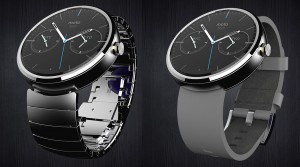
And I am put back on the topic every time I see a Moto 360 image like this:
Moto-360

Nobody’s saying when that will be released or what it will cost and there is an issue over how it’s apparently bigger than you think. Plus, I think it requires a phone to connect to and that this phone can’t be an iPhone one. But still, every time I see that, I think I could handle wearing a smart watch.

That’s not a reasoned or experienced analysis, but even though it is heavily Android-weighted, this is:

As was the case with the iPad, the experience of using an Android Wear device is transformative and completely unlike what you might imagine it to be. You have to experience it to understand its pull.

Yes: Android Wear is flawed, clunky and not ready for prime time. The LG G watch I’m using is too bulky and square — the round ones will be much better. And even the coveted round Moto 360 is too big.

But Android Wear watches are the first smartwatches to cross the line from awkward to awesome, because they’re the first to completely abandon the smartphone’s icons, menus and widgets paradigm and massively leverage subtle contextual cues, images, icons and colors to present tiny nuggets of information in their most essential and quickly graspable form.

I jumped back into the car and started slowly clawing my way through city traffic to head back home to Petaluma. At my first red light, I began wondering about the exact definition of a word that I sometimes use with a general but not exact understanding of its definition. Without even removing my hand from the wheel, I turned my wrist slightly and said in completely natural speech: “OK, Google: Define rife.” About a second later, the definition silently appeared on my wrist. I scanned the definition and said “Wow!” Then the light changed and I drove off.

Looking up a word is the least powerful, least interesting thing one might do with wearable technology. Yet it was thrilling because of where and how the interaction occurred. The wrist is a perfect place for instant, quickly scannable data. All the we-don’t-have-to-accept-ignorance qualities of the smartphone revolution are multiplied when an Android Wear watch is on your wrist.

Over the next few hours, simple notifications appeared, which gave me nice nuggets of knowledge without causing any disruptive shift in attention. It was like Google Glass, but more subtle and therefore more intimate and personal.

Here’s the most important takeaway from this column — the wrist is a spectacularly perfect place to get notifications, launch voice commands and get Google Now cards. Like the iPad, it feels so good — you’ll know it when you feel it.

Why Android Wear is the new iPad – Mike Elgan, ComputerWorld (28 June 2014)